I have been getting telephone calls purporting to be from eBay. The calls are automated (female voice) and generally go like this:
Robotic voice: "Your PIN number is 1181. Your PIN number is 1181.Your PIN number is 1181. You've now completed the telephone portion of this process. Please return to eBay to continue. You may need to sign in again if you've signed out. Goodbye."
The calls come from a variety of different numbers but always from the 847 exchange. I have recorded a variety of sources including (847) 709 0211 and (847) 709 0211. Despite several calls to eBay to warn them, they don't seem to be interested in this. At first they denied the problem exists but have since realized it is happening.
So what is this form of phishing? I suspect someone has tapped into a phone line somewhere and has direct dialing capabilities and the ability to mask the true number of origin. I haven't figured out how they potentially compromise the victim's username and password unless they count on people hitting auto call-back then hit them with a "to validate who you are I have to ask you some questions...".
Anyone else get one of these? Anyone else perplexed by why eBay is not interested in getting the exact time, date, and return number of the call so they can trace where it comes from?
File this one under general weirdness...
Friday, July 27, 2007


Wednesday, July 25, 2007
Vancouver Flex, AIR and RIA training date set!
The Vancouver RIA training day is now set at August 30, 2007. You can register for it here:
www.massivetechshow.com/adobe/.
This day will be all about RIA development and feature training in Flex, Adobe AIR (formerly Apollo), AJAX and other technologies. Nitobi's Andre Charland has agreed to be one of the presenters as well as Ryan Stewart from Seattle. Ross Ladell will also be there and hopefully do some Flash stuff.
Register now - space is *very* limited.
If you can't make it to this one, also consider MAX 2007 as the place to be for 2007.
www.massivetechshow.com/adobe/.
This day will be all about RIA development and feature training in Flex, Adobe AIR (formerly Apollo), AJAX and other technologies. Nitobi's Andre Charland has agreed to be one of the presenters as well as Ryan Stewart from Seattle. Ross Ladell will also be there and hopefully do some Flash stuff.
Register now - space is *very* limited.
If you can't make it to this one, also consider MAX 2007 as the place to be for 2007.
Tuesday, July 17, 2007
AIR Custom Chrome 2: Apple-shaped Application
In a recent AIR tutorial I showed how to make a window with custom chrome. A reader wrote a comment asking, "What about odd shaped windows? For example, an apple shape…" This question was among other requests for multiple windows and resizing with custom chrome. Today I'll tackle the apple-shaped window. Here is a screenshot of the completed application:
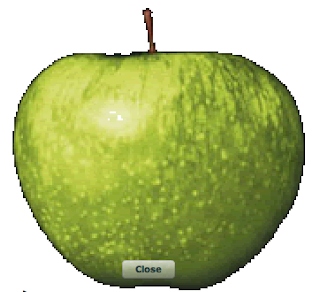
The first thing you need is an image of an apple that has a transparent background. I recommend *.gif format. You can use Adobe Fireworks to set the transparency. After you use the magic wand tool to remove the background, click "Save as" then open up options and you can set the transparent colors. Alternatively, you can just use this image.
We can re-use the code from the Custom Chrome AIR Tutorial, but we will have to change a few lines to get this to work.
1. Set up a new project and give it a name as described in the first steps of the Custom Chrome example. Then, in Flex Builder, right-click (PC) or ctrl-Click (Mac) on the name of the project and select "New -> Folder". Name the folder "images" and copy the transparent apple.gif file (referenced above) to that folder. If you do this outside of Flex Builder, you will have to tell Flex Builder to "refresh" the folders under the project. To do this, right-click (PC) or ctrl-Click (Mac) on the name of the project and go down the list to click "refresh". Flex Builder now sees the file.
2. Since we are making a transparent window the shape of an apple, the root pane must not have any visible rectangular components.
To get rid of the rectangular title window, remove these lines of code (basically everything in between the opening and closing <mx:titlewindow> and </mx:titlewindow> elements):
Replace them with this code for the apple-shaped window (cut-and-paste this if you're lazy like me or simply grab the full code from the end):
If you named your directory something other than "images" you should change the code above to reflect this.
3. Now we need to add in the function "close()" that is called when the button is clicked. The function is only a few lines of code. Put this inside the existing <mx:script> element:
That’s basically it. The complete code is below. Of course, you could use other methods to close the window. I just put the ugly button in the middle of the apple for convenience since I only had 15 minutes to write this.
Complete code (please feel free to cut-and-paste, use for your own purposes):

The first thing you need is an image of an apple that has a transparent background. I recommend *.gif format. You can use Adobe Fireworks to set the transparency. After you use the magic wand tool to remove the background, click "Save as" then open up options and you can set the transparent colors. Alternatively, you can just use this image.

We can re-use the code from the Custom Chrome AIR Tutorial, but we will have to change a few lines to get this to work.
1. Set up a new project and give it a name as described in the first steps of the Custom Chrome example. Then, in Flex Builder, right-click (PC) or ctrl-Click (Mac) on the name of the project and select "New -> Folder". Name the folder "images" and copy the transparent apple.gif file (referenced above) to that folder. If you do this outside of Flex Builder, you will have to tell Flex Builder to "refresh" the folders under the project. To do this, right-click (PC) or ctrl-Click (Mac) on the name of the project and go down the list to click "refresh". Flex Builder now sees the file.
2. Since we are making a transparent window the shape of an apple, the root pane must not have any visible rectangular components.
To get rid of the rectangular title window, remove these lines of code (basically everything in between the opening and closing <mx:titlewindow> and </mx:titlewindow> elements):
<mx:TitleWindow  id="mainPanel" backgroundColor="#0326FD" layout="absolute" cornerRadius="15" alpha="1.0"
 color="#FFFEFE" width="465" height="160" backgroundAlpha="0.7" borderColor="#1FBDF7" themeColor="#2FE7FD"
 x="0" showCloseButton="true" close="closeEvent(event)">

 <mx:Label text="Look mom - no chrome!" width="400" textAlign="center" fontFamily="Verdana" fontSize="15" fontWeight="bold" x="22.5" y="10"/>
 <mx:Label x="62.5" y="92" text="(c) Duane Nickull - samples at technoracle.blogspot.com"/>
</mx:TitleWindow>
Replace them with this code for the apple-shaped window (cut-and-paste this if you're lazy like me or simply grab the full code from the end):
<mx:Image id="mainPanel"   x="42" y="10" width="363" height="343"
 source="images/apple.gif" scaleContent="true" autoLoad="true"/>
<mx:Button x="176" click="close()" y="305" label="Close" width="60" height="21"/>
If you named your directory something other than "images" you should change the code above to reflect this.
3. Now we need to add in the function "close()" that is called when the button is clicked. The function is only a few lines of code. Put this inside the existing <mx:script> element:
public function close():void {
   stage.window.close();
}
That’s basically it. The complete code is below. Of course, you could use other methods to close the window. I just put the ugly button in the middle of the apple for convenience since I only had 15 minutes to write this.
Complete code (please feel free to cut-and-paste, use for your own purposes):
<?xml version="1.0" encoding="utf-8"?>
<mx:Application xmlns:mx="http://www.adobe.com/2006/mxml" layout="absolute"
 xmlns:utils="utils.*" creationComplete="init()" height="424" width="465" >

    <mx:Style>
        Application
        {
            /*make app window transparent*/
            background-color:"";
            background-image:"";
            padding: 0px;
            margin-top: 0;
   margin-right: 0;
   margin-bottom: 0;
   margin-left: 0;
        }
    </mx:Style>

  <mx:Script>
   <![CDATA[
            import flash.display.Bitmap;
            import mx.events.CloseEvent;

    public function init():void {

         // Move the app when the panel is dragged
    mainPanel.addEventListener( MouseEvent.MOUSE_DOWN, startMove );

    }
   public function startMove(event:MouseEvent):void {
       stage.window.startMove();
    }

    public function close():void {
       stage.window.close();
    }
   ]]>

  </mx:Script>


  <mx:Image id="mainPanel"   x="42" y="10" width="363" height="343"
   source="images/apple.gif" scaleContent="true" autoLoad="true"/>
  <mx:Button x="176" click="close()" y="305" label="Close" width="60" height="21"/>


</mx:Application>
Monday, July 16, 2007
Vancouver Flash/Flex/AIR event!!
From Ross Ladell:
Wicked stuff. Vancouver is really starting to take off. Our August 30 RIA training is still in discussion but we are doing everything we can to put a full day together.
Thurday July 19th the Vancouver Flash User Group is hosting an evening
with Paul Ortchanian. We're flying Paul up from San Francisco to give
a 2 hour presentation on getting the most out of the powerful
BitmapData class. Paul will also be taking us through a number of the
flash experiments on his site, www.reflektions.com .
This event is FREE, but you will need to create an account on the
Flash User Group's meetup website: You can get more information on the
event here: http://flash.meetup.com/110/calendar/5982036/ .
The VFUG website is www.flashinvan.com.
Wicked stuff. Vancouver is really starting to take off. Our August 30 RIA training is still in discussion but we are doing everything we can to put a full day together.
What is up with Air Canada anyways?
A while ago, I wrote a blog post about some genius at Air Canada who decided the company really needed to start charging $2.00 for a blanket. This in itself is completely asinine but nothing compared to their IT system. Matt MacKenzie just had an experience that shows the fragile state of their IT organization. This is a good read and reveals just how bad the state of things is.
What is the issue? I really though that once they got rid of car salesman/CEO Robert Milton and got a really good CEO like Monty Brewer in charge things would change.
Here is another treat from the fine folks at Air Canada. When you become "Elite" you get this special card with "Air Canada Elite Priority Contacts" on the back. The number on the top left for Toll Free North American is 1-800-401-7201. These are purported to be "special" numbers only for elites. If you call in, it asks you to enter your mileage number, then redirects you based on your query to the inevitable conclusion - a recording that says "Please hang up and call the Air Canada Elite Priority Contact" number on the back of your card.
Now the staff at Air Canada are really nice people and for the large part they go over their heads to be nice, helpful, cheerful on flights. Some of the best service I have had has been on Air Canada but they have to fix their management. PLEASE!!!
What is the issue? I really though that once they got rid of car salesman/CEO Robert Milton and got a really good CEO like Monty Brewer in charge things would change.
Here is another treat from the fine folks at Air Canada. When you become "Elite" you get this special card with "Air Canada Elite Priority Contacts" on the back. The number on the top left for Toll Free North American is 1-800-401-7201. These are purported to be "special" numbers only for elites. If you call in, it asks you to enter your mileage number, then redirects you based on your query to the inevitable conclusion - a recording that says "Please hang up and call the Air Canada Elite Priority Contact" number on the back of your card.
Now the staff at Air Canada are really nice people and for the large part they go over their heads to be nice, helpful, cheerful on flights. Some of the best service I have had has been on Air Canada but they have to fix their management. PLEASE!!!
Friday, July 13, 2007
Making Custom Chrome AIR Applications — A Tutorial
So you’ve probably tried playing around with Adobe Integrated Runtime (AIR) and had an idea to make a custom chrome application. A custom chrome application is one that does not use the typical operating system-provided chrome or application control window. As a result, is does not have standard controls, for example, to close or move the application window. At first glance creating a custom chrome application seems easy but it turns out to be a bit harder than it looks.
This tutorial assumes you are somewhat familiar with Flex programming (MXML and ActionScript) and have already installed the Flex Builder 2.01 and AIR extensions. If you’ve not done this, please visit Adobe Labs.
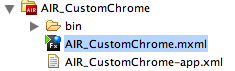
There are two important files you will have to work with to make your application chromeless. The first is the core AIR application, the second is the *-app.xml application descriptor file. This file is usually in the same directory as your base application. Go through the steps of setting up a new AIR project by selecting “File -> New –> AIR Project” from the Flex Builder Menu. Give your project a name (I called mine AIR_CustomChrome) and click “Finish”. You should have a file directory in the Navigator pane of your project that looks similar to this:
1. After you have set up a new project, you should be able to see the default code as follows:
2. In your *.MXML file, add the following lines of code to make the application. Insert them just below the “THIS IS WHERE TO ADD CODE” line:
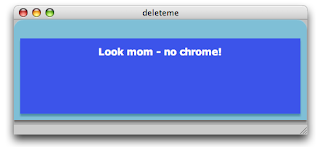
3. Test your application by running it. It should look like the image below. This application uses the system chrome, so on a Macintosh computer it will have the three little colored buttons on the top left and an application window to house the application.
4. Next, we are going to lose the system chrome. Open up the AIR_CustomChrome-app.xml file and locate the following line of code:
…and change it as follows (the parts highlighted in bold font) before saving and closing the file:
This tells the runtime not to use system chrome and that the application has support for transparency.
You might think this would be enough but it is not.
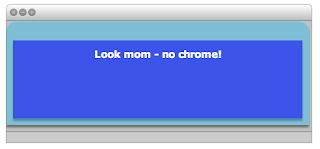
If you run the application again, you will get an application that looks like the one below. Not only are you still stuck with chrome, but it is even uglier than before. We can fix this in the next steps.
5. The cause of this is the root element used by default by AIR. This element is the <mx:windowedapplication> tag. Change both the opening and closing tags to <mx:application> Your code should look something like this now:
…and it will yield the application below when run.
This is somewhat problematic as we have almost rid ourselves of the standard native window but have not yet introduced functionality to replace the standard chrome for things like moving or closing the application. To close the application you will have to use native operating system methods (for example on a Mac, highlight the app then hit Command-Q)
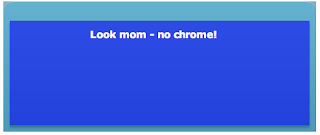
6. Note that the top right and left corners still have a tiny bit of gray color around the edges. This is still the default application window showing itself. To get rid of this, we have to introduce some lines of CSS inside the tag. Add these lines of code to your application just below the root tag.
This code sets the style for the Application component (now your root element) and will remove the gray. When you run the application again, it will be gone. Your application will also be semi-transparent as shown below.
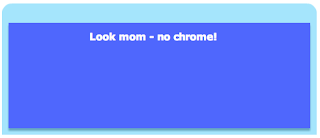
7. We still have no way to move or close the application. In order to do this, we have to introduce some simple scripting elements. Start by adding a <mx:script> tag just below your <mx:style> tag and add the following lines of code:
…and add the following method call to the root element:
…to call the init() function when the application starts up. When you run the application now, you can move it on your screen by clicking on it and dragging it.
8. We will want to add the ability to close the application. Luckily, the TitleWindow element has a built in close button. Add the following attributes to the <mx:titledwindow> element:
9. Now that we have added the Close button, we have to import the ability to detect the CloseEvent. Add the following line of code in the <mx:script> element to import this functionality:
…then add the following function to your code base.
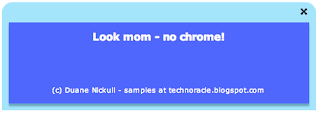
Your complete code should now look like this:
Your application will now be chromeless and it actually can be closed by clicking on the Close button in the top right hand corner.
This tutorial assumes you are somewhat familiar with Flex programming (MXML and ActionScript) and have already installed the Flex Builder 2.01 and AIR extensions. If you’ve not done this, please visit Adobe Labs.
There are two important files you will have to work with to make your application chromeless. The first is the core AIR application, the second is the *-app.xml application descriptor file. This file is usually in the same directory as your base application. Go through the steps of setting up a new AIR project by selecting “File -> New –> AIR Project” from the Flex Builder Menu. Give your project a name (I called mine AIR_CustomChrome) and click “Finish”. You should have a file directory in the Navigator pane of your project that looks similar to this:

1. After you have set up a new project, you should be able to see the default code as follows:
<?xml version="1.0" encoding="utf-8"?>
<mx:WindowedApplication xmlns:mx="http://www.adobe.com/2006/mxml" layout="absolute">
 <!--THIS IS WHERE TO ADD CODE-->
</mx:WindowedApplication>
2. In your *.MXML file, add the following lines of code to make the application. Insert them just below the “THIS IS WHERE TO ADD CODE” line:
<mx:TitleWindow  id="mainPanel" backgroundColor="#0326FD"  layout="absolute" cornerRadius="15" alpha="1.0" color="#FFFEFE" width="465" height="160" backgroundAlpha="0.7" borderColor="#1FBDF7" themeColor="#2FE7FD" x="0">

<mx:Label text="Look mom - no chrome!" width="400" textAlign="center" fontFamily="Verdana" fontSize="15" fontWeight="bold" x="22.5" y="10"/>

</mx:TitleWindow>
3. Test your application by running it. It should look like the image below. This application uses the system chrome, so on a Macintosh computer it will have the three little colored buttons on the top left and an application window to house the application.

4. Next, we are going to lose the system chrome. Open up the AIR_CustomChrome-app.xml file and locate the following line of code:
<rootContent systemChrome="standard" transparent="false" visible="true">[SWF reference is generated]</rootContent>
…and change it as follows (the parts highlighted in bold font) before saving and closing the file:
<rootContent systemChrome="none" transparent="true" visible="true">[SWF reference is generated]</rootContent>
This tells the runtime not to use system chrome and that the application has support for transparency.
You might think this would be enough but it is not.
If you run the application again, you will get an application that looks like the one below. Not only are you still stuck with chrome, but it is even uglier than before. We can fix this in the next steps.

5. The cause of this is the root element used by default by AIR. This element is the <mx:windowedapplication> tag. Change both the opening and closing tags to <mx:application> Your code should look something like this now:
<?xml version="1.0" encoding="utf-8"?>
<mx:Application xmlns:mx="http://www.adobe.com/2006/mxml" layout="absolute" height="202" width="483">
<mx:TitleWindow  id="mainPanel" backgroundColor="#0326FD"  layout="absolute" cornerRadius="15" alpha="1.0" color="#FFFEFE" width="100%" height="100%" backgroundAlpha="0.7" borderColor="#1FBDF7" themeColor="#2FE7FD" x="0" >

<mx:Label text="Look mom - no chrome!" width="400" textAlign="center" fontFamily="Verdana" fontSize="15" fontWeight="bold" x="22.5" y="10"/>
</mx:TitleWindow>
</mx:Application>
…and it will yield the application below when run.
This is somewhat problematic as we have almost rid ourselves of the standard native window but have not yet introduced functionality to replace the standard chrome for things like moving or closing the application. To close the application you will have to use native operating system methods (for example on a Mac, highlight the app then hit Command-Q)

6. Note that the top right and left corners still have a tiny bit of gray color around the edges. This is still the default application window showing itself. To get rid of this, we have to introduce some lines of CSS inside the
<mx:Style>
        Application
        {
            /*make app window transparent*/
            background-color:"";
            background-image:"";
            padding: 0px;
            margin-top: 0;
   margin-right: 0;
   margin-bottom: 0;
   margin-left: 0;
        }
</mx:Style>
This code sets the style for the Application component (now your root element) and will remove the gray. When you run the application again, it will be gone. Your application will also be semi-transparent as shown below.

7. We still have no way to move or close the application. In order to do this, we have to introduce some simple scripting elements. Start by adding a <mx:script> tag just below your <mx:style> tag and add the following lines of code:
<mx:Script>
 <![CDATA[
   import flash.display.Bitmap;

   public function init():void {

   // Move the app when the panel is dragged
   mainPanel.addEventListener( MouseEvent.MOUSE_DOWN, startMove );

   }

   public function startMove(event:MouseEvent):void {
   stage.window.startMove();
   }
  ]]>
</mx:Script>
…and add the following method call to the root element:
creationComplete="init()"
…to call the init() function when the application starts up. When you run the application now, you can move it on your screen by clicking on it and dragging it.
8. We will want to add the ability to close the application. Luckily, the TitleWindow element has a built in close button. Add the following attributes to the <mx:titledwindow> element:
showCloseButton="true" close="closeEvent(event)"
9. Now that we have added the Close button, we have to import the ability to detect the CloseEvent. Add the following line of code in the <mx:script> element to import this functionality:
import mx.events.CloseEvent;
…then add the following function to your code base.
  public function closeEvent(event:CloseEvent):void {
     stage.window.close();
 }
Your complete code should now look like this:
<?xml version="1.0" encoding="utf-8"?>
<mx:Application xmlns:mx="http://www.adobe.com/2006/mxml" layout="absolute"
 xmlns:utils="utils.*" creationComplete="init()" height="160" width="465" >

    <mx:Style>
        Application
        {
            /*make app window transparent*/
            background-color:"";
            background-image:"";
            padding: 0px;
            margin-top: 0;
   margin-right: 0;
   margin-bottom: 0;
   margin-left: 0;
        }
    </mx:Style>

  <mx:Script>
   <![CDATA[
            import flash.display.Bitmap;
            import mx.events.CloseEvent;

    public function init():void {

         // Move the app when the panel is dragged
    mainPanel.addEventListener( MouseEvent.MOUSE_DOWN, startMove );

    }
   public function startMove(event:MouseEvent):void {
       stage.window.startMove();
    }

    public function closeEvent(event:CloseEvent):void {
       stage.window.close();
    }
   ]]>

  </mx:Script>

 <mx:TitleWindow  id="mainPanel" backgroundColor="#0326FD"  layout="absolute" cornerRadius="15" alpha="1.0"
  color="#FFFEFE" width="465" height="160" backgroundAlpha="0.7" borderColor="#1FBDF7" themeColor="#2FE7FD"
  x="0" showCloseButton="true" close="closeEvent(event)">

   <mx:Label text="Look mom - no chrome!" width="400" textAlign="center" fontFamily="Verdana" fontSize="15" fontWeight="bold" x="22.5" y="10"/>
   <mx:Label x="62.5" y="92" text="(c) Duane Nickull - samples at technoracle.blogspot.com"/>
  </mx:TitleWindow>
</mx:Application>
Your application will now be chromeless and it actually can be closed by clicking on the Close button in the top right hand corner.

Drag and Drop AIR Example
Adobe Integrated Runtime (AIR) offers developers some pretty cool features. Nevertheless, as we work towards version 1.0, there is still some catch up work being done to add in basic functionality for things like drag and drop, local file save, read, etc. One of the topics I wanted to write more about is the drag and drop functionality.
So what is drag and drop really? When you start to look at the architectural pattern, it is one of copying an original and showing a thumbnail of the original while in transit to being placed somewhere else in the environment. There are two types of drag – the copy drag and the move drag. In the copy drag, the original is left in place and the copy is placed in the target location. In the move drag, the original is removed. This requires a little more care as you have to be certain you do not destroy the original until you have confirmed the target is complete.
The first thing to do is to write a function that creates the bitmap of the item being dragged to produce a smooth effect while running. This function builds the object to drag and returns it:
So what is drag and drop really? When you start to look at the architectural pattern, it is one of copying an original and showing a thumbnail of the original while in transit to being placed somewhere else in the environment. There are two types of drag – the copy drag and the move drag. In the copy drag, the original is left in place and the copy is placed in the target location. In the move drag, the original is removed. This requires a little more care as you have to be certain you do not destroy the original until you have confirmed the target is complete.
The first thing to do is to write a function that creates the bitmap of the item being dragged to produce a smooth effect while running. This function builds the object to drag and returns it:
public function
createTransferableData(image:Bitmap, sourceFile:File):TransferableData{
var transfer:TransferableData = new TransferableData();
transfer.addData(image,"Bitmap",false);
transfer.addData(image.bitmapData,"bitmap",false);
transfer.addData(new Array(sourceFile),"file list",false);
return transfer;
}
The TransferableData object has some unique properties in the new AIR package. This object will come in four basic formats. They are "text" (string data), "url" (URL string), "file list" (array of File objects) and "bitmap". The key method is addData(),which builds the new object. It is important to note that transferable data objects may have redundant information in multiple formats -- this increases the likelihood that recipient applications will understand the object.
The DragManager object handles most of the actual operations at runtime. The code is relatively simple to set up:
private function onMouseDown(event:MouseEvent):void{
var bitmap:Bitmap = Bitmap(event.target.content);
var bitmapFile:File = new File(event.target.content.loaderInfo.url);
var transferObject:TransferableData = createTransferableData(bitmap,bitmapFile);
DragManager.doDrag(this,transferObject,bitmap.bitmapData,new
Point(-mouseX),(-mouseY));
}
Several things are happening with this code. First, the original copy is left in place when the drag operation starts. If your intent is merely to copy the object to the target, that might be okay. When moving, there are ways to make the original appear to go away but it is trickier than it seems because you have to take precautions to make sure the target gets dropped before destroying the original.
Another issue with this code as written is that by default, the copied image will appear offset to the original and this can be slightly ugly. The placement of the copied image can be tweaked by adding some fine tuning of the points as follows:
DragManager.doDrag(this,transferObject,bitmap.bitmapData,new
Point((-mouseX+65),(-mouseY+90)));
Now when you start the drag, the drag object (in the code below anyways) appears right where the original was regardless of where the mouse is placed.
If you want the original to simply disappear, you can do it easily by adding the following line of code into the onMouseDown() class:
bitmap.visible=false;
However, this removes both the original and the copy if the user releases the mouse button before the drag is complete. A better way hide the original is to set the visible property to false on the specific object, but the code is not as portable since each time it is used the object will have to be explicitly named.
The best way to really do this is with the NativeDragComplete event from the DragManager. A drag gesture involves the following event sequence:
nativeDragStart: A drag-and-drop gesture is begun by calling the DragManager.doDrag() method within a mouseDown or mouseMoved event handler. The DisplayObject passed to the doDrag() method becomes the initiating object and will dispatch a nativeDragStart event. (If the drag and drop starts outside of an AIR application, the rest of the sequence of events is the same, but there is no initiating object.)
nativeDragEnter, nativeDragOver: When a drag gesture passes over a DisplayObject, that object will dispatch a nativeDragEnter event. While the drag gesture remains over the DisplayObject, it will continually dispatch nativeDragOver events. In response to either of these events, an object that serves as a potential drop target should check the properties of the event object to decide whether it can accept the drop. If the data format and allowed actions are appropriate, then the event handler for these events must call DragManager.acceptDrop(), passing in a reference to the target object. The user will then be able to drop the dragged item onto the target.
nativeDragExit: When a drag gesture passes out of a DisplayObject, the object dispatches a nativeDragExit event. If the object earlier called the DragManager.acceptDrop() method, that call is no longer valid and acceptDrop() must be called again if the gesture re-enters the DisplayObject.
nativeDragDrop: When a DisplayObject has called DragManager.acceptDrop() and the user releases the drag gesture over the object, that object dispatches a nativeDragDrop event. The handler for that event can access the data in the transferable property of the event object and should set the DragManager.dropAction property to signal which action should be taken by the initiating object.
nativeDragComplete: When the user releases the mouse at the end of a drag gesture, the initiating object dispatches a nativeDragComplete event (whether or not the drop itself was consummated). The handler for this event can check the dropAction property of the event object to determine what, if any, modification should be made to its internal data state, such as removing a dragged-out item from a list. If dropAction==DragActions.NONE, then the dragged item was not dropped on an eligible target.
Here is a screenshot of me dropping an image of the Leela Palace Hotel into this document, minus the mouse pointer:

The code to play around with this is below:
<?xml version="1.0" encoding="utf-8"?>
<mx:WindowedApplication xmlns:mx="http://www.adobe.com/2006/mxml" layout="absolute">
<mx:Script>
<![CDATA[
import flash.desktop.DragManager;
import flash.desktop.TransferableData;
import flash.desktop.DragManager;
import flash.filesystem.File;
import flash.events.NativeDragEvent;
private function onMouseDown(event:MouseEvent):void{
var bitmap:Bitmap = Bitmap(event.target.content);
var bitmapFile:File = new
File(event.target.content.loaderInfo.url);
var transferObject:TransferableData =
createTransferableData(bitmap,bitmapFile);
DragManager.doDrag(this,transferObject,bitmap.bitmapData,new
Point((-mouseX+65),(-mouseY+90)));
bitmap.visible=false; //makes the original disappear
}
public function createTransferableData(image:Bitmap, sourceFile:File):TransferableData{
var transfer:TransferableData = new TransferableData();
transfer.addData(image,"Bitmap",false);
transfer.addData(image.bitmapData,"bitmap",false);
transfer.addData(new Array(sourceFile),"file list",false);
return transfer;
}
]]>
</mx:Script>
<mx:Panel x="10" y="10" width="310" height="361" layout="absolute" title="Panel 1">
<!--replace image with one from your own system-->
<mx:Image x="35" id="duaneImage" y="38" width="204" height="155"
mouseDown="onMouseDown(event)"
source="file:////Users/duane/Desktop/Picture 1.png"
mouseDownOutside="duaneImage.visible=(false)"/>
</mx:Panel>
</mx:WindowedApplication>
Thursday, July 12, 2007
MAX 2007 Enterprise Tracks
We now have the final list of Enterprise & Collaboration tracks for Adobe MAX 2007 being held Sept 30-Oct 4 in Chicago, IL. The track focuses on topics like SOA and Web 2.0 Design Patterns for the enterprise and it has lots of PDF, LiveCycle, Flex, AIR and Acrobat Connect sessions. This is just a sample of the training and tracks offered at MAX 2007. There are four other tracks plus Boot Camps and more. If you are looking for LiveCycle or LiveCycle ES training, this is *the* place to be in 2007.
So what are you waiting for - sign up here now ;-)
So what are you waiting for - sign up here now ;-)
Adding Dimension to Your Content with Acrobat 3D
Skill: Intermediate
Acrobat
This session covers the Acrobat 3D JavaScript API. Learn how to add script-based interactivity to 3D content inside PDF documents. We'll also explain how to create controls in the enclosing document for vertical solutions such as manufacturing. The session will provide scripting samples for developers as well as an overview of the new features available in the latest product release.
Monday, October 1 3:15 pm - 4:15 pm Grayson Lang, Rak Bhalla
Tuesday, October 2 1:30 pm - 2:30 pm Grayson Lang, Rak Bhalla
------------
Adobe Hosted Services: Web APIs and Mashups
Skill: General Audience
Connect, LiveCycle
This session will provide an overview of Adobe's newly announced "connected documents" initiatives. Learn about these new and exciting methods for improving document collaboration using Adobe technologies.
Monday, October 1 11:30 am - 12:30 pm Patrick Rodriguez, Nigel Pegg
Tuesday, October 2 2:45 pm - 3:45 pm Patrick Rodriguez, Nigel Pegg
------------
Adobe's "Mars" Project: XML-friendly PDF
Skill: Intermediate
Acrobat
This session will explore the decisions behind the "Mars" project, the effort to design a pure XML file format for expressing PDF. The talk will delve into the structure of the logical data model and review the major components. The presenters will show examples and discuss future plans for "Mars".
Tuesday, October 2 9:15 am - 10:15 am Joel Geraci
Wednesday, October 3 1:45 pm - 2:45 pm Joel Geraci
------------
Boot Camp for LiveCycle
Skill: Advanced
LiveCycle, Flex
Write code together with the LiveCycle development team in this three-hour collaborative session. Boot Camp provides a mixture of short presentations, workshops, and free-form coding. Make sure to bring your laptop, your best questions, your most desired features, your coolest projects to share, and be ready to learn something new.
Wednesday, October 3 9:00 am - 12:30 pm Matt Butler, Christoph Rooms
------------
Case Study: Advanced Real-World PDF Examples
Skill: General Audience
Acrobat
This session will showcase some very technically advanced PDF documents created for real-world applications by the Adobe developer/integrator community. We'll focus on four core examples from various vertical industries to show the depth and breadth of use of PDF for information delivery. Each case will examine the "code behind" and relay other developer and business tactics used in the sample.
Monday, October 1 2:00 pm - 3:00 pm Joel Geraci, Thom Parker
Tuesday, October 2 1:30 pm - 2:30 pm Joel Geraci, Thom Parker
------------
Case Study: How Reuters is Changing Step with Adobe Products
Skill: General Audience
Connect
Charles Jennings, global head of learning at Reuters, will present how this global information company is transforming its learning practices with Adobe technology. He will also explore Reuters' work with 24/7 performance support tools and a range of new learning approaches. Reuters works in the fast-moving world of banks and brokerages, supplying indispensable news and data that keeps the financial markets running. Speed and accuracy are key to Reuters' success, in both its services and the way in which it develops and trains its employees.
Monday, October 1 11:30 am - 12:30 pm Charles Jennings
Tuesday, October 2 1:30 pm - 2:30 pm Charles Jennings
------------
Case Study: Leading-Edge Use of PDF Documents in the Financial Industry
Skill: General Audience
LiveCycle
BusinessEdge, a business and technology consulting firm, will showcase how Adobe technology can help make the account enrollment process more engaging and more streamlined.
Monday, October 1 2:00 pm - 3:00 pm
Tuesday, October 2 2:45 pm - 3:45 pm
------------
Case Study: Transforming eGovernment with Software as a Service (SaaS)
Skill: General Audience
LiveCycle
This session will describe the design, development, and implementation of an eForms solution for a large consortium of local government agencies. The project included the development of 20-plus Adobe LiveCycle Form templates shared by all of the agencies. The resulting service is hosted and managed using a new Form Hosting product called FormCenter. FormCenter has been developed by Avoka Technologies for government and large organizations that need to implement customer-facing eForms solutions.
Monday, October 1 4:30 pm - 5:30 pm Philip Copeland
Wednesday, October 3 1:45 pm - 2:45 pm Philip Copeland
------------
Collaborative Hosted Services Roadmap
Skill: General Audience
Connect, LiveCycle
Come learn about Adobe's Collaborative Hosted Services. We'll provide a roadmap and introduction to new services being announced during MAX 2007.
Monday, October 1 3:15 pm - 4:15 pm Erik Larson
Wednesday, October 3 4:15 pm - 5:15 pm Erik Larson
------------
Documents 2.0: The Next Generation of Document Collaboration
Skill: Intermediate
Connect, LiveCycle
Documents are often the user's interface to any enterprise architecture, including SOA and web service infrastructures. Come learn more about using documents as front ends to your applications and solutions. See how the new web services-based family of servers from Adobe provides PDF file generation capability, document storage and sharing, and additional features to enhance your solutions and document roundtripping. This session will include an overview of these document services, the web services interface, and demonstrations of the capabilities of Adobe Integrated Runtime, Acrobat, and Flex (including LiveCycle Data Services).
Tuesday, October 2 9:15 am - 10:15 am Mark Grilli
Wednesday, October 3 3:00 pm - 4:00 pm Mark Grilli
------------
Everything You Want to Know about LiveCycle Form Guides
Skill: Intermediate
LiveCycle
This presentation begins with a general overview of LiveCycle Forms ES and then dives into how to use it as part of a data capture solution. From there, the presentation takes an in-depth look at Form Guides, which enable the creation of wizard-style Flash interfaces using Flex to make form filling easier and more intuitive, and allow for data exchange with the PDF form view.
Monday, October 1 4:30 pm - 5:30 pm Anthony Rumsey
Wednesday, October 3 4:15 pm - 5:15 pm Anthony Rumsey
------------
Extending the Product Lifecycle Management Enterprise with Adobe
Skill: General Audience
LiveCycle
Learn how Adobe LiveCycle products can enhance and extend the PLM Enterprise. This session will identify key weaknesses that exist in PLM products and describe how Adobe LiveCycle products can be used to address them. We will present a case study, demonstrate key functionality, and provide valuable ROI information that can be used to maximize the value of a PLM investment.
Tuesday, October 2 9:15 am - 10:15 am Jason Enzweiler
Tuesday, October 2 4:00 pm - 5:00 pm Jason Enzweiler
------------
Forms Gone Wild
Skill: Intermediate
LiveCycle
This session focuses on the user experience of forms and provides form designers with vital information on creating and deploying form solutions that facilitate a rich user experience. We'll share a top ten list of bad form design elements that apply to PDF, HTML, and Flex and Adobe Integrated Runtime (AIR) technologies.
Tuesday, October 2 9:15 am - 10:15 am Duane Nickull
Wednesday, October 3 4:15 pm - 5:15 pm Duane Nickull
------------
Hands On: Adobe Acrobat: I didn't know you could do that!
Skill: General Audience
Acrobat
Learn powerful techniques for using Adobe Acrobat 8, including scripting in Acrobat and programmatically controlling Acrobat and Reader. We'll cover working with a form, adding some JavaScript to manipulate a PDF document, embedding multimedia, setting up and participating in a PDF review cycle, and more. Get questions answered by a veteran PDF guru, and see tips and tricks used by expert PDF developers. Samples will be distributed.
Monday, October 1 2:00 pm - 3:30 pm Lori DeFurio
Tuesday, October 2 3:30 pm - 5:00 pm Lori DeFurio
Wednesday, October 3 1:45 pm - 3:15 pm Lori DeFurio
Wednesday, October 3 3:45 pm - 5:15 pm Lori DeFurio
------------
Hands On: Building a LiveCycle Center of Excellence
Skill: General Audience
LiveCycle
Learn how a Fortune 100 financial institution built a Center of Excellence around the Adobe LiveCycle product suite. Understand the business drivers that justified procuring Adobe's enterprise-strength software in an environment where multiple Business Process Management (BPM) tools existed. This methodology and lessons-learned session will demonstrate the necessary steps to create and implement a solution team that can increase delivery bandwidth by handling numerous endeavors simultaneously. Qualifying business opportunities, ensuring successful business solutions, implementing standards-based development, constructing a successful delivery team, managing system performance, and monitoring business metrics are all highlighted in this 90-minute session.
Tuesday, October 2 8:30 am - 10:00 am Justin Klei
Wednesday, October 3 1:45 pm - 3:15 pm Justin Klei
------------
Hands On: Building an Application Using LiveCycle ES
Skill: Intermediate
LiveCycle
This interactive session provides an overview of LiveCycle Enterprise Suite and then drills down into the primary components in the context of building an application. We'll also discuss the use case for LiveCycle ES in the industry and compare it to other platforms. NOTE: This is a deep-dive into LiveCycle ES where the participants can follow along on computers, but not where they are coding themselves.
Monday, October 1 11:30 am - 1:00 pm Sanga Viswanathan, Gary Gilchrist
Monday, October 1 4:00 pm - 5:30 pm Sanga Viswanathan, Gary Gilchrist
------------
Hands On: Building Custom Applications with LiveCycle Workspace
Skill: Advanced
LiveCycle, Flex
LiveCycle Workspace provides an intuitive Flex based user experience for initiating and participating in LiveCycle based forms and processes. LiveCycle Workspace provides Flex components, CSS templates, and UI source code to allow customers to customize and extend Workspace. This presentation walks through Workspace components, the underlying SDK, and deployment topologies, including customization.
Tuesday, October 2 1:30 pm - 3:00 pm Mark Bartel
Tuesday, October 2 3:30 pm - 5:00 pm Mark Bartel
Wednesday, October 3 1:45 pm - 3:15 pm Mark Bartel
Wednesday, October 3 3:45 pm - 5:15 pm Mark Bartel
------------
Hands On: Case Study: Insurance Agency Collaboration
Skill: General Audience
LiveCycle
Assurant will discuss how they have used Adobe technology to collaborate more effectively with their independent agent channels.
Monday, October 1 11:30 am - 1:00 pm
Monday, October 1 4:00 pm - 5:30 pm
------------
Hands On: Designing Dynamic Forms with LiveCycle Designer 8
Skill: Intermediate
Acrobat, LiveCycle
Learn how to design forms that people will love. This session examines the elements of good form design with hands-on examples in LiveCycle Designer 8. The session explores important concepts in graphic design and interaction design and shows how these concepts relate to successful form design. Too often, the people filling out forms are frustrated and confused by poorly designed forms. This session will improve your knowledge of design and your thinking about good form design. This session is led by J.P. Terry and there is more information on the SmartDoc website (www.smartdoctech.com).
Monday, October 1 2:00 pm - 3:30 pm J.P. Terry
Monday, October 1 4:00 pm - 5:30 pm J.P. Terry
Wednesday, October 3 11:00 am - 12:30 pm J.P. Terry
------------
Hands On: Designing PDF Forms and Flex-based Form Guides
Skill: Intermediate
LiveCycle
Get up-close and personal with Flex and XFA in this hands-on training session. You will learn how these two powerful technologies can be used together to offer your customers the best online and offline form-filling experiences. We will cover basic form design, scripting and data binding techniques while creating a dynamic PDF form which we will then easily re-purpose to a rich Flash-based wizard, deployable from LiveCycle Forms ES, using the Guide Builder tool.
Monday, October 1 2:00 pm - 3:30 pm Stefan Cameron
Tuesday, October 2 8:30 am - 10:00 am Stefan Cameron
Tuesday, October 2 3:30 pm - 5:00 pm Stefan Cameron
Wednesday, October 3 3:45 pm - 5:15 pm Stefan Cameron
------------
Hands On: LiveCycle ES Business Process Management and Design
Skill: Intermediate
LiveCycle
In this session, we'll explain the process management functionality in Adobe LiveCycle Enterprise Suite. Topics will include components, control flow, data types and mappings, exception handling, events, parallel flows, security, subprocesses, transactions, versioning, short- vs. long-lived processing, and reporting.
Monday, October 1 2:00 pm - 3:30 pm Matt Butler
Tuesday, October 2 8:30 am - 10:00 am Matt Butler, Bob Bailey
------------
Hands On: Rapid Training: Building a Curriculum in 60 Minutes or Less
Skill: General Audience
Connect
Learn to build a curriculum in an hour or less from start to delivery using Adobe Acrobat Connect Professional (formerly Macromedia Breeze). We'll cover authoring content, managing enrollment, and tracking participation.
Monday, October 1 11:30 am - 1:00 pm Randah McKinnie
Monday, October 1 4:00 pm - 5:30 pm Randah McKinnie
Tuesday, October 2 1:30 pm - 3:00 pm Randah McKinnie
Wednesday, October 3 1:45 pm - 3:15 pm Randah McKinnie
------------
Leveraging PDF within Adobe AIR Applications
Skill: Intermediate
Adobe Integrated Runtime, Acrobat
Adobe AIR is a cross-OS runtime that allows developers to leverage their existing web development skills (Flash, Flex, HTML,PDF, JavaScript, Ajax, etc.) to build rich Internet applications that can be deployed to the desktop. This session will examine how Adobe AIR applications can utilize PDF content alongside HTML and Flash. We will explore how PDF content can be interacted with using Adobe AIR functionality, integration, and scripting.
Monday, October 1 2:00 pm - 3:00 pm Rick Borstein
Tuesday, October 2 4:00 pm - 5:00 pm Rick Borstein
------------
LiveCycle Digital Security and Certification
Skill: Beginner
LiveCycle, Acrobat
This session will focus on the persistent rights management and document security technologies in the LiveCycle Enterprise Suite. The components explored will include LiveCycle Digital Signatures ES, LiveCycle Rights Management (formerly Policy Server), and LiveCycle User Manager. The thrust of the talk will focus on LiveCycle ES as a service oriented platform for delivering key interactions with remote clients but will also showcase core capabilities and delve quickly into SDK's and API's for developers.
Monday, October 1 4:30 pm - 5:30 pm Duane Nickull
Wednesday, October 3 1:45 pm - 2:45 pm Duane Nickull
------------
LiveCycle ES: Building Applications
Skill: General Audience
LiveCycle
In this one-day intensive course, you'll learn how to develop, streamline, integrate, and protect composite applications across geographical and organization boundaries with Adobe LiveCycle Enterprise Suite. By enabling service-oriented architecture (SOA) and business process management (BPM), LiveCycle ES allows both business and IT professionals to visually assemble end-to-end processes that unify systems, people, business rules, and web services quickly and flexibly. The basics of SOA solutions and using rich Internet applications are introduced, followed by an in-depth walkthrough of designing, deploying, and monitoring processes. We'll cover the use of form guides and Flex, development of web services to build the composite application, and the use of business rules in processes.
Sunday, September 3 09:00 am - 5:00 pm Bob Bailey
------------
LiveCycle Rights Management ES: Its Purpose, Scope, and Integration with Various Technologies and Formats
Skill: General Audience
Connect
In this session, we'll provide an overview of Adobe LiveCycle Rights Management ES and how it is used to protect content. Afterward, the session will focus on some common integration tasks, including integration with enterprise content management (ECM) software, product lifecycle management (PLM) software, authentication environments (such as ActiveDirectory and LDAP), and multiple file formats. Topics will include Rights Management Customer Configuration and architecture, integration strategy, integration points, and open-source products.
Monday, October 1 3:15 pm - 4:15 pm Shashi Rai
Wednesday, October 3 11:00 am - 12:00 pm Shashi Rai
------------
Pimp My PDF
Skill: Intermediate
Acrobat
Learn about developer interfaces, JavaScript, custom stamps, multimedia, and unconventional uses of form fields in Acrobat 8 to bring your documents to life and/or build Acrobat into your mission-critical application
Tuesday, October 2 2:45 pm - 3:45 pm Thom Parker
Wednesday, October 3 3:00 pm - 4:00 pm Thom Parker
------------
Realizing SOA Enterprise Architecture with LiveCycle ES
Skill: Advanced
LiveCycle
This session will walk through LiveCycle Enterprise Suite, a first-class implementation of the OASIS Reference model for SOA. We'll illustrate the overall architecture and major component groupings, including the core service container and service invocation layer. From there, the session will discuss the various architectural methods in which LiveCycle could be integrated into both front-end and back-end office systems, covering the "out-of-the-box" mechanisms available from LiveCycle ES for integration using e-mail, SQL, messaging, and web services. Also covered are more advanced use cases through component development, scripting, connectors, and leveraging existing middleware.
Monday, October 1 3:15 pm - 4:15 pm Charlton Barreto, Michael Moore
Tuesday, October 2 4:00 pm - 5:00 pm Charlton Barreto, Michael Moore
------------
SAP Interactive Forms by Adobe
Skill: General Audience
LiveCycle
Learn how a leading edge enterprise streamlined their processes by automating forms workflows with SAP Interactive Forms by Adobe, a key component in the SAP NetWeaver SOA platform. SAP Interactive Forms by Adobe allow the elimination of paper forms processes and enable users (regular and ad-hoc) interact with SAP back-end software in a document-centric workflow. Based on PDF document technology, they allow users enter and manipulate SAP data online or offline and on any platform through the ubiquitously deployed, free Adobe Reader.agent channels, improving agent productivity and loyalty.
Wednesday, October 3 9:30 am - 10:30 am
Wednesday, October 3 3:00 pm - 4:00 pm
------------
The Future of PDF and Standards
Skill: General Audience
Acrobat
In this session, we'll cover the details of Adobe's January 2007 announcement that it will submit PDF to the ISO as a public open standard. We'll also discuss the strategy of having multiple subsets of PDF also be ISO standards (PDF/A is ISO 19005-1 and PDF/X is ISO 15930-1). We'll also introduce Mars, an experimental, XML-friendly serialization of PDF introduced by Adobe, and discuss it within the context of the standards initiatives.
Monday, October 1 11:30 am - 12:30 pm Jim King
Tuesday, October 2 4:00 pm - 5:00 pm Jim King
------------
Adobe on AIR tour 2007 Vancouver. Ted’s Porsche upgrade / Nitobi rocks da house!
Friggin Awesome! Sharks with Friggin laser beams!! A jam session in a sauna?
The 2007 Adobe on AIR Bus Tour is now on its third city stop (Portland). This tour will keep the bus driving all summer long so check it out when they come to your town. This is one show you don’t want to miss. It reminded me of my old rock and roll days touring in a metal band. Of course there are some differences.
First – the guys on the bus play Guitar Hero rather than real instruments. Kind of cool given the instant gratification but as an accomplished musician (you can download my latest music for free here), I couldn’t bring myself to try it. Besides, you need long hair to really be a guitar hero right? I seemed to have thought so back in the 1980s (yes - that is me on the left):

Second – they don’t have to lug Ampeg 8x10 cabinets, Marshall Stacks, and drum kits up three flights of stairs. Trust me – this is a good thing.
They also have bloggers and other new media rather than traditional paparazzi. The media shape of the world has changed forever. This is also a good thing.
Last night the bus stopped in Vancouver, my home town. The venue was pretty surreal. We were in a greenhouse on the third floor of a downtown bar. I am not sure what rocket scientist built this without air conditioning, but last night was very hot. Finnish sauna makers should have been there to take notes.
The crowd was awesome! Vancouver developers and architects came out in droves and stayed for the entire five hours. Even the girls at the bar got into the act. Here is one wearing a Nitobi sticker.

Before the event, fellow Porsche owner and Adobe Evangelist Ted Patrick took me up on my offer to let him drive my Porsche 911 Twin Turbo with all the Ruf accessories. As you can see by this photo, Ted now wants to upgrade his Boxster. Ahh – there is no substitute! Non-Porsche owners will not understand this.

Anyways, the crowd on hand were awesome! Here is a shot from halfway back when a ton of people still could not get in the room. Standing room only. Mike Chambers, Kevin Hoyt, and Mike Downey all gave top-notch presentations which the developer crowd loved. Being on last, I was worried that there was going to be no way this crowd would stay here five hours but they did.

Then Andre Charland got up and blew everyone away. Nitobi's two demos and code samples include a Mac style dock with magnified apps built in AIR and a SalesForce.com offline AIR application with synch capabilities. The scary thing is both of these were written in so few lines of code. Andre is a genius and has the ability to consistently come up with clever little apps with his cohorts James, Alexei and Dave.
I am actually very surprised that Nitobi still exists as a stand alone company. I personally think they are the #1 acquisition target in the tech sector today. Profitable, on the leading edge, four evangelists and probably the coolest corporate culture in the industry ('Dre claims he got in 60+ days in Whistler last season ;-). DISCLAIMER: I am on the Advisory Board of Nitobi and have a financial interest. In the interest of transparency, I am following Redmonk's lead on my blog and disclosing any conflicts of interest to help readers come to their own conclusions.
Andre then proceeded to have several beers and make funny faces in front of cameras while showing off his new iPhone.

He was immediately joined by others:

Eventually even Ross Ladell (Blast Radius) and Adobe's own Suzanne got into the fray:

I'll leave it to your imagination what happened after a few more drinks in the hot greenhouse.
Anyways, I went on last trying in vain to measure up to the others and managed to squeak out a 20 minute summary on Adobe's technology platform architecture, showing its relevance to Web 2.0, SOA etc. As promised, the slides are available here. I only presented the first 15 or so due to time, but I will be recording a session with these later in the month for public consumption.
The 2007 Adobe on AIR Bus Tour is now on its third city stop (Portland). This tour will keep the bus driving all summer long so check it out when they come to your town. This is one show you don’t want to miss. It reminded me of my old rock and roll days touring in a metal band. Of course there are some differences.
First – the guys on the bus play Guitar Hero rather than real instruments. Kind of cool given the instant gratification but as an accomplished musician (you can download my latest music for free here), I couldn’t bring myself to try it. Besides, you need long hair to really be a guitar hero right? I seemed to have thought so back in the 1980s (yes - that is me on the left):

Second – they don’t have to lug Ampeg 8x10 cabinets, Marshall Stacks, and drum kits up three flights of stairs. Trust me – this is a good thing.
They also have bloggers and other new media rather than traditional paparazzi. The media shape of the world has changed forever. This is also a good thing.
Last night the bus stopped in Vancouver, my home town. The venue was pretty surreal. We were in a greenhouse on the third floor of a downtown bar. I am not sure what rocket scientist built this without air conditioning, but last night was very hot. Finnish sauna makers should have been there to take notes.
The crowd was awesome! Vancouver developers and architects came out in droves and stayed for the entire five hours. Even the girls at the bar got into the act. Here is one wearing a Nitobi sticker.

Before the event, fellow Porsche owner and Adobe Evangelist Ted Patrick took me up on my offer to let him drive my Porsche 911 Twin Turbo with all the Ruf accessories. As you can see by this photo, Ted now wants to upgrade his Boxster. Ahh – there is no substitute! Non-Porsche owners will not understand this.

Anyways, the crowd on hand were awesome! Here is a shot from halfway back when a ton of people still could not get in the room. Standing room only. Mike Chambers, Kevin Hoyt, and Mike Downey all gave top-notch presentations which the developer crowd loved. Being on last, I was worried that there was going to be no way this crowd would stay here five hours but they did.

Then Andre Charland got up and blew everyone away. Nitobi's two demos and code samples include a Mac style dock with magnified apps built in AIR and a SalesForce.com offline AIR application with synch capabilities. The scary thing is both of these were written in so few lines of code. Andre is a genius and has the ability to consistently come up with clever little apps with his cohorts James, Alexei and Dave.
I am actually very surprised that Nitobi still exists as a stand alone company. I personally think they are the #1 acquisition target in the tech sector today. Profitable, on the leading edge, four evangelists and probably the coolest corporate culture in the industry ('Dre claims he got in 60+ days in Whistler last season ;-). DISCLAIMER: I am on the Advisory Board of Nitobi and have a financial interest. In the interest of transparency, I am following Redmonk's lead on my blog and disclosing any conflicts of interest to help readers come to their own conclusions.
Andre then proceeded to have several beers and make funny faces in front of cameras while showing off his new iPhone.

He was immediately joined by others:

Eventually even Ross Ladell (Blast Radius) and Adobe's own Suzanne got into the fray:

I'll leave it to your imagination what happened after a few more drinks in the hot greenhouse.
Anyways, I went on last trying in vain to measure up to the others and managed to squeak out a 20 minute summary on Adobe's technology platform architecture, showing its relevance to Web 2.0, SOA etc. As promised, the slides are available here. I only presented the first 15 or so due to time, but I will be recording a session with these later in the month for public consumption.
Monday, July 09, 2007
Wanted - lawyer in China to sue spammer ZXData
I guess with every success comes a dark side. Spammers from China have targeted my blog. The latest is a large series of spam attacks comes from a company called ZXData. The Whois reveals ZXData is:
Domain Name: ZXDATA.COM
Registrar: XIN NET TECHNOLOGY CORPORATION
Whois Server: whois.paycenter.com.cn
Referral URL: http://www.xinnet.com
Name Server: NS2.XINNET.CN
Name Server: NS2.XINNETDNS.COM
Status: ok
Updated Date: 18-jun-2007
Creation Date: 13-apr-2006
Expiration Date: 13-apr-2008
The key contact is:
cuijie
yichuan shanghai
shanghai Beijing 200040
CN
tel: 56528808
fax: 56528808
8112318888@sohu.com
I am willing to send a lawyer money who can do something about this. These morons are causing me so many headaches. I have even contemplated turning comment moderation on but given I am not able to get to comments fast enough, this would stiffle the interactions with this blog.
ZXData are obviously not smart nor are they particularly creative. Spamming me with links to falun gong and pornography do not impress me and will not entice me to do business with them.
I would ask that everyone who reads this and is pissed off take the time to email the person (click here to start - 8112318888@sohu.com) to tell them what they really think.
Lawyers in China - please send me proposals outlining how you can go after this spammer. They have caused me a great loss in productivity and I wish to recover it.
Domain Name: ZXDATA.COM
Registrar: XIN NET TECHNOLOGY CORPORATION
Whois Server: whois.paycenter.com.cn
Referral URL: http://www.xinnet.com
Name Server: NS2.XINNET.CN
Name Server: NS2.XINNETDNS.COM
Status: ok
Updated Date: 18-jun-2007
Creation Date: 13-apr-2006
Expiration Date: 13-apr-2008
The key contact is:
cuijie
yichuan shanghai
shanghai Beijing 200040
CN
tel: 56528808
fax: 56528808
8112318888@sohu.com
I am willing to send a lawyer money who can do something about this. These morons are causing me so many headaches. I have even contemplated turning comment moderation on but given I am not able to get to comments fast enough, this would stiffle the interactions with this blog.
ZXData are obviously not smart nor are they particularly creative. Spamming me with links to falun gong and pornography do not impress me and will not entice me to do business with them.
I would ask that everyone who reads this and is pissed off take the time to email the person (click here to start - 8112318888@sohu.com) to tell them what they really think.
Lawyers in China - please send me proposals outlining how you can go after this spammer. They have caused me a great loss in productivity and I wish to recover it.
Friday, July 06, 2007
iPhone support for Adobe Flash
At least one person seems very sure that the Apple iPhone will support Adobe Flash. As reported by Macworld in the UK, "Apple will introduce built-in support for Adobe Flash on the iPhone in the next couple of months".
I personally cannot confirm or deny this is true (thanks for all the emails BTW). We'll just have to wait and see.
I personally cannot confirm or deny this is true (thanks for all the emails BTW). We'll just have to wait and see.
Adobe MAX 2007
LiveCycle Developers:
During Max 2007, we will be having a full on Boot Camp dedicated to LiveCycle with some Flex/AIR! This will be a great opportunity to get questions answered and learn more about what is possible in terms of the new LiveCycle ES platform. This is in addition to all the other Enterprise and Collaboration track sessios at MAX 2007 in Chicago Sept 30-Oct 4.
http://www.adobemax2007.com/na/sessions/ (you can filter the Enterprise and Collaboration track)
***************************************************************************
Description:
Boot Camp for LiveCycle
Skill: Advanced
LiveCycle, Flex
Write code together with the LiveCycle development team in this three-hour collaborative session. Boot Camp provides a mixture of short presentations, workshops, and free-form coding. Make sure to bring your laptop, your best questions, your most desired features, your coolest projects to share, and be ready to learn something new.
**************************************************************************
As co-owners of the track, Charlton and I would like to request input on the following:
1. If you have a specific question or topic you would like to share at the LiveCycle Bootcamp, please ping us with it. You do not need to prepare any slides, just come with your laptop, a USB key, and your code to share with others. Topics we are currently seeking are:
- JavaScript tricks and techniques for PDF documents
- writing and deploying SOAP-based Web Services in LiveCycle ES
- workbench tricks and techniques
But we are willing to entertain anything LiveCycle-related.
2. If you are unable to present, please indicate some specific topics you would like to see covered and we will seek community leaders to come in and showcase their skills.
Remember - this is *your* event. As LiveCycle developers, this is the premiere place in 2007 to interact and mingle with the best of the best of the LiveCycle crowd. You can meet the team who built LiveCycle, talk to the architects, have a beer with the developers, and share input for the future of the product!
I hope to see you all at MAX!
During Max 2007, we will be having a full on Boot Camp dedicated to LiveCycle with some Flex/AIR! This will be a great opportunity to get questions answered and learn more about what is possible in terms of the new LiveCycle ES platform. This is in addition to all the other Enterprise and Collaboration track sessios at MAX 2007 in Chicago Sept 30-Oct 4.
http://www.adobemax2007.com/na/sessions/ (you can filter the Enterprise and Collaboration track)
***************************************************************************
Description:
Boot Camp for LiveCycle
Skill: Advanced
LiveCycle, Flex
Write code together with the LiveCycle development team in this three-hour collaborative session. Boot Camp provides a mixture of short presentations, workshops, and free-form coding. Make sure to bring your laptop, your best questions, your most desired features, your coolest projects to share, and be ready to learn something new.
**************************************************************************
As co-owners of the track, Charlton and I would like to request input on the following:
1. If you have a specific question or topic you would like to share at the LiveCycle Bootcamp, please ping us with it. You do not need to prepare any slides, just come with your laptop, a USB key, and your code to share with others. Topics we are currently seeking are:
- JavaScript tricks and techniques for PDF documents
- writing and deploying SOAP-based Web Services in LiveCycle ES
- workbench tricks and techniques
But we are willing to entertain anything LiveCycle-related.
2. If you are unable to present, please indicate some specific topics you would like to see covered and we will seek community leaders to come in and showcase their skills.
Remember - this is *your* event. As LiveCycle developers, this is the premiere place in 2007 to interact and mingle with the best of the best of the LiveCycle crowd. You can meet the team who built LiveCycle, talk to the architects, have a beer with the developers, and share input for the future of the product!
I hope to see you all at MAX!
Wednesday, July 04, 2007
Totally Free Stuff from Adobe! (Developer Resources Galore)
The latest from our guru Craig.
AIR:
Introducing Adobe Integrated Runtime (AIR) Beta (Mike Chambers, 6/11)
Enter the Adobe AIR Developer Derby (Adrian Ludwig, 6/11)
Six must-see Adobe AIR sample applications (Rob Christensen. 6/11)
Developers speak about Adobe AIR (video Parts 1 , 2 , and 3 , 5/21-6/4)
Flex:
What’s new in Flex 3 (Matt Chotin, 6/11)
What’s in store for Flex 3 Beta (video, Steven Heintz, 6/11)
Attend Flex events and happenings in your area (Mike Potter, 6/4)
Invoking .NET objects using the Flex RemoteObject API (Mark Piller, 5/14)
LiveCycle Data Services/Flex:
Flex Store sample (6/4)
Random Walk Component sample (6/4)
Automation API samples (6/4)
ActionScript
Revised ActionScript Developer Center (May 29)
AVM bytecode overview (PDF, 401K) (May 29)
Mobile
Developing Flash Lite for BREW applications for Verizon Wireless (Ryan Unger and Zak Dabbas, 6/4)
Seminar: Testing and porting Flash Lite content with Device Central (Paul Lamonby, 5/14)
Extending Flash Lite 2.1 features with Flyer (Felipe Andrade, 5/28)
LiveCycle
New resources, Quick Starts, and samples for LiveCycle ES (6/4)
Configuring SSL on IBM WebSphere 6.0x – Part 3: Enabling the client to trust the server's SSL certificate (Steve Forrest, 5/21)
Sample: Performing an LDAP query for role resolution (Valerie Snider-Lynch, 5/14)
ColdFusion
ColdFusion developer security guidelines (PDF, 564k)
CS3
Creating a custom rich text editor Flex 2 component with Fireworks CS3 (Darrell Heath, 5/21)
Contact management application in Dreamweaver – Part 3 (Razvan Cotlarciuc, 5/21)
Managing websites with multiple layouts in Dreamweaver (Adrian Senior, 5/14)
Examining the Puzzle Game sample application in Flash (Valerio Virgillito, 5/14)
Using the 3D Rotate command in Fireworks CS3 (Aaron Beall, 5/14)
Acrobat
Acrobat 8.1 SDK documentation now available (5/23)
New Acrobat 3D Developer Center (5/23)
Digital signatures in Acrobat (PDF, 452k) (5/21)
Tutorial: 3D/Forms interaction (PDF, 1.2M) (6/4)
Tutorial: Controlling animations (PDF 3.7M) (6/4)
Tutorial: Smooth camera rotations (PDF 1.4M) (6/4)
Reader
Deploying Adobe Reader (PDF, 266k) (5/21)
RoboHelp and Captivate
Adobe RoboHelp 6 co-stars with Adobe Captivate 2 (5/14)
AIR:
Introducing Adobe Integrated Runtime (AIR) Beta (Mike Chambers, 6/11)
Enter the Adobe AIR Developer Derby (Adrian Ludwig, 6/11)
Six must-see Adobe AIR sample applications (Rob Christensen. 6/11)
Developers speak about Adobe AIR (video Parts 1 , 2 , and 3 , 5/21-6/4)
Flex:
What’s new in Flex 3 (Matt Chotin, 6/11)
What’s in store for Flex 3 Beta (video, Steven Heintz, 6/11)
Attend Flex events and happenings in your area (Mike Potter, 6/4)
Invoking .NET objects using the Flex RemoteObject API (Mark Piller, 5/14)
LiveCycle Data Services/Flex:
Flex Store sample (6/4)
Random Walk Component sample (6/4)
Automation API samples (6/4)
ActionScript
Revised ActionScript Developer Center (May 29)
AVM bytecode overview (PDF, 401K) (May 29)
Mobile
Developing Flash Lite for BREW applications for Verizon Wireless (Ryan Unger and Zak Dabbas, 6/4)
Seminar: Testing and porting Flash Lite content with Device Central (Paul Lamonby, 5/14)
Extending Flash Lite 2.1 features with Flyer (Felipe Andrade, 5/28)
LiveCycle
New resources, Quick Starts, and samples for LiveCycle ES (6/4)
Configuring SSL on IBM WebSphere 6.0x – Part 3: Enabling the client to trust the server's SSL certificate (Steve Forrest, 5/21)
Sample: Performing an LDAP query for role resolution (Valerie Snider-Lynch, 5/14)
ColdFusion
ColdFusion developer security guidelines (PDF, 564k)
CS3
Creating a custom rich text editor Flex 2 component with Fireworks CS3 (Darrell Heath, 5/21)
Contact management application in Dreamweaver – Part 3 (Razvan Cotlarciuc, 5/21)
Managing websites with multiple layouts in Dreamweaver (Adrian Senior, 5/14)
Examining the Puzzle Game sample application in Flash (Valerio Virgillito, 5/14)
Using the 3D Rotate command in Fireworks CS3 (Aaron Beall, 5/14)
Acrobat
Acrobat 8.1 SDK documentation now available (5/23)
New Acrobat 3D Developer Center (5/23)
Digital signatures in Acrobat (PDF, 452k) (5/21)
Tutorial: 3D/Forms interaction (PDF, 1.2M) (6/4)
Tutorial: Controlling animations (PDF 3.7M) (6/4)
Tutorial: Smooth camera rotations (PDF 1.4M) (6/4)
Reader
Deploying Adobe Reader (PDF, 266k) (5/21)
RoboHelp and Captivate
Adobe RoboHelp 6 co-stars with Adobe Captivate 2 (5/14)
Friday, June 29, 2007
The Evangelist Dialogs: Final Entry
So this has been quite the trip. If you've been following along, you'll understand why I am tired right now. Here are the final facts and statistics:
- Airplanes dumped me in 9 cities (Vancouver, Korea, Singapore, Hong Kong, Bangkok (only en route), Bangalore, Singapore, Sydney, and San Francisco (only en route)...
- on four continents...
- in 8 countries...
- in 12 days.
- Approximately 20-30% of total time was spent in the air.
- I gave about 20-25 talks (various sizes).
- I probably spoke to 700-1000 people directly.
- And I had two stretches in which I was awake for up to 36 hours.
Anyone still want to be an evangelist?
Since Bangalore, I went to Sydney via Singapore (again). While en route I managed to photo this beautiful sunrise from our airplane.

The Sydney leg was very useful. A lot of people were really happy to get the Web 2.0 and SOA talk. The realization that Adobe has been responsible for providing great tools for the Internet since its inception really drives home the point that we are the one to make Web 2.0 happen. For the enterprise crowd, the realization that they want the patterns for Web 2.0 for the enterprise is something they are glad Adobe "gets".
Sydney was pretty cold and rainy so I was happy to leave and get back home. Now it is time to sleep and get back into my normal time stream.

- Airplanes dumped me in 9 cities (Vancouver, Korea, Singapore, Hong Kong, Bangkok (only en route), Bangalore, Singapore, Sydney, and San Francisco (only en route)...
- on four continents...
- in 8 countries...
- in 12 days.
- Approximately 20-30% of total time was spent in the air.
- I gave about 20-25 talks (various sizes).
- I probably spoke to 700-1000 people directly.
- And I had two stretches in which I was awake for up to 36 hours.
Anyone still want to be an evangelist?
Since Bangalore, I went to Sydney via Singapore (again). While en route I managed to photo this beautiful sunrise from our airplane.

The Sydney leg was very useful. A lot of people were really happy to get the Web 2.0 and SOA talk. The realization that Adobe has been responsible for providing great tools for the Internet since its inception really drives home the point that we are the one to make Web 2.0 happen. For the enterprise crowd, the realization that they want the patterns for Web 2.0 for the enterprise is something they are glad Adobe "gets".
Sydney was pretty cold and rainy so I was happy to leave and get back home. Now it is time to sleep and get back into my normal time stream.

Saturday, June 23, 2007
Evangelist Dialogs – Day 7: Walled Gardens and the Best Cocktail in the World in Bangalore
We did three more talks today. It was mainly journalists but also some local users groups and architects. The talk that explains how to decompose Tim O’Reilly’s Web 2.0 examples into design patterns using the Mackenzie-Nickull Architectural Patterns Meta Model template seems to be very popular. There are a lot of people anxious to read the book when it comes out.
Back at the hotel, Prayank and I stopped for a drink at my hotel (the Leela Palace). I couldn’t decide what I wanted so I asked the bartender to invent a new drink. He came up with a really cool invention. When I asked him what it was, he said he just invented it and asked me my name. I told him and he proudly declared that the new drink is “The Duane”. The inventor, Mr. Ramalingham from the Library Bar at the Leela Palace, also started getting other customers ordering it who were sitting near me. If you go to Bangalore and come to the Leela Palace, ask for "The Duane".

Trust me – this guy is a genius!!! The recipe is as follows:
Grey Goose – 45 ml
Malibu – 30 ml
Pineapple Juice – 120 ml
Orange Syrup – 80 ml
Raspberry Syrup – one dash
Glass – tall glass
Garnish – Pineapple cone with cherry
IMO – this is the best cocktail in the world.
Traffic continued to be bad in Bangalore. Prayank and I just had to laugh it off as we dodged cows, a guy riding a horse, pedestrians and about 45 different types of wheeled vehicles.

Right now it is time to head to the airport to get back to Singapore, then on to Sydney. Further away from home.
Back at the hotel, Prayank and I stopped for a drink at my hotel (the Leela Palace). I couldn’t decide what I wanted so I asked the bartender to invent a new drink. He came up with a really cool invention. When I asked him what it was, he said he just invented it and asked me my name. I told him and he proudly declared that the new drink is “The Duane”. The inventor, Mr. Ramalingham from the Library Bar at the Leela Palace, also started getting other customers ordering it who were sitting near me. If you go to Bangalore and come to the Leela Palace, ask for "The Duane".

Trust me – this guy is a genius!!! The recipe is as follows:
Grey Goose – 45 ml
Malibu – 30 ml
Pineapple Juice – 120 ml
Orange Syrup – 80 ml
Raspberry Syrup – one dash
Glass – tall glass
Garnish – Pineapple cone with cherry
IMO – this is the best cocktail in the world.
Traffic continued to be bad in Bangalore. Prayank and I just had to laugh it off as we dodged cows, a guy riding a horse, pedestrians and about 45 different types of wheeled vehicles.

Right now it is time to head to the airport to get back to Singapore, then on to Sydney. Further away from home.
Thursday, June 21, 2007
Evangelist Dialogs Day 5 and 6: India
I arrived in India late at night to find what appeared to be complete chaos. After getting my luggage, the private car picked me up in what I can only describe as a non-contact demolition derby. The entire parking lot was jammed packed with cars all beeping horns at each other. The funny thing is that it is like adding bold text to emphasize a phrase. If you bold everything, you have emphasized nothing. The Indians use their car horns in Bangalore very similarly. To beep at everything is to beep at nothing (but it is much noisier).
Now just to clarify, I have been to New York, LA, Paris, Barcelona, London and Berlin. Traffic is bad in so many places but Bangalore takes the cake. The lines in the middle of the road and the traffic lights hanging above the streets are meaningless to those who use the roads. The poor lines lie in the road in an utterly futile attempt to mark lanes, impassioned in their quest and ignored universally. Nevertheless, what a blast!! We got a great driver. He got us everywhere ahead of schedule.
At our visit to Fidelity, I received a great honor. I was asked to light a candle in front of a huge crowd with the other guest speakers to inaugurate their architects convention. There were at least 250 architects present. The talk went very well too and I found the crowd very easy to relate to as architects just get the topic of design patterns, models and reference architecture for Web 2.0. The questions were bang on.
After Fidelity, we grabbed our driver and raced across town, dodging 3-wheeled taxis, cows, pedestrians and potholes that could have swallowed a hippo.
The second talk at Infosys was really well received too. The architects at Infosys were totally amazed to see that Adobe has a really good enterprise story and we have baked SOA into our new LiveCycle ES architecture. I can’t wait to share this with the LiveCycle team back home. Infosys definitely is a first class company.
Today, we meet with some press and bloggers in addition to a few side meetings. Should be fun.
More later.
Now just to clarify, I have been to New York, LA, Paris, Barcelona, London and Berlin. Traffic is bad in so many places but Bangalore takes the cake. The lines in the middle of the road and the traffic lights hanging above the streets are meaningless to those who use the roads. The poor lines lie in the road in an utterly futile attempt to mark lanes, impassioned in their quest and ignored universally. Nevertheless, what a blast!! We got a great driver. He got us everywhere ahead of schedule.
At our visit to Fidelity, I received a great honor. I was asked to light a candle in front of a huge crowd with the other guest speakers to inaugurate their architects convention. There were at least 250 architects present. The talk went very well too and I found the crowd very easy to relate to as architects just get the topic of design patterns, models and reference architecture for Web 2.0. The questions were bang on.
After Fidelity, we grabbed our driver and raced across town, dodging 3-wheeled taxis, cows, pedestrians and potholes that could have swallowed a hippo.
The second talk at Infosys was really well received too. The architects at Infosys were totally amazed to see that Adobe has a really good enterprise story and we have baked SOA into our new LiveCycle ES architecture. I can’t wait to share this with the LiveCycle team back home. Infosys definitely is a first class company.
Today, we meet with some press and bloggers in addition to a few side meetings. Should be fun.
More later.
Wednesday, June 20, 2007
Evangelist Dialogs Day 4 - Goodbye Hong Kong
..and Hello Bangkok/Bangalore India. Traveling all night is fun, really! NOT!!
My suspicions are confirmed; Cathay Pacific is first class royale! Check out my seat/bed/cocoon.

Today was another frantic day of early rise and nonstop presentations and meetings. From the start of the day it was end-to-end presentations with the exception of about 18 minutes where I had a chance to eat some food. Zip2Zap showed off a great demo of a really cool Web 2.0 application for financial services built with Flex. The Hong Kong IT crowd, like the crowds in Korea and Singapore, seems very eager to adopt the latest in Web 2.0 technologies. There is a great infectious air of enthusiasm and a “let’s do it” attitude. No wonder this region is booming economically. Lots of smart developers and lots of open minded IT managers who seem to understand that the core design patterns of SOA and Web 2.0 are essential to the future of their enterprises. This makes it very easy to deliver a compelling message about why LiveCycle ES is a must have for any company serious about being in sync and not losing its edge to the competition.
I have been asked a lot about Microsoft Silverlight and JavaFX from Sun. While I have not used either of these technologies, I wouldn’t compare them directly to AIR (the technology formerly known as Prince… oops. I meant Apollo) . What is clear is that the future of RIA development is going in the same direction. The fact that Adobe, Sun and Microsoft have all started carving out a niche in this area seems to indicate it is the place to be. Of course, Adobe has the advantage being the incumbent player in the Enterprise 2.0 space (Clarification: to me, Enterprise 2.0 is the adoption of the design patterns of Web 2.0 by enterprises). Some analysts might cast it differently so ask for a definition when talking to someone.
On a personal note, I really miss my family now. My son has a new mountain bike needing some assembly which I need to be doing but this trip pays the bills. My wife and two young daughters are hard to be without. Ahh – one more week till I return.
Hong Kong has to be one of the most beautiful cities in the world. Check out this photo from the Adobe office:

No rest for the wicked. As I write this I am on a plane bound for Bangkok then on to Bangalore. My less-than-a-week-old 15” MacBook Pro has some serious display issues too. I went with the newer sharper display. It seems to be a hardware issue and it is making it hard to do presentations. The job of an evangelist requires nerves of steel. When things go terribly wrong with less than 3-5 minutes before starting a presentation, you need to have a backup plan, remain cool, and always do what needs to be done to do the job.
Bangalore will be another day of panic but I am also looking forward to spending more than 18 hours in one country. I get in after midnight and have to be ready to leave the hotel by 8:00 AM. So tired…. Need sleep.
More to follow.
My suspicions are confirmed; Cathay Pacific is first class royale! Check out my seat/bed/cocoon.

Today was another frantic day of early rise and nonstop presentations and meetings. From the start of the day it was end-to-end presentations with the exception of about 18 minutes where I had a chance to eat some food. Zip2Zap showed off a great demo of a really cool Web 2.0 application for financial services built with Flex. The Hong Kong IT crowd, like the crowds in Korea and Singapore, seems very eager to adopt the latest in Web 2.0 technologies. There is a great infectious air of enthusiasm and a “let’s do it” attitude. No wonder this region is booming economically. Lots of smart developers and lots of open minded IT managers who seem to understand that the core design patterns of SOA and Web 2.0 are essential to the future of their enterprises. This makes it very easy to deliver a compelling message about why LiveCycle ES is a must have for any company serious about being in sync and not losing its edge to the competition.
I have been asked a lot about Microsoft Silverlight and JavaFX from Sun. While I have not used either of these technologies, I wouldn’t compare them directly to AIR (the technology formerly known as Prince… oops. I meant Apollo) . What is clear is that the future of RIA development is going in the same direction. The fact that Adobe, Sun and Microsoft have all started carving out a niche in this area seems to indicate it is the place to be. Of course, Adobe has the advantage being the incumbent player in the Enterprise 2.0 space (Clarification: to me, Enterprise 2.0 is the adoption of the design patterns of Web 2.0 by enterprises). Some analysts might cast it differently so ask for a definition when talking to someone.
On a personal note, I really miss my family now. My son has a new mountain bike needing some assembly which I need to be doing but this trip pays the bills. My wife and two young daughters are hard to be without. Ahh – one more week till I return.
Hong Kong has to be one of the most beautiful cities in the world. Check out this photo from the Adobe office:

No rest for the wicked. As I write this I am on a plane bound for Bangkok then on to Bangalore. My less-than-a-week-old 15” MacBook Pro has some serious display issues too. I went with the newer sharper display. It seems to be a hardware issue and it is making it hard to do presentations. The job of an evangelist requires nerves of steel. When things go terribly wrong with less than 3-5 minutes before starting a presentation, you need to have a backup plan, remain cool, and always do what needs to be done to do the job.
Bangalore will be another day of panic but I am also looking forward to spending more than 18 hours in one country. I get in after midnight and have to be ready to leave the hotel by 8:00 AM. So tired…. Need sleep.
More to follow.
Tuesday, June 19, 2007
Evangelist dialogs - day 3
Arrived in Singapore late last night and got busy preparing for the next day. Schedule is nuts! Check this out:
7:00 am – up for breakfast
8:30 – leave hotel (check out)
9:00 – 10:00am: Room set up. Computer check.
10:00 am -12:00 pm: Partner briefing
10:00 am: Arrival of Partners / Refreshments
10:15 am: Welcome
10:15 – 11:15 am: Livecycle ES presentation
11:15 am -12:00 pm: Q&A
12:00 pm: lunch (working lunch)
1:00 pm: Arrival of Media
1:15 pm: Welcome
1:15 – 2:15 pm: Livecycle ES presentation
2:15 – 3:00 pm: Q&A
3:00 – 4:00pm: Refreshments / Side one-one interviews
4:30 – leave for airport.
It is now 5:15 and I am sitting in an airport lounge. On the way out of the city I saw this amazing statue. It is either going to be the world’s largest Ferris wheel or the world’s largest bicycle wheel truing stand. Either way – well done Singapore! This country is also very cool! Everyone is really energetic and positive. If only there was a way to export this energy to other areas of the world.
Tonight I fly to Hong Kong. After two days of luxury aboard Singapore Airlines (my gawd – has it really only been two???), tonight I see what Cathay has to offer for first class.
7:00 am – up for breakfast
8:30 – leave hotel (check out)
9:00 – 10:00am: Room set up. Computer check.
10:00 am -12:00 pm: Partner briefing
10:00 am: Arrival of Partners / Refreshments
10:15 am: Welcome
10:15 – 11:15 am: Livecycle ES presentation
11:15 am -12:00 pm: Q&A
12:00 pm: lunch (working lunch)
1:00 pm: Arrival of Media
1:15 pm: Welcome
1:15 – 2:15 pm: Livecycle ES presentation
2:15 – 3:00 pm: Q&A
3:00 – 4:00pm: Refreshments / Side one-one interviews
4:30 – leave for airport.
It is now 5:15 and I am sitting in an airport lounge. On the way out of the city I saw this amazing statue. It is either going to be the world’s largest Ferris wheel or the world’s largest bicycle wheel truing stand. Either way – well done Singapore! This country is also very cool! Everyone is really energetic and positive. If only there was a way to export this energy to other areas of the world.
Tonight I fly to Hong Kong. After two days of luxury aboard Singapore Airlines (my gawd – has it really only been two???), tonight I see what Cathay has to offer for first class.
Sunday, June 17, 2007
The Evangelist Dialog - Day 2 (Seoul - Singapore)
Seoul is such a beautiful city. When I was here 8 years ago, the smog and traffic were so bad I could barely see three blocks. Today is a beautiful day, filled with sun and clean air. The day was very busy. All day long talk, listen, talk, listen. Here are some interesting things. My fellow blog brethren have informed me that the Korean Flex user group community has over 6500 members! They also asked me to come back and party with them with some cool Korean liquor called Shoju (spelling???). These guys were fun.
I just about missed my plane thanks to a minor fender bender which slowed freeway traffic to a crawl. Managed to make it by about 3 minutes. Once again, Singapore Airlines exceeded every single other airline.
Flying to Singapore, will be there soon.
I just about missed my plane thanks to a minor fender bender which slowed freeway traffic to a crawl. Managed to make it by about 3 minutes. Once again, Singapore Airlines exceeded every single other airline.
Flying to Singapore, will be there soon.
.. and now I am in Korea!
Anyung ha se yo! Je erumun Duane yim ni da! Ju nun Canada esu whatsem ni da.
I am now in Korea and I love everything about this country. In South Korea, about 70% of the land is covered with mountains and Seoul itself is a world class city with a world class tech community. I am a bit haggered but glad to be here again.

Being an evangelist for Adobe Systems definitely has its benefits. At the airport I got picked up in an Equus Limo (made by Hyundai). The car is amazing - full on Luxury. At the Hotel Intercontinental, there is a pyramid sticking out of the ground reminiscent of the Louvre in Paris where I was 3 weeks ago.

Tomorrow I will be meeting some of the top bloggers and top press in Korea. It will be an honor to meet with luminaries such as Ik-Jong Kim (Electronic Times), Hong-Seok Lee (Digital Times), Kyu-Hee Cho (eWeek Korea), Management & Computer magazine's Sang-il Lee, Computer World's Jeong-eun Kim, Jun-Kee Park or Monthly w.e.b., Electronic Information Times' very own Jeong-Hyun Heo, Computer Times' Jeong-Hyun Kim and several other top notch publications. This country just *loves* technology.
I am really keen to meet my fellow blogosphere devotees too. A special meeting has been arranged where I will get a chance to talk to Jun-Gyun Bae (Flex Adobe Community Champion), Ho-Sung Shin (Flex Adobe Community Champion & one of the brains behind the Dongbu Life insurance Flex project), Man-Young Lee (Flex Adobe Community Champion, BAM, Java and BPM master), Kwang-Nam Hur (Flash Adobe Community Champion), Joo-il Yang (blogger extraordinaire and Flash Designer), Chang-Shin Lee (top flight Java guy), Tae-Wan Kim, Dong-Ho Lee, and Sung-Hoon Choi among others.
Many people who talk to me think the evangelist role is only about talking, promoting etc. It is also about listening. Tomorrow, while I might be giving two presentations, most of the day will be focused on listening to what Koreans want from Adobe and what they think we need to be doing in the next 1,3,5 and 10 years. After all, they are the real users and the ones who are instrumental to our success.
Time to grab some sleep and ready myself for a power day tomorrow. here is the schedule:
7:00 - Up and get breakfast
8:00 - Pack up suitcase, leave hotel room
9:00 - meet local Adobe staff.
10:00 - 10:45 a.m. Pre-meeting with Interpreter (get set up for live concurrent translation into Korean)
10:40 - 11:00 a.m. Reception (I hope they have Tim Horton's)
11:00 - 11:10 a.m. Introduction to Press
11:10 - 11:50 a.m. Presentation (WHOOPS! Maybe I should write one before going to bed)
11:50 - 12:00 a.m. Q & A
12:00 - 13:00 p.m. Lunch
Session 2. Blogger Roundtable
13:00 - 13:10 p.m. Introduction
13:10 - 13:40 p.m. Presentation
13:40 - 14:20 p.m. Open Forum
14:20 - leave for airport (60 minutes via limo)
16:30 - on flight bound for Singapore
21:45 - arrive Singapore
22:00 - clear customs, get bags
22:30 - get to hotel
23:00 - new blog entry and prepare for next day.
This is the reality of Technical Evangelism. If you think you've got what it takes, email us - we have more jobs like this open!
I am now in Korea and I love everything about this country. In South Korea, about 70% of the land is covered with mountains and Seoul itself is a world class city with a world class tech community. I am a bit haggered but glad to be here again.

Being an evangelist for Adobe Systems definitely has its benefits. At the airport I got picked up in an Equus Limo (made by Hyundai). The car is amazing - full on Luxury. At the Hotel Intercontinental, there is a pyramid sticking out of the ground reminiscent of the Louvre in Paris where I was 3 weeks ago.

Tomorrow I will be meeting some of the top bloggers and top press in Korea. It will be an honor to meet with luminaries such as Ik-Jong Kim (Electronic Times), Hong-Seok Lee (Digital Times), Kyu-Hee Cho (eWeek Korea), Management & Computer magazine's Sang-il Lee, Computer World's Jeong-eun Kim, Jun-Kee Park or Monthly w.e.b., Electronic Information Times' very own Jeong-Hyun Heo, Computer Times' Jeong-Hyun Kim and several other top notch publications. This country just *loves* technology.
I am really keen to meet my fellow blogosphere devotees too. A special meeting has been arranged where I will get a chance to talk to Jun-Gyun Bae (Flex Adobe Community Champion), Ho-Sung Shin (Flex Adobe Community Champion & one of the brains behind the Dongbu Life insurance Flex project), Man-Young Lee (Flex Adobe Community Champion, BAM, Java and BPM master), Kwang-Nam Hur (Flash Adobe Community Champion), Joo-il Yang (blogger extraordinaire and Flash Designer), Chang-Shin Lee (top flight Java guy), Tae-Wan Kim, Dong-Ho Lee, and Sung-Hoon Choi among others.
Many people who talk to me think the evangelist role is only about talking, promoting etc. It is also about listening. Tomorrow, while I might be giving two presentations, most of the day will be focused on listening to what Koreans want from Adobe and what they think we need to be doing in the next 1,3,5 and 10 years. After all, they are the real users and the ones who are instrumental to our success.
Time to grab some sleep and ready myself for a power day tomorrow. here is the schedule:
7:00 - Up and get breakfast
8:00 - Pack up suitcase, leave hotel room
9:00 - meet local Adobe staff.
10:00 - 10:45 a.m. Pre-meeting with Interpreter (get set up for live concurrent translation into Korean)
10:40 - 11:00 a.m. Reception (I hope they have Tim Horton's)
11:00 - 11:10 a.m. Introduction to Press
11:10 - 11:50 a.m. Presentation (WHOOPS! Maybe I should write one before going to bed)
11:50 - 12:00 a.m. Q & A
12:00 - 13:00 p.m. Lunch
Session 2. Blogger Roundtable
13:00 - 13:10 p.m. Introduction
13:10 - 13:40 p.m. Presentation
13:40 - 14:20 p.m. Open Forum
14:20 - leave for airport (60 minutes via limo)
16:30 - on flight bound for Singapore
21:45 - arrive Singapore
22:00 - clear customs, get bags
22:30 - get to hotel
23:00 - new blog entry and prepare for next day.
This is the reality of Technical Evangelism. If you think you've got what it takes, email us - we have more jobs like this open!
Subscribe to:
Posts (Atom)