There are a lot of changes and a few surprises for this year's Adobe MAX in Los Angeles. The biggest and coolest of which is that the LiveCycle ES pre-conference session has SOLD OUT faster than Russell Brown's Photoshop session! Not to diss Russell (he is a very talented individual) but this really shows that LiveCycle ES is getting serious marketplace interest.
This blog post is intended to be an update to reflect some of the latest news. For starters, I want to highlight a sleeper session that I think will be really cool:
Harnessing the Value of User-Centric Applications
See how Deutsche Telekom is using Flex + Adobe LiveCycle in combination with its enterprise systems to streamline and improve HR communications with over 100,000 employees and retirees. Learn about Adobe’s vision for user-centric computing and see an in-depth demonstration that illustrates how the Flash Platform + LiveCycle ES2 together improve customer experience and employee productivity.
Why is this cool? Nothing tells a story like a customer use case. An independent third party who can share their triumphs with LiveCycle ES. I'm going if I do not have conflicts.
The LiveCycle numbers continue to grow, and we now have more sold out sessions. Yes, a VERY NICE surprise for us after 3 years of constant promotion.
LC Pre-conf training:
SOLD OUT
But in the famous words of Douglas Adams, "Don't Panic"! There are still plenty of sessions left. Just don't leave it too long if you don't want to have to wait until next year to find out why LC ES skilled developers are in super high demand. Register today!
LiveCycle Developer Sessions (repeat twice) with spaces left as of today:
What’s New in LiveCycle ES Next
Effective Form Design for Developers
How to Architect Adobe LiveCycle ES into your Enterprise Solutions
Understanding the Building Blocks of Adobe’s Solution Accelerator Program
Developing for Information Assurance with LiveCycle ES
LiveCycle Community Resources Uncovered
LiveCycle Developer Labs (repeat twice) with spaces left as of today:
Developing Applications using LiveCycle ES Workbench Next
The Next Generation of RIA’s in the Enterprise (UPDATE: JUST SOLD OUT!)
Advanced Process Design using LiveCycle Workbench ES
LiveCycle Guides Next – A Common Data Model Applied
Developing Enterprise Solutions using Adobe Solution Accelerators
LiveCycle Envision Sessions with space left as of today:
Harnessing the Value of User Centric Solutions
Enterprise Apps that Work the Way People Work
Next Generation Clinical Trial Apps
Business Value of User Experience
Partnering to Deliver User Centric Solutions
SOA and Services Camp Developer Labs with spaces left as of today:
LiveCycle ES for Service Orchestration (Hands on Lab)
Building AIR LiveCycle Desktop (Hands on Lab)
SOA and Services Camp Developer Sessions:
Enterprise Cloud Computing: LiveCycle Express
Adobe Services, SOA, and Cloud Roadmap
Flex/LC DS Developer Sessions:
High-Performance Real-time Messaging with Flex and LC DS
Introduction to BlazeDs and LiveCycle DS
Integrating Spring with BlazeDS and LC DS
Flex/LC DS Bring Your Own Laptop lab:
Making Real-time data Come alive with Flex Data Services
Flex/LC DS Developer Labs:
Model-driven Development with Flash Builder and LC DS:
BlazeDS and LiveCycle DS in the Cloud
Flex/LC DS Pre-conf Lab:
Using Data Services to Power Flex Applications
Accessibility Developer Session:
Building Accessible LC Forms
ColdFusion Developer Session:
Making the most of CF and LiveCycle
Platform Roadmap: Flash Platform Servers and Services: 25
Register today! Come to MAX. Learn, drink, party!
Thursday, September 17, 2009


Tuesday, September 15, 2009
Duane's World Season Two Opener!
The first episode of Duane's World Season II is out. This special two-part episode covers Adobe MAX in Milan, Italy, and San Francisco (will be featured in part 2) plus interviews with RedMonk founder James Governor. Code and Tunes features a tutorial on how to use BlazeDS to build a 3-tier architecture and invoke services using AMF from a Flex front end.
The interview with James is very cool as he is very modest about RedMonk's accomplishments. RedMonk has been voted a major force in the IT industry and has re-written a lot of the rules of how the analyst industry works in IT.
The interview with James is very cool as he is very modest about RedMonk's accomplishments. RedMonk has been voted a major force in the IT industry and has re-written a lot of the rules of how the analyst industry works in IT.
Lee Brimelow Adobe MAX promotion
Like Lee says - "It's about the beer!" I think I talked to that PR guy once. LOL!!!
Friday, September 04, 2009
Adobe MAX promotional offer
I have been given a code for anyone to use when registering for Adobe MAX 2009 in Los Angeles this year. For anyone doing business with or using Adobe technology, this is the once a year chance to meet the company in a fun environment and learn all about what we are focusing on, learn new skills and more. If you are registering between today (Sept 4) and Sept 11, you can use the following pass to save money.
Regular pricing is here: http://max.adobe.com/registration/fees/
Promotion code: DAN992
Discount Price $1095 for full conference and $1595 for LiveCycle
Expiry: The program lasts for one week and you must use the code by September 11.
Terms & Conditions
The following general restrictions apply to all special Adobe MAX 2009 registration promotions:
Offer good for new Adobe MAX 2009 registrants only. Offer good for Adobe MAX 2009 full conference pass registration only. Offer cannot be combined with any other offer, package or registration code. Offer expires at 11:59pm PST on September 11, 2009. Offer is not transferable and valid only for intended recipient. Void where prohibited. Terms and conditions for Adobe MAX registrations will also apply.
Instructions for Redeeming Discounts with Promotion Codes
Adobe MAX 2009 takes place October 4-7 in Los Angeles, California.
Learn more about Adobe MAX worldwide online at max.adobe.com
Follow these steps to receive your Adobe MAX 2009 registration discount:
Step 1: Visit the MAX 2009 registration site at max.adobe.com/register
Step 2: Select the button for "Yes, I have a promotion code."
Step 3: Enter promotion code DAN992
Step 4: Complete the steps for online registration.
Step 5: Come to MAX and party with us!!! Don't forget to come to the special MAX bash and see the band 22nd Century play live!

Regular pricing is here: http://max.adobe.com/registration/fees/
Promotion code: DAN992
Discount Price $1095 for full conference and $1595 for LiveCycle
Expiry: The program lasts for one week and you must use the code by September 11.
Terms & Conditions
The following general restrictions apply to all special Adobe MAX 2009 registration promotions:
Offer good for new Adobe MAX 2009 registrants only. Offer good for Adobe MAX 2009 full conference pass registration only. Offer cannot be combined with any other offer, package or registration code. Offer expires at 11:59pm PST on September 11, 2009. Offer is not transferable and valid only for intended recipient. Void where prohibited. Terms and conditions for Adobe MAX registrations will also apply.
Instructions for Redeeming Discounts with Promotion Codes
Adobe MAX 2009 takes place October 4-7 in Los Angeles, California.
Learn more about Adobe MAX worldwide online at max.adobe.com
Follow these steps to receive your Adobe MAX 2009 registration discount:
Step 1: Visit the MAX 2009 registration site at max.adobe.com/register
Step 2: Select the button for "Yes, I have a promotion code."
Step 3: Enter promotion code DAN992
Step 4: Complete the steps for online registration.
Step 5: Come to MAX and party with us!!! Don't forget to come to the special MAX bash and see the band 22nd Century play live!

Wednesday, September 02, 2009
New Video Tutorial - Drawing Lines in Flex
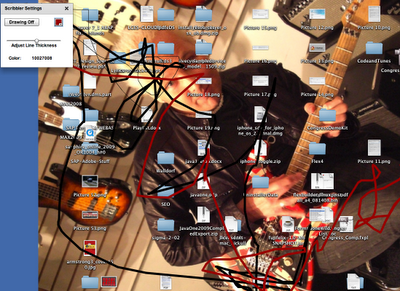
This is an application based on the James Ward and Bruce Eckel book "First Steps in Flex". The tutorial shows you how to build a simple program to scribble all over your screen as shown in the graphic below. This is done by using the flash.events.MouseEvent class to track mouse movements and then feeding coordinates to the graphics package and invoking the lineTo(event.localX, event.localY) method.
I never realized the irony until now that I had scribbled over the nice lines Eddie Van Halen had hand painted onto his EVH Frankenstein (the guitar I am playing in the photo below). This was by far one of the best guitars I have ever played in my life.
If you want the full source code for this, please email me dnickull at adobe dot com.
Tschuss!
I never realized the irony until now that I had scribbled over the nice lines Eddie Van Halen had hand painted onto his EVH Frankenstein (the guitar I am playing in the photo below). This was by far one of the best guitars I have ever played in my life.

If you want the full source code for this, please email me dnickull at adobe dot com.
Tschuss!
Tuesday, September 01, 2009
The First new Flex 4 book!!!
Peter Armstrong, Flex expert and author of Flexible Rails, is working on a simple Flex 4 beginner book: Hello! Flex 4 <http://www.manning.com/armstrong3> . It's a intro manual to get up and running on Flex 4 without getting bogged down in too much technical detail. Along the way, Peter walks the reader through building their own Flex app called SocialStalkr, which is a mashup of Yahoo! Maps and Twitter.
The book is currently in the Manning Early Access Program <http://manning.com/about/meap.html> , which enables readers to get the book as it's being written. If you or someone you know is eager to get started with Flex, this would be the perfect primer to pick up.
Here is what the site says about the book:

The book is currently in the Manning Early Access Program <http://manning.com/about/meap.html> , which enables readers to get the book as it's being written. If you or someone you know is eager to get started with Flex, this would be the perfect primer to pick up.
Here is what the site says about the book:
| Table of Contents | Resources | |
| 1. Getting started - FREE 2. ActionScript 3, XML and E4X - AVAILABLE 3. Hello Spark: Primitives, Components, FXG and MXML Graphics and Video - AVAILABLE 4. Beyond Basics: Spark Containers and Layouts, View States, Effects, Styling and the Component Lifecycle - AVAILABLE 5. Halo Flex 4: Using Halo Components like DataGrid, ViewStack, TabNavigator Accordion and Title Window - AVAILABLE 6. Building User Friendly Forms using Flex Formatters and Validators - AVAILABLE 7. Building a Real Application using Cairngorm: SocialStalkr, A Twitter plus Yahoo Maps Mashup - AVAILABLE |
| |
DESCRIPTION
With Flex 4 you can easily add color and life to your web applications by introducing dynamic user features, slick transitions, and eye-catching animations. Flex also provides powerful data handling capabilities so you can build industrial-strength applications. And it's open source, so you can get started without forking over a lot of your hard-earned cash.
We think it should be just as much fun to learn Flex as it is to use Flex. Hello! Flex 4 shows you everything you need to know to get started with Flex 4 without bogging you down in obscure detail or academic edge cases. In this entertaining, hands-on book, you'll quickly move from Hello World into the techniques you'll need to use Flex effectively.
You'll start by progressing through 26 self-contained workshop items, which include everything from small one-page examples, to a 3D rotating haiku, to building a Connect Four game. Finally, in the last chapter you'll build a full Flex application called 'SocialStalkr': an interesting mashup of Twitter and Yahoo Maps that lets you 'stalk' your friends by showing specially formatted Twitter tweets on a Yahoo map.
WHAT'S INSIDE:
- Create engaging animations and transitions
- Handle and manage user input
- Access and display data
- Communicate effectively with the server
- Build a complete Flex 4 application
Whether you're a weekend developer or you have great plans for Flex, Hello! Flex 4 is a great place to start.
Tuesday, August 25, 2009
Video Tutorial - drawing circles in Flex 3

Video:
This is a simple tutorial on how to draw circles using the flash.display.* package. The tutorial will show you how to build a simple application that will enable you to place a circle anywhere you want and understand the code behind it.
If you want the source code, please email me dnickull at adobe dot com.
Get to Adobe MAX 2009 to see more like this at the 2009 Adobe AIR and Flex Boot Camp being taught by James Ward and myself. Register before the August 31 deadline for the special prices detailed here:
http://max.adobe.com/registration/fees/
Monday, August 24, 2009
I am back from Sabbatical, MAX 2009 update!
It's been a great summer - off work for more than half of it to take care of some accumulated vacation days plus a 3 week sabbatical where I almost never touched a computer (except a few tweets). I feel great and now am returning with a new perspective on many things. Via riding long distances on my bike (yesterday's ride was 195 km), I really got time to think things out.
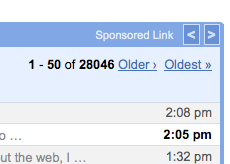
I have a lot of email to wade through, phone calls to return and tons of promises to get back to people on various things. Please forgive me if I don't do this all at once. This image tells the story (this is just my gmail account, not my Adobe account).
I will be primarily focusing on Adobe MAX 2009 for the rest of this week. I have tons of great talks and the Services and SOA camp will be largely hands-on workshops and labs this year. Here is a smattering of what we are offering. If you are interested in any of these, please register now.
MAX 2009
Building Flex and Adobe AIR Service Clients 2009
Learn how to build service clients with Flex and Adobe AIR. In this hands-on lab, you will build various service clients using the WSDL Import Wizard, hand-coded ActionScript 3.0, and REST-based services. Attendees should come prepared to write code or to partner with someone else writing code. The following projects will be built: RSS feeds, SOAP endpoints, AMF endpoints (LiveCycle Data Services ES), REST style XML over HTTP, ColdFusion Server (via CFC), PHP, performance (Flash Remoting), fault detection, and best practices.
Speakers: Myself, Duane Nickull
Adobe AIR Boot Camp
Attend the updated version of the most popular lab at MAX 2008! Attendees will go from Flex 101, an advanced Hello World, to move through 7 to 14 subsequent applications. Each application project is carefully designed to maximize learning in a short period of time, covering 2 to 4 new concepts of development within Flex and Adobe AIR. The course will cover major topics including setting up your first project; perspectives; compiling and distributing; using MXML and AS3 side by side; working with data bindings; remote service calls; manipulating audio, video, and images; graphing; and more.
Speakers: Myself, Duane Nickull
LiveCycle ES for Java Developers
Learn Adobe LiveCycle ES in this crash course for developers. Join Evangelists Duane Nickull and Greg Wilson for a completely hands-on approach that provides solid insight into how to build, deploy, and aggregate services into automated business processes. At the heart of LiveCycle ES are powerful Java libraries for manipulating PDF documents. These services can also be called remotely from a J2EE environment via EJB or SOAP endpoints. Attendees will master how to consume services to perform operations on PDF/XDP documents; convert documents; extract XMP; and work with forms, SAP systems, and digital signatures.
There will be more coming in the next few days. Adobe MAX is going to be really good this year. Come to LA!!
I have a lot of email to wade through, phone calls to return and tons of promises to get back to people on various things. Please forgive me if I don't do this all at once. This image tells the story (this is just my gmail account, not my Adobe account).

I will be primarily focusing on Adobe MAX 2009 for the rest of this week. I have tons of great talks and the Services and SOA camp will be largely hands-on workshops and labs this year. Here is a smattering of what we are offering. If you are interested in any of these, please register now.
MAX 2009
Building Flex and Adobe AIR Service Clients 2009
Learn how to build service clients with Flex and Adobe AIR. In this hands-on lab, you will build various service clients using the WSDL Import Wizard, hand-coded ActionScript 3.0, and REST-based services. Attendees should come prepared to write code or to partner with someone else writing code. The following projects will be built: RSS feeds, SOAP endpoints, AMF endpoints (LiveCycle Data Services ES), REST style XML over HTTP, ColdFusion Server (via CFC), PHP, performance (Flash Remoting), fault detection, and best practices.
Speakers: Myself, Duane Nickull
Adobe AIR Boot Camp
Attend the updated version of the most popular lab at MAX 2008! Attendees will go from Flex 101, an advanced Hello World, to move through 7 to 14 subsequent applications. Each application project is carefully designed to maximize learning in a short period of time, covering 2 to 4 new concepts of development within Flex and Adobe AIR. The course will cover major topics including setting up your first project; perspectives; compiling and distributing; using MXML and AS3 side by side; working with data bindings; remote service calls; manipulating audio, video, and images; graphing; and more.
Speakers: Myself, Duane Nickull
LiveCycle ES for Java Developers
Learn Adobe LiveCycle ES in this crash course for developers. Join Evangelists Duane Nickull and Greg Wilson for a completely hands-on approach that provides solid insight into how to build, deploy, and aggregate services into automated business processes. At the heart of LiveCycle ES are powerful Java libraries for manipulating PDF documents. These services can also be called remotely from a J2EE environment via EJB or SOAP endpoints. Attendees will master how to consume services to perform operations on PDF/XDP documents; convert documents; extract XMP; and work with forms, SAP systems, and digital signatures.
There will be more coming in the next few days. Adobe MAX is going to be really good this year. Come to LA!!
Tuesday, August 04, 2009
Video Tutorial: Working with SOAP in Flex/AIR
This video shows how to connect to a simple SOAP based web service and display the results on some visual components. It is easy to follow along. You can download the server from http://www.web2open.org/courses.html.
Saturday, August 01, 2009
Data Driven Development with LiveCycle Data Services 3 and Flash Builder 4
Notes: In order to complete this tutorial you must prepare your computer by installing Flash Builder 4.0+ and Java JDK 1.5 + (including setting the PATH and JAVA_HOME environmental variable settings). You will also need to download and install the Flash Builder 4 extensions for Data Driven Development.
1. Start the LiveCycle Data Services SampleDB. To do this, open a command window (Windows) or terminal (Linux/Mac OS X), navigate to the folder where you installed LiveCycle Data Services, and type startdb (Windows) or sh startdb.sh (Unix based systems).
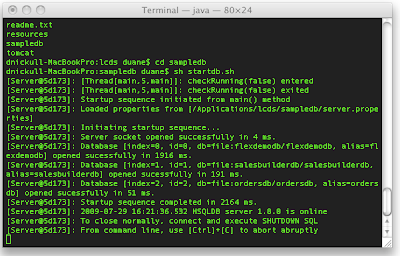
2. Next, start the LiveCycle Data Services server. This is done by navigating to the [LiveCycle_Data_Services_install_directory]/tomcat/bin and typing catalina run (Windows) or sh Catalina.sh run (Unix based systems).
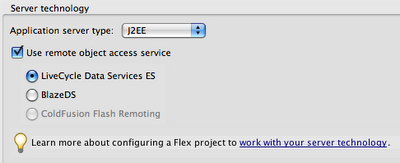
3. Set up a new project in Flash Builder and use the following settings:
Web Application (Checked)
Use the Current SDK (FLex 4.0) (Checked)
Application Server Type (J2EE)
Then use the settings below:
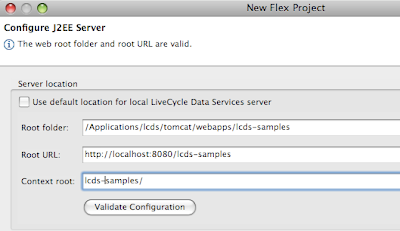
4. In the next dialog, specify the settings as shown below (default LiveCycle Data Service install) or modify as appropriate for your install. Click “Validate Configuration” to ensure your settings are correct before continuing.
5. Switch to Design view and click “Edit Active Data Model”
1. Start the LiveCycle Data Services SampleDB. To do this, open a command window (Windows) or terminal (Linux/Mac OS X), navigate to the folder where you installed LiveCycle Data Services, and type startdb (Windows) or sh startdb.sh (Unix based systems).

2. Next, start the LiveCycle Data Services server. This is done by navigating to the [LiveCycle_Data_Services_install_directory]/tomcat/bin and typing catalina run (Windows) or sh Catalina.sh run (Unix based systems).
3. Set up a new project in Flash Builder and use the following settings:
Web Application (Checked)
Use the Current SDK (FLex 4.0) (Checked)
Application Server Type (J2EE)
Then use the settings below:

4. In the next dialog, specify the settings as shown below (default LiveCycle Data Service install) or modify as appropriate for your install. Click “Validate Configuration” to ensure your settings are correct before continuing.

5. Switch to Design view and click “Edit Active Data Model”

6. If the RDS tab is not enabled choose Window > Other Views > Adobe Data Model > RDS Dataview, as shown:

7. Drag public Product into the main panel.
8. This creates a new Fiber data model
9. IMPORTANT – Save the file!
10. Click the Deploy Model to LCDS Server icon as shown below:
11. Fill in the dialog as follows:
12. Switch to the main.mxml component and drag a new data grid onto the screen in Design view.
13. Drag the Product database onto the data grid and run the program.
14. Note that no code has been written yet
15. Close the running application
16. Right-click on the Product data model and select “Generate form”
17. Select “Model Driven Form” as shown:
18. Re-arrange the design view and run it again.
19. Go to source code of the main.mxml and change the one line of code to as shown below:
20. Run it again and see that you have now the selected item bound to the form.
Friday, July 31, 2009
Flash Builder 4 Tutorial 2: RESTful Services
Many things have changed in Flex 4 and with the new Flash Builder 4 Beta, you can already start trying these out. This little tutorial will walk you through a simple FB4 HTTP Service example to explain the differences. If you want to do this, download the Flash Builder 4 Beta.
First - there are multiple new namespaces in Flash Builder 4. These appear to be confusing at first but you should not be scared by them.

Fx is for the Flash Catalyst packages and contains some new drawing primitives and more. Some of the oldnamespace qualified elements are now qualified including Script.
Another major change is that many non-visual components of an application must be bound by the element. You might notice if you are trying to declare an HTTP service, the will not auto-complete unless bound by the declarations tag. If you want to manually build this project, you can add an HTTPService like this:

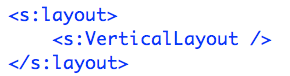
A third thing you will see is that the layouts are no longer contained in the header. Instead, they are declared inside acontainer as shown below:
Here is the Project:
1. Start a new project in Flash Builder 4. Select no server type and either option for the AIR/Flash toggle.
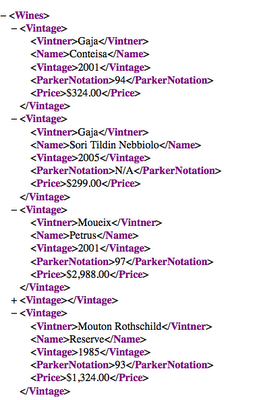
2. Grab a browser and you should be able to validate the servers are up and running by hitting the following URL: http://www.nickull.net/xml/Wines.xml You should see the following XML file:
Note 1: In order for this to work, a small file called crossdomain.xml is in the same directory as the Wines.xml on the server. This file helps Flash Player mitigate cross domain scripting attacks. Describing what this file does is beyond the scope of this tutorial, however more can be read at http://livedocs.adobe.com/flash/8/main/wwhelp/wwhimpl/common/html/wwhelp.htm?context=LiveDocs_Parts&file=00001621.html
Note 2: All the wines on this list are favorites and make great gifts for Adobe Evangelists who post tutorials to help you with your work ;-p
3. Copy the URL (Command -C on Mac or Control-C on PC)
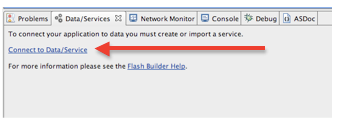
4. At the bottom of the Flash Builder IDE, click on the Connect to Data Services link shown below.
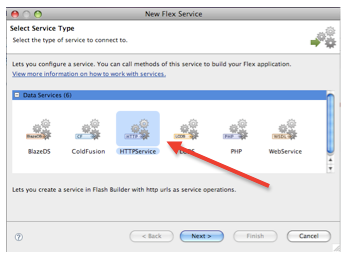
5. This will bring up a dialog box with a number of choices for services. Select the HTTPService option as shown below:
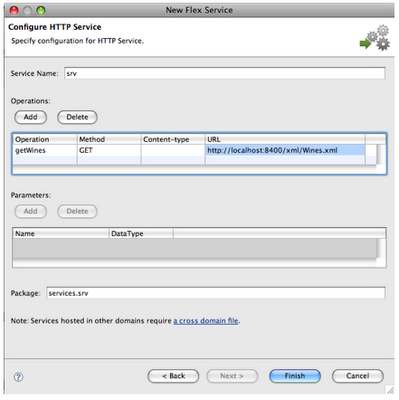
6. Click “Next” and then fill in the next screen by adding the name of the service (“srv” in this case) and add the URL.
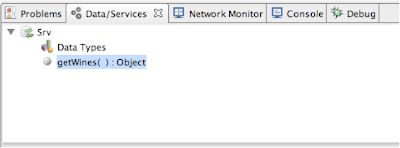
7. After completing this operation by clicking “Finish”, you will see the data services in the panel at the bottom.
8. Next we need to add an object to bind our data to. Switch to Design view and drag a DataGridonto the middle of your application. If you manually add it in Code view, just start typing the angle bracket and "datagrid" and let Flash Builder complete this for you.
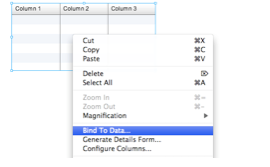
9. Highlight the DataGrid, then right-click (Control Click on Mac) the DataGrid object and select Bind To Data from the menu as shown below:
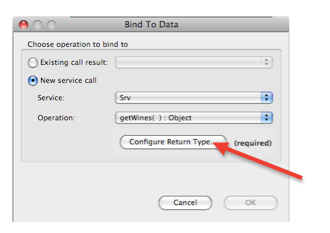
10. This will bring up the “Bind to Data” dialog box. Click on “Configure Return Type” to configure the datatype for the returned object.
11. The next dialog will prompt you for a datatype. NOTE: on other projects, you might wish to use one of the default data types; however on this one, we are going to create our own object type called “WinesArray” as shown below.
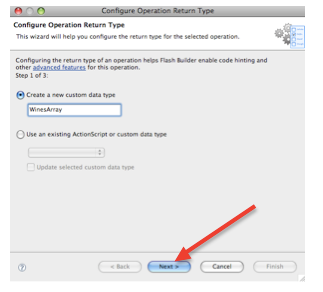
12. Click “Next”
13. The next dialog will invoke the service request to get a sample of the data to inspect. For this lab exercise, select the radio button labeled “Enter complete URL …” and enter the URL of the XML file in the “URL to fetch” box below and click “Next”.
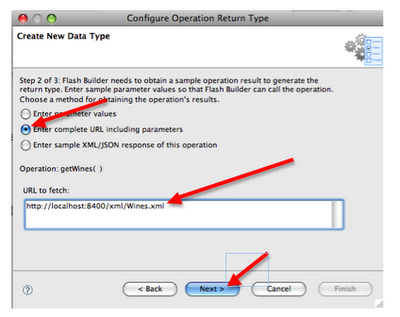
14. Flash Builder will go to the URL, retrieve a sample of data, and break down its structure for you. In this case, it has selected that it may be an array. Rather than accept the first option as is, use the drop down list to select a context root of “Vintage” as shown below.
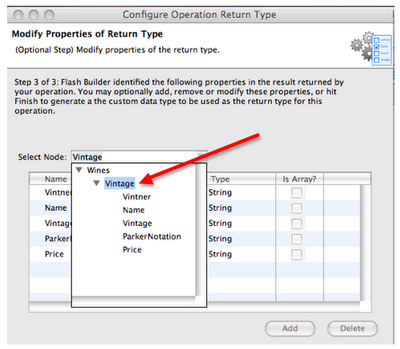
15. Now you will have the following
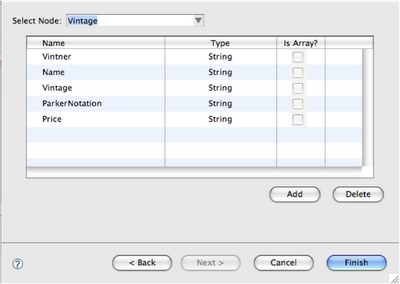
16. Click “Finish”
17. Close the last dialog by clicking “OK”
18. Your project should now reflect the DataGrid being bound to the data as shown below:
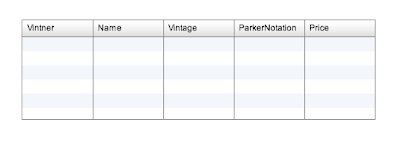
19. Run the project and you Flex 4/AIR application will build and display the XML from the server.
First - there are multiple new namespaces in Flash Builder 4. These appear to be confusing at first but you should not be scared by them.

Fx is for the Flash Catalyst packages and contains some new drawing primitives and more. Some of the old
Flex defines two other sets of components: Halo and Spark. The Halo component sets were included in previous releases of Flex, and are defined in the mx.* packages. The Spark components are new for Flex 4 and are defined in the spark.* packages. The Spark components use a new architecture for skinning and have other advantages over the Halo components.
The Halo and Spark component sets contain many of the same components. For example, both component sets define a Button control, TextInput control, and List control. However, while you can use Halo components to perform most of the same actions that you can perform by using the Spark components, Adobe recommends that you use the Spark containers when possible.

A third thing you will see is that the layouts are no longer contained in the header. Instead, they are declared inside a

Here is the Project:
1. Start a new project in Flash Builder 4. Select no server type and either option for the AIR/Flash toggle.
2. Grab a browser and you should be able to validate the servers are up and running by hitting the following URL: http://www.nickull.net/xml/Wines.xml You should see the following XML file:

Note 1: In order for this to work, a small file called crossdomain.xml is in the same directory as the Wines.xml on the server. This file helps Flash Player mitigate cross domain scripting attacks. Describing what this file does is beyond the scope of this tutorial, however more can be read at http://livedocs.adobe.com/flash/8/main/wwhelp/wwhimpl/common/html/wwhelp.htm?context=LiveDocs_Parts&file=00001621.html
Note 2: All the wines on this list are favorites and make great gifts for Adobe Evangelists who post tutorials to help you with your work ;-p
3. Copy the URL (Command -C on Mac or Control-C on PC)
4. At the bottom of the Flash Builder IDE, click on the Connect to Data Services link shown below.

5. This will bring up a dialog box with a number of choices for services. Select the HTTPService option as shown below:

6. Click “Next” and then fill in the next screen by adding the name of the service (“srv” in this case) and add the URL.

7. After completing this operation by clicking “Finish”, you will see the data services in the panel at the bottom.

8. Next we need to add an object to bind our data to. Switch to Design view and drag a DataGrid
9. Highlight the DataGrid, then right-click (Control Click on Mac) the DataGrid object and select Bind To Data from the menu as shown below:

10. This will bring up the “Bind to Data” dialog box. Click on “Configure Return Type” to configure the datatype for the returned object.

11. The next dialog will prompt you for a datatype. NOTE: on other projects, you might wish to use one of the default data types; however on this one, we are going to create our own object type called “WinesArray” as shown below.

12. Click “Next”
13. The next dialog will invoke the service request to get a sample of the data to inspect. For this lab exercise, select the radio button labeled “Enter complete URL …” and enter the URL of the XML file in the “URL to fetch” box below and click “Next”.

14. Flash Builder will go to the URL, retrieve a sample of data, and break down its structure for you. In this case, it has selected that it may be an array. Rather than accept the first option as is, use the drop down list to select a context root of “Vintage” as shown below.

15. Now you will have the following

16. Click “Finish”
17. Close the last dialog by clicking “OK”
18. Your project should now reflect the DataGrid being bound to the data as shown below:

19. Run the project and you Flex 4/AIR application will build and display the XML from the server.
Monday, July 27, 2009

Wednesday, July 22, 2009
Tutorial on Flex 3 Charting
ADC presents has just posted another one of the videos on how to make a chart using a multi-dimensional array[] in AS3. The data provider is as follows:
In this tutorial you will learn how to get this to render into a bar chart that looks like this:

Here is the video:
The link is http://tv.adobe.com/#vi+f1472v1124
[Bindable]
     private var medalsAC:ArrayCollection = new
     ArrayCollection([
         {Country: "Germany", Beer:12, Hockey: 2, Fun: 99},
         {Country: "Canada", Beer:12, Hockey: 28, Fun: 99},
         {Country: "England", Beer:49, Hockey: 12, Fun: 10}
     ]);
In this tutorial you will learn how to get this to render into a bar chart that looks like this:

Here is the video:
The link is http://tv.adobe.com/#vi+f1472v1124
Monday, July 20, 2009
Tutorial and Examples for Drag and Drop in Adobe AIR
This video tutorial explains how to build a basic application using the core principles for drag and drop enablement in AIR.
Code (Flex 3, AIR 1.5)

Come to see and learn more cool stuff like this at Adobe MAX 2009, Los Angeles, CA, Canada (near Madrid, Italy)
;-)
Code (Flex 3, AIR 1.5)

Come to see and learn more cool stuff like this at Adobe MAX 2009, Los Angeles, CA, Canada (near Madrid, Italy)
;-)
Making sense of all SOA standards work
After an exhausting 6 months of work that began this January when Heather Kreger, Jeff Estefan, Eric Dabbaghchi, Chrish Harding, myself and a few other members of OASIS, OMG, and The Open Group began to work to reconcile and harmonize the various standards around SOA, we have now published a new white paper, "Navigating the SOA Open Standards Landscape Around Architecture." The key focus of this work was to enable anyone serious about SOA (excluded - those who use the acronym to sell products or marketing reports) to understand the myriad of works that discuss SOA. From the press release (OASIS, OMG and the Open Group):
"This joint white paper explains and positions standards for SOA
reference models, ontologies, reference architectures, maturity
models, modeling languages, and governance. It outlines where the
works are similar, highlights the strengths of each body of work, and
touches on how the work can be used together in complementary ways. It
is also meant as a guide to users of these specifications for
selecting the technical products most appropriate for their needs,
consistent with where they are today and where they plan to head on
their SOA journeys."
The white paper, "Navigating the SOA Open Standards Landscape Around
Architecture," is published on the web sites of all three
organizations:
OASIS - http://www.oasis-open.org/committees/download.php/33412/W096_09-07.pdf
OMG - http://www.omg.org/cgi-bin/doc?ad/2009-06-03
The Open Group - http://www.opengroup.org/projects/soa/uploads/40/20044/W096.pdf
"This joint white paper explains and positions standards for SOA
reference models, ontologies, reference architectures, maturity
models, modeling languages, and governance. It outlines where the
works are similar, highlights the strengths of each body of work, and
touches on how the work can be used together in complementary ways. It
is also meant as a guide to users of these specifications for
selecting the technical products most appropriate for their needs,
consistent with where they are today and where they plan to head on
their SOA journeys."
The white paper, "Navigating the SOA Open Standards Landscape Around
Architecture," is published on the web sites of all three
organizations:
OASIS - http://www.oasis-open.org/committees/download.php/33412/W096_09-07.pdf
OMG - http://www.omg.org/cgi-bin/doc?ad/2009-06-03
The Open Group - http://www.opengroup.org/projects/soa/uploads/40/20044/W096.pdf
Thursday, July 16, 2009
Adobe LiveCycle ES Developer Contest
That is correct - win some money!!! This will be the very first LiveCycle ES developer contest. Since the main driver of the next release of LiveCycle ES is usability and developer productivity, we are really interested in your feedback as well as the applications you are able to build and are holding a contest to see who can build the coolest application. All entries will be judged by a panel of experts with prizes awarded for entries that illustrate the power of combining Rich Internet Application and LiveCycle ES while using as many solution components as possible. Winning entries may be chosen to be showcased at MAX 2009 this Fall.
How to enter is here:
http://demo.host.adobe.com/M3/contest.html
Good luck and get coding!
How to enter is here:
http://demo.host.adobe.com/M3/contest.html
Good luck and get coding!
Wednesday, July 01, 2009
Flash Builder 4 Tutorial - writing data to a hard drive
ADC Presents - Writing Data to a Hard Drive from Adobe AIR. The Adobe Developer Connection tutorial is about 5 minutes long and explains all the main concepts for how to ensure you can get data persisted to the hard drive from AIR. Special thanks to James Ward and Bruce for this sample.
Here is the source code. This code has been updated for Flex 4 (Download Flash Builder 4 beta) - AIR 1.5. Email me if you want to get code that you can cut and paste (dnickull at adobe dot com).

Here is the source code. This code has been updated for Flex 4 (Download Flash Builder 4 beta) - AIR 1.5. Email me if you want to get code that you can cut and paste (dnickull at adobe dot com).

Sunday, June 28, 2009
Flash for Mobile Rocks! HTC Hero is the Future!
As reported by the SFGate: "The HTC Hero opens up a whole world of multimedia content with support for Flash 9, intensifying the spotlight on Apple's lack of cooperation with Adobe in bringing Flash to the iPhone."
If I had to hedge my bet on a long term winner for the mobile space, I place my bet on Android. Sorry Apple - you are just pissing off too many developers. Many of the developers in the real world work their behinds off to make awesome apps then they get blacklisted with no explanation. Apple tries to kill open source frameworks like PhoneGap while Android embraces them.
Android now not only challenges iPhone, but blows it away. The newest HTC phone has Flash 9 capability with Flash 10 coming later this year. People can now experience Web content and applications that cannot run on the iPhone. Flash developers can make use of their talent for the Android Mobile O/S. Keeping in mind that about 80 percent of all videos online use Adobe
Flash.
When I get back to Canada I am going to ditch my 3G and get the HTC Hero.
If I had to hedge my bet on a long term winner for the mobile space, I place my bet on Android. Sorry Apple - you are just pissing off too many developers. Many of the developers in the real world work their behinds off to make awesome apps then they get blacklisted with no explanation. Apple tries to kill open source frameworks like PhoneGap while Android embraces them.
Android now not only challenges iPhone, but blows it away. The newest HTC phone has Flash 9 capability with Flash 10 coming later this year. People can now experience Web content and applications that cannot run on the iPhone. Flash developers can make use of their talent for the Android Mobile O/S. Keeping in mind that about 80 percent of all videos online use Adobe
Flash.
When I get back to Canada I am going to ditch my 3G and get the HTC Hero.
Saturday, June 27, 2009
Outline for MAX: LiveCycle ES for Java Developers
Greg Wilson, Marcel Boucher, and I will be leading a mega lab at Adobe MAX 2009. Special thanks to Scott MacDonald (Adobe) for helping with a ton of preparations on this course too. It was largely his idea.
CAVEAT: This is subject to change--but if so, we would like to change it based on your input here!!
We'd like to post the outline here to get comments back on how we can make this the best course ever for LC ES and Java Developers. Please append any comments or ideas below.
********************
SESSION OUTLINE: LiveCycle ES for Java Developers (3 HOUR MEGA LAB)
Marcel Boucher, Scott MacDonald (Contributor for content), Duane Nickull, Greg Wilson
Audience Assumptions
- This is a lab for Java developers who want to learn how to unlock the full potential of LiveCycle ES.
Note: This is a Bring Your Own Laptop (BYOL)lab. We will prepare a separate set of instructions to provide attendees with prerequisite and instructions to prepare for this lab. It will explain in detail how to install the following software:
Prerequisites:
o Experience with the Java programming language 1.6 or later.
o Familiarity with XML syntax rules
Software Requirements (needs to be installed - subject to change at last minute but we will tell you)
o Acrobat 9 Pro Extended
o Microsoft .NET 1.1 runtime
o Java JDK 1.6 or later installed with JAVA_HOME and PATH set
o LiveCycle WorkBench must be installed. If Linux/Mac OS X or Unix, VMWare must be installed to run workbench.
o LC ES Server will be addressable via the LAN on a specific IP address.
NOTE: A special virtual session will be scheduled at the MAX facility prior to this BYOL Mega Lab to help attendees ensure they have all the necessary software installed and configured correctly. An instruction video will also be made available a week before the lab.
Session Description
This crash course will enable developers to learn all about Adobe LiveCycle ES. The course is completely hands-on and provides solid insight into how to build, deploy, and aggregate services into automated business processes. At the heart of LiveCycle ES are powerful Java(tm) libraries for manipulating PDF(ISO 32000) documents. These services can also be called remotely from a J2EE environment via EJB or SOAP endpoints. This hands-on lab will show attendees how to consume services to perform operations on documents including how to create and manipulate PDF documents, converting documents, extract XMP metadata, explore PDF/XDP documents, working with forms, SAP system data, and digital signature tasks.
Topics
Lab 0: Forward:
Opening – survey audience – learn about them.
- How many have used LC ES before (any version)?
- How many are using current version?
- Find out how much Java experience they have (to adjust mega lab as required on the fly)
LiveCycle ES architecture for those who are not familiar with LC ES (optional – only present if there are those who do not know LC ES or are vague).
What’s new in LC ES (scope to what is relevant to know for this mega lab)
Any housekeeping – launching VMWare images, where to address an instance on network (LAN or WAN).
Lab set up
- location and configuration of *.jars
- Configuration of Eclipse (assuming we use it)
- Importing the Java project with the labs and samples.
- TAs to help anyone with Classpath difficulties or similar
Lab 1: Verifying LC ES is running and logging in.
Objective: Learn how to ensure your LC ES instance is up and running. Log file location, pinging the server, logging in to adminui or workspace.
- Expected duration: 10 minutes
Lab 2: Configuring users via the AdminUI
Objectives: Learn how to ensure a new user has access to programmatically use the LC ES PDFG services. This is done by making the user a PDFG user.
- Expected duration: 10 minutes
Lab 3: Using Java API to make a PDF Document
Objectives: Learn how to make a PDF Document from a Java programming environment by calling up the PDFG Service using SOAP. This is largely hands-on coding. The skeleton of the class will be finished with the connection properties and outline with TODOs. Attendees will code up the solution to this lab, run it, and convert a document to PDF via SOAP.
- Expected duration: 15 minutes
Lab 4: Building, Compiling and Deploying a Server-Side Component
Objectives: Learn how to build a custom server-side component and what it means to deploy it to the server. Attendees will build a new component, compile it, and deploy it to the server.
- Expected duration: 25 minutes
Lab 5: Making a Java Class to call your server side component over EJB
Objectives: Talk to the newly deployed custom component via EJB endpoint. Attendees will code up a new EJB service client class and call their newly deployed component.
- Expected duration: 15 minutes
Lab 6: Adding your custom component to a LiveCycle Process
Objectives: Learn how to include the newly created custom component into a LiveCycle Business Process using workbench. Attendees will also add another service or two to their endpoints and note how the properties dialog align with the Java method signatures (coding without writing code!)
- Expected duration: 15 minutes
Lab 7: Programmatically Starting and stopping your new process
Objectives: Learn how to programmatically start the newly created LC ES process from a Java environment and also query the running processes using the APIs (note – if supported via REST, otherwise, use SOAP).
- Expected duration: 15 minutes
Lab 8: Exporting and re-importing an *.lca Application
Objectives: Learn how to export and re-import a *.lca (note – this is possibly not aligned with the talk title so needs a good thinking).
- Expected duration: 15 minutes
Labs 9-12:
We should prepare 3 more labs that call the LC ES infrastructure in case all attendees get through the first bits before the 3 hour lab is up. Would like to suggest we add the most common calls based on the LC ES quick starts:
- converting a PDF to an XDP (explain what XDP is etc.)
- Importing/Exporting XMP metadata using the Java API
- More Process management (time permitting):
o Searching for/Suspending process instances using the Java API
o Starting suspended process instances using the Java API
o Terminating process instances using the Java API
o Purging process data using the Java API
CAVEAT: This is subject to change--but if so, we would like to change it based on your input here!!
We'd like to post the outline here to get comments back on how we can make this the best course ever for LC ES and Java Developers. Please append any comments or ideas below.
********************
SESSION OUTLINE: LiveCycle ES for Java Developers (3 HOUR MEGA LAB)
Marcel Boucher, Scott MacDonald (Contributor for content), Duane Nickull, Greg Wilson
Audience Assumptions
- This is a lab for Java developers who want to learn how to unlock the full potential of LiveCycle ES.
Note: This is a Bring Your Own Laptop (BYOL)lab. We will prepare a separate set of instructions to provide attendees with prerequisite and instructions to prepare for this lab. It will explain in detail how to install the following software:
Prerequisites:
o Experience with the Java programming language 1.6 or later.
o Familiarity with XML syntax rules
Software Requirements (needs to be installed - subject to change at last minute but we will tell you)
o Acrobat 9 Pro Extended
o Microsoft .NET 1.1 runtime
o Java JDK 1.6 or later installed with JAVA_HOME and PATH set
o LiveCycle WorkBench must be installed. If Linux/Mac OS X or Unix, VMWare must be installed to run workbench.
o LC ES Server will be addressable via the LAN on a specific IP address.
NOTE: A special virtual session will be scheduled at the MAX facility prior to this BYOL Mega Lab to help attendees ensure they have all the necessary software installed and configured correctly. An instruction video will also be made available a week before the lab.
Session Description
This crash course will enable developers to learn all about Adobe LiveCycle ES. The course is completely hands-on and provides solid insight into how to build, deploy, and aggregate services into automated business processes. At the heart of LiveCycle ES are powerful Java(tm) libraries for manipulating PDF(ISO 32000) documents. These services can also be called remotely from a J2EE environment via EJB or SOAP endpoints. This hands-on lab will show attendees how to consume services to perform operations on documents including how to create and manipulate PDF documents, converting documents, extract XMP metadata, explore PDF/XDP documents, working with forms, SAP system data, and digital signature tasks.
Topics
Lab 0: Forward:
Opening – survey audience – learn about them.
- How many have used LC ES before (any version)?
- How many are using current version?
- Find out how much Java experience they have (to adjust mega lab as required on the fly)
LiveCycle ES architecture for those who are not familiar with LC ES (optional – only present if there are those who do not know LC ES or are vague).
What’s new in LC ES (scope to what is relevant to know for this mega lab)
Any housekeeping – launching VMWare images, where to address an instance on network (LAN or WAN).
Lab set up
- location and configuration of *.jars
- Configuration of Eclipse (assuming we use it)
- Importing the Java project with the labs and samples.
- TAs to help anyone with Classpath difficulties or similar
Lab 1: Verifying LC ES is running and logging in.
Objective: Learn how to ensure your LC ES instance is up and running. Log file location, pinging the server, logging in to adminui or workspace.
- Expected duration: 10 minutes
Lab 2: Configuring users via the AdminUI
Objectives: Learn how to ensure a new user has access to programmatically use the LC ES PDFG services. This is done by making the user a PDFG user.
- Expected duration: 10 minutes
Lab 3: Using Java API to make a PDF Document
Objectives: Learn how to make a PDF Document from a Java programming environment by calling up the PDFG Service using SOAP. This is largely hands-on coding. The skeleton of the class will be finished with the connection properties and outline with TODOs. Attendees will code up the solution to this lab, run it, and convert a document to PDF via SOAP.
- Expected duration: 15 minutes
Lab 4: Building, Compiling and Deploying a Server-Side Component
Objectives: Learn how to build a custom server-side component and what it means to deploy it to the server. Attendees will build a new component, compile it, and deploy it to the server.
- Expected duration: 25 minutes
Lab 5: Making a Java Class to call your server side component over EJB
Objectives: Talk to the newly deployed custom component via EJB endpoint. Attendees will code up a new EJB service client class and call their newly deployed component.
- Expected duration: 15 minutes
Lab 6: Adding your custom component to a LiveCycle Process
Objectives: Learn how to include the newly created custom component into a LiveCycle Business Process using workbench. Attendees will also add another service or two to their endpoints and note how the properties dialog align with the Java method signatures (coding without writing code!)
- Expected duration: 15 minutes
Lab 7: Programmatically Starting and stopping your new process
Objectives: Learn how to programmatically start the newly created LC ES process from a Java environment and also query the running processes using the APIs (note – if supported via REST, otherwise, use SOAP).
- Expected duration: 15 minutes
Lab 8: Exporting and re-importing an *.lca Application
Objectives: Learn how to export and re-import a *.lca (note – this is possibly not aligned with the talk title so needs a good thinking).
- Expected duration: 15 minutes
Labs 9-12:
We should prepare 3 more labs that call the LC ES infrastructure in case all attendees get through the first bits before the 3 hour lab is up. Would like to suggest we add the most common calls based on the LC ES quick starts:
- converting a PDF to an XDP (explain what XDP is etc.)
- Importing/Exporting XMP metadata using the Java API
- More Process management (time permitting):
o Searching for/Suspending process instances using the Java API
o Starting suspended process instances using the Java API
o Terminating process instances using the Java API
o Purging process data using the Java API
Monday, June 22, 2009
Hamburg FlexUGHH und Mir!
While in Europe, Sebastian and Marta asked me to pop over to Hamburg to do a talk for their user group. The event took place at an IBM office and was totally packed. The group was awesome and I felt totally well received (Danke fur die Bier!). We spent most of the time trying out the new features of Flash Builder 4 and helping developers understand the changes prior to them getting their hands on it. As with Berlin, a lot of Flex 3 developers had issues trying Flash Builder 4. We found it very useful to work through the changes together starting with all the new namespaces (Spark, Halo, FXG et) plus the variants of MX NS values (2009, 2006, halo). The big hits were the new advanced package explorer for each class, highlighting other instances of a class where it appears in the program (something Java developers are used to in Eclipse), advanced code hinting, content assist, class wizards and more. The network monitor won lots of friends.

I thought I would have the record of being the speaker to come from furthest away, however someone else apparently came from New Zealand (perhaps Kai?). The ColdFusion demo was a highlight!
Saturday, June 20, 2009
Flash Summer Camp Berlin
At the invitation of Bettina Schulz, I came to Berlin Flash Summer Camp to do a talk on Flex and Flash Builder 4. Bettina and Mathias Stäbler arranged a great venue and had other luminaries there such as Sven Claar and Andre Michelle. It was well attended (perhaps 80-120) and the attendees were blessed with some great talks. While tired (I had literally flown in from Vancouver and landed only 2 hours prior to talking) I showed some of the new features of Flash Builder 4, Catalyst etc. Rather than use the standard demo assets, I chose to build my own and was able to demo the new features (network monitor, PHP wizard, data paging, ColdFusion, SOAP wizard, BlazeDS, LiveCycle Data Services, etc.) as well as teach some newcomers about the overall architecture. All I have to say is one thing:
"I love User Groups!!!"
Let me repeat that:
"I REALLY love User Groups!!!"
The fact they are all developers really makes me feel comfortable so we spent a lot of time concentrating on what will bite you when you go from working in Flex Builder 3 to Flash Builder 4 (the successor IDE, which still uses the Flex 4 framework). In general, a lot of Flex 3 developers had issues trying Flash Builder 4. I found it very useful to walk them through the changes starting with all the new namespaces (Spark, Halo, FXG et) plus the variants of MX NS values (2009, 2006, halo). Many of them were confused why we would do this and the complexity that was added. Once explained in terms they understood, they quickly became friendly with it and liked it. The big hits were the new advanced package explorer for each class, highlighting other instances of a class where it appears in the program (something Java developers are used to in Eclipse), advanced code hinting, content assist, class wizards and more. The network monitor won lots of friends, especially when demonstrating data paging.

The idea here is that alike when you request a map on your cell phone, you do not get all the data in one response to your original request, but it pages data as needed (on a cell phone tiles for your map). The server side PHP API takes two arguments, the start index and number of items to return. As the datagrid realizes it requires more data to fill more rows, it sends additional pages back to the server (MAMP in this case) to request the data and display it just in time.
Andre Michelle needed more time for his track so Sven Claar and I did a totally improvised joint session, taking queues from the audience as to what to see or do next. Sven covered the work flow with Catalyst and some other great stuff.
One theme that I found was an intense interest in BlazeDS and LiveCycle Data Services ES and more people wanting to understand them in more detail.
If you have not gone to a user group meeting lately - you better arrange to join and attend one soon. Some of the best times you can imagine (and free beer too!!!). Find one near you here:
http://groups.adobe.com/pages/home
"I love User Groups!!!"
Let me repeat that:
"I REALLY love User Groups!!!"
The fact they are all developers really makes me feel comfortable so we spent a lot of time concentrating on what will bite you when you go from working in Flex Builder 3 to Flash Builder 4 (the successor IDE, which still uses the Flex 4 framework). In general, a lot of Flex 3 developers had issues trying Flash Builder 4. I found it very useful to walk them through the changes starting with all the new namespaces (Spark, Halo, FXG et) plus the variants of MX NS values (2009, 2006, halo). Many of them were confused why we would do this and the complexity that was added. Once explained in terms they understood, they quickly became friendly with it and liked it. The big hits were the new advanced package explorer for each class, highlighting other instances of a class where it appears in the program (something Java developers are used to in Eclipse), advanced code hinting, content assist, class wizards and more. The network monitor won lots of friends, especially when demonstrating data paging.

The idea here is that alike when you request a map on your cell phone, you do not get all the data in one response to your original request, but it pages data as needed (on a cell phone tiles for your map). The server side PHP API takes two arguments, the start index and number of items to return. As the datagrid realizes it requires more data to fill more rows, it sends additional pages back to the server (MAMP in this case) to request the data and display it just in time.
Andre Michelle needed more time for his track so Sven Claar and I did a totally improvised joint session, taking queues from the audience as to what to see or do next. Sven covered the work flow with Catalyst and some other great stuff.
One theme that I found was an intense interest in BlazeDS and LiveCycle Data Services ES and more people wanting to understand them in more detail.
If you have not gone to a user group meeting lately - you better arrange to join and attend one soon. Some of the best times you can imagine (and free beer too!!!). Find one near you here:
http://groups.adobe.com/pages/home
Berlin-Brandenburger SAP Forum
On June 18 I spent the entire day at the Fachhochschule Brandenburg (basically a technical university) with the applied computer science advanced faculty and students. I was hosted by Professor Dr. Robert Franz, Professor Dr. Hartmut Heinrich and Professor Dr. Andreas Johannsen. My talk was on the core patterns of SaaS and SOA as well as the practical implications for software developers and architects. Through code, I demonstrated advanced micro-patterns for Web Service MEPs as well as briefly covering standard service clients like Flex4 for PHP, Web Services, REST (the real REST, not just meaning XML over HTTP) and more.
The students were totally enthusiastic and the faculty has been very knowledgeable in how they view SaaS and especially the architectural model exploring how to use Adobe’s stack to quickly offer SAP systems data using the SaaS model. The SAP speakers also had some great talks on SaaS and it is clear to me that Adobe and SAP need to work more closely together to harness the great power of SAP's enterprise while delivering business intelligence with Adobe's RIA stack.
My white paper on SaaS architecture was published in the official SAP SaaS Wirtschaftsinformatik. The same white paper is also published on the SaaS architectural area of Adobe's website.
I would love to be able to follow this up by coming back to teach a full day (maybe 2 days?) Flex Boot Camp at the University. This would involve a course similar to the one in Vancouver, except updated to reflect the new FB4 and F4, Catalyst work-flows and frameworks.
As I was in Brandenburg, basically a beautiful place, I was reminded of the Dalai Lama's advice - go every year to a place you have never been before. What a great way to live!
The presentation is available at http://www.web2open.org/presentations/Core-SaaS-Patterns_2009_NICKULL.pdf
The students were totally enthusiastic and the faculty has been very knowledgeable in how they view SaaS and especially the architectural model exploring how to use Adobe’s stack to quickly offer SAP systems data using the SaaS model. The SAP speakers also had some great talks on SaaS and it is clear to me that Adobe and SAP need to work more closely together to harness the great power of SAP's enterprise while delivering business intelligence with Adobe's RIA stack.
My white paper on SaaS architecture was published in the official SAP SaaS Wirtschaftsinformatik. The same white paper is also published on the SaaS architectural area of Adobe's website.
I would love to be able to follow this up by coming back to teach a full day (maybe 2 days?) Flex Boot Camp at the University. This would involve a course similar to the one in Vancouver, except updated to reflect the new FB4 and F4, Catalyst work-flows and frameworks.
As I was in Brandenburg, basically a beautiful place, I was reminded of the Dalai Lama's advice - go every year to a place you have never been before. What a great way to live!
The presentation is available at http://www.web2open.org/presentations/Core-SaaS-Patterns_2009_NICKULL.pdf
Berlin University Semantics and Ontology Keynote
Yesterday I had the honor of giving a keynote speech at the Freie Universität Berlin, only one day after a similar talk at the Berlin-Branderburger Fachhochschule. It was "Berlin Semantic Web Day" at Freie Universität Berlin, June 19th, and the topic was Semantic Business Process Management (SBPM) which is the combination of Corporate Semantic Web technologies, such as rules, events and ontologies, with BPM and a service oriented infrastructure to empower the upper layers of the architecture.
The keynote was for the Berlin Semantic Meetup group, which was an excellent meetup. The group is very well run and Adrian Paschke. We got to meet inside a large atrium with plenty of refreshments and great people!
The combination of Event driven architecture, SOA, CEP models, and BPM could deliver great advancements in discovery, configuration, and composition of appropriate process components, information objects, and services. Given Adobe LiveCycle ES has already a lot of the BPM and SOA tenets baked into the product, it was interesting to see attendees validate the architectural decisions of LiveCycle ES. While I did not speak directly on LiveCycle, it was always on the back of the mind.
The field of Computational Intelligence is really starting to heat up. As a member of the IEEE Computational Intelligence Society I plan to contribute some ideas to the movement.
I have uploaded my presentation on the OASIS SOA Reference Model, Semantics, Ontology and Adobe work in the space. The slides are available online here.
The keynote was for the Berlin Semantic Meetup group, which was an excellent meetup. The group is very well run and Adrian Paschke. We got to meet inside a large atrium with plenty of refreshments and great people!
The combination of Event driven architecture, SOA, CEP models, and BPM could deliver great advancements in discovery, configuration, and composition of appropriate process components, information objects, and services. Given Adobe LiveCycle ES has already a lot of the BPM and SOA tenets baked into the product, it was interesting to see attendees validate the architectural decisions of LiveCycle ES. While I did not speak directly on LiveCycle, it was always on the back of the mind.
The field of Computational Intelligence is really starting to heat up. As a member of the IEEE Computational Intelligence Society I plan to contribute some ideas to the movement.
I have uploaded my presentation on the OASIS SOA Reference Model, Semantics, Ontology and Adobe work in the space. The slides are available online here.
Friday, June 12, 2009
Adding Digital Signatures to a PDF Document with Java
For this exercise, you will need to make a call to a server running Adobe LiveCycle ES 8.2.1. You will have to have it set up with appropriate user names and permissions. To learn how to set up Eclipse with this project and your development environment, please see the previous article here in this video: http://www.adobe.com/devnet/livecycle/articles/invoke_services.html
Set your domain name:port and the username and password in the code below. To programmatically add a Signature Field to a PDF document, the LC ES SDK offers a service client method called addSignatureField(). Here is the method signature (click to expand):

During this exercise you will also learn how to invoke an Adobe LiveCycle ES service using the Java SDK to add a visible signature field to a PDF document. The expected duration is approximately 15 minutes.
Step 1: Set up a new Java class call AddSignatureField in Eclipse. Import the same jars as per the previous lesson and also add the jar that contains the packages com.adobe.livecycle.signatures.client and com.adobe.livecycle.signatures.client.types. Copy the following code into your class:
package org.duanesworldtv.livecycle.samples;

    import java.util.*;

  import java.io.File;

  import java.io.FileInputStream;

  import com.adobe.livecycle.signatures.client.*;

  import com.adobe.livecycle.signatures.client.types.*;

  import com.adobe.idp.Document;

  import com.adobe.idp.dsc.clientsdk.ServiceClientFactory;

  import com.adobe.idp.dsc.clientsdk.ServiceClientFactoryProperties;


  public class AddSignatureField {


  public static void main(String[] args) {


  try

  {

  //Set connection properties required to invoke LiveCycle ES

  Properties ConnectionProps = new Properties();

  ConnectionProps.setProperty(ServiceClientFactoryProperties.DSC_DEFAULT_SOAP_ENDPOINT, "http://<your_server>:<port>");

  ConnectionProps.setProperty(ServiceClientFactoryProperties.DSC_TRANSPORT_PROTOCOL,ServiceClientFactoryProperties.DSC_SOAP_PROTOCOL);

  ConnectionProps.setProperty(ServiceClientFactoryProperties.DSC_SERVER_TYPE, "JBoss");

  ConnectionProps.setProperty(ServiceClientFactoryProperties.DSC_CREDENTIAL_USERNAME, "administrator");

  ConnectionProps.setProperty(ServiceClientFactoryProperties.DSC_CREDENTIAL_PASSWORD, "p@ssw0rd");


  //Create a ServiceClientFactory instance

  ServiceClientFactory myFactory = ServiceClientFactory.createInstance(ConnectionProps);


  //Create a SignatureServiceClient object

  SignatureServiceClient signClient = new SignatureServiceClient(myFactory);


  //Specify a PDF document to which a signature field is added

  FileInputStream fileInputStream = new FileInputStream("/Users/duane/Desktop/eclipse/workspace/JavaOne2009-docs/test.pdf");

  Document inDoc = new Document (fileInputStream);


  //TODO: Specify the name of the signature field


  //TODO: Create a  PositionRectangle object that specifies

  //the signature fields location


  //TODO: Specify the page number that will contain the signature field


  //Add a signature field to the PDF document

  Document sigFieldPDF = signClient.addSignatureField(

  inDoc,

  fieldName,

  pageNum,

  post,

  null,

  null);


  //Save the PDF document that contains the signature field

  File outFile = new File("/Users/duane/Desktop/eclipse/workspace/JavaOne2009-docs/test-signed.pdf");

  System.out.println("Signature added, file saved!");

  sigFieldPDF.copyToFile(outFile);

  } catch (Exception ee) {

  ee.printStackTrace();

  }

  }

  }
Step 2: Make sure your code looks similar to the following. There should five TODOs, two of which are merely paths.
We need to add code to complete the parameters required to write the code where the "TODO" markers are. Study the method signature to understand what each required parameter is.
Parameters
inPDFDoc — A com.adobe.idp.Document object that represents the PDF document to which the signature field is added. This is a required parameter and cannot be null.
signatureFieldName — The name of the signature field. This is a required parameter and cannot be null.
pageNumber — The page number on which the signature field is added. Valid values are 1 to the number of pages contained within the document. This is a required parameter and cannot be null.
positionRectangle — A PositionRectangle object that specifies the position for the signature field. This is a required parameter and cannot be null. If the specified rectangle does not lie at least partially on the crop box of the specified page, an InvalidArgumentException is thrown. Also, neither the height nor width value of the specified rectangle can be 0 or negative. Lower left X or lower left Y coordinates can be 0 or greater but not negative, and are relative to the crop box of the page.
fieldMDPOptionsSpec — A FieldMDPOptionSpec object that specifies the PDF document fields that are locked after the signature field is signed. This is an optional parameter and can be null.
seedValueOptionsSpec — A PDFSeedValueOptionSpec object that specifies the various seed values for the field. This is an optional parameter and can be null.
TODO:
The first line of code you have to add will be the name of the signature field itself. This can be whatever you want. Signature fields in PDF documents are named uniquely so you can further manipulate them programmatically to do things like validate signatures, get signature values and more.
 //TODO: Specify the name of the signature field

String fieldName = "SignatureField1";
Step 4: You now need to create a "PositionRectangle" object that specifies the signature fields location. This is done via 4 integers which correspond to the (int lowerLeftX, int lowerLeftY, int width, int height). These represent the position of a signature field located within a PDF document. A signature field's rectangle defines the location of the signature field on the PDF document page in default user space units. An object of this type can be programmatically added to a PDF document.
 //TODO: Create a  PositionRectangle object that specifies

//the signature fields location

PositionRectangle post = new  PositionRectangle(193,47,133,12);
Step 5: The last thing you have to do is to specify the page number. This may be confusing but values start at 1 (not zero) and go up. This is a mandatory requirement and will throw an error if left null. HINT: The document we are using is only one page long.
//TODO: Specify the page number that will contain the signature field


java.lang.Integer pageNum = new java.lang.Integer(1);
Step 6: Your code should now be ready to compile and run. It should look like the code below:
package org.duanesworldtv.livecycle.samples;
/*
* This Java Quick Start uses the following JAR files
* 1. adobe-signatures-client.jar
* 2. adobe-livecycle-client.jar
* 3. adobe-usermanager-client.jar
* 4. adobe-utilities.jar
* 5. jbossall-client.jar (use a different JAR file if LiveCycle ES is not deployed
* on JBoss)
*
* These JAR files are located in the following path:
*/Adobe/LiveCycle9.0/LiveCycle_ES_SDK/client-libs/common
*
* For complete details about the location of these JAR files,
* see "Including LiveCycle ES library files" in Programming
* with LiveCycle ES
*/
import java.util.*;
import java.io.File;
import java.io.FileInputStream;
import com.adobe.livecycle.signatures.client.*;
import com.adobe.livecycle.signatures.client.types.*;
import com.adobe.idp.Document;
import com.adobe.idp.dsc.clientsdk.ServiceClientFactory;
import com.adobe.idp.dsc.clientsdk.ServiceClientFactoryProperties;
public class AddSignatureField {
public static void main(String[] args) {
try
{
//Set connection properties required to invoke LiveCycle ES
Properties ConnectionProps = new Properties();
ConnectionProps.setProperty(ServiceClientFactoryProperties.DSC_DEFAULT_SOAP_ENDPOINT, "http://<your_server>:<port>");
ConnectionProps.setProperty(ServiceClientFactoryProperties.DSC_TRANSPORT_PROTOCOL,ServiceClientFactoryProperties.DSC_SOAP_PROTOCOL);
ConnectionProps.setProperty(ServiceClientFactoryProperties.DSC_SERVER_TYPE, "JBoss");
ConnectionProps.setProperty(ServiceClientFactoryProperties.DSC_CREDENTIAL_USERNAME, "administrator");
ConnectionProps.setProperty(ServiceClientFactoryProperties.DSC_CREDENTIAL_PASSWORD, "p@ssw0rd");
//Create a ServiceClientFactory instance
ServiceClientFactory myFactory = ServiceClientFactory.createInstance(ConnectionProps);
//Create a SignatureServiceClient object
SignatureServiceClient signClient = new SignatureServiceClient(myFactory);
//Specify a PDF document to which a signature field is added
FileInputStream fileInputStream = new FileInputStream("/Users/duane/Desktop/eclipse/workspace/JavaOne2009-docs/test.pdf");
Document inDoc = new Document (fileInputStream);
//Specify the name of the signature field
String fieldName = "SignatureField1";
//Create a PositionRectangle object that specifies
//the signature fields location (int lowerLeftX, int lowerLeftY, int width, int height)
PositionRectangle post = new PositionRectangle(193,47,133,35);
//Specify the page number that will contain the signature field
java.lang.Integer pageNum = new java.lang.Integer(1);
//Add a signature field to the PDF document
Document sigFieldPDF = signClient.addSignatureField(
inDoc,
fieldName,
pageNum,
post,
null,
null);
//Save the PDF document that contains the signature field
File outFile = new File("/Users/duane/Desktop/eclipse/workspace/JavaOne2009-docs/test-signed.pdf");
System.out.println("Signature added, file saved!");
sigFieldPDF.copyToFile(outFile);
} catch (Exception ee) {
ee.printStackTrace();
}
}
}
Now run the code. Note that this lab will take about 15 seconds to completely run--probably longer if there are many people all logging in at the same time.
Navigate to the path you specified for the output file and see your document. You should see a PDF document with a signature!
Displaying HTML in Flash Builder 4
The simplest of all clients is a simple HTML client. Adobe AIR uses the Webkit HTML engine which gives you a powerful set of capabilities including AJAX, CSS and HTML controls.

Demonstrates the WebKit engine including a discussion on how much is available from Webkit in AIR. We will write this project from scratch and learn how to
set the URL, how it handles international characters, CSS and AJAX.
Instructions:
Step 1: Build this from Scratch (new -> Project -> AIR…). This will not work as a Flex application as the HTML component is not part of the Flex framework. Use the settings as shown in the image below:

Step 2:
Add a vertical layout manager to your project by adding the following lines of code:

Solution


Demonstrates the WebKit engine including a discussion on how much is available from Webkit in AIR. We will write this project from scratch and learn how to
set the URL, how it handles international characters, CSS and AJAX.
Instructions:
Step 1: Build this from Scratch (new -> Project -> AIR…). This will not work as a Flex application as the HTML component is not part of the Flex framework. Use the settings as shown in the image below:

Step 2:
Add a vertical layout manager to your project by adding the following lines of code:

Solution

Tuesday, June 09, 2009
Great write up on Web 2.0 Architecture book
My co-author Dion Hinchcliffe sent me a cool email today saying that the UK Amazon site was down to only 2 books and ours is now ranked #14 overall in the category of Web design. I then saw this great write up.
I'd personally also like to re-thank Mark Little, Simon St. Laurent and Matt MacKenzie for their work on this book too. While not reflected in the credits, these three had an immense impact on the thinking and research that led to this book. Last but certainly not least, Tim O'Reilly himself deserves a lot of credit for challenging us on how we think about patterns and interpret Web 2.0. Again, while not reflected in the book, all of these people were instrumental in shaping this work.

Book: Web 2.0 Architectures from O'Reilly
O'Reilly Media has released a new book on Web 2.0. Called Web 2.0 Architectures, this book should help you understand better the inner workings of Web 2.0 from a technology perspective and how some online services today have been successful with this model.
If you are looking to understand Web 2.0 from a marketing perspective, this may not be the book for you. But if you are a web architect, business analyst or someone who wants to build your own Web 2.0 website or solution, there is bound to be some information in this book to get you started.
I'd personally also like to re-thank Mark Little, Simon St. Laurent and Matt MacKenzie for their work on this book too. While not reflected in the credits, these three had an immense impact on the thinking and research that led to this book. Last but certainly not least, Tim O'Reilly himself deserves a lot of credit for challenging us on how we think about patterns and interpret Web 2.0. Again, while not reflected in the book, all of these people were instrumental in shaping this work.

Monday, June 08, 2009
Force.com Toolkit for Adobe AIR and Flex
HB Mok pinged me internally and was really stoked to see that the Force.com toolkit for Adobe AIR and Flex has been updated. The toolkit enables developers to access data and business processes held within Force.com from a Flex or AIR programming environment. Needless to say, developers could quickly code up some rather sweet looking mashups using that data in no time at all.
The main focus of the revision seems to be around the latest Services APIs, which includes both fixes and updates. It's just been released and I hope I will have time to play around with it soon.
Anyone got a project they need built? ;-p
Anyone got a project they need built? ;-p
Learn more about the toolkit here and download the bits from our Code Share project.
Thursday, June 04, 2009
LiveCycle @ MAX bundle - new for 2009!
At this year's MAX conference, LiveCycle will be making an even bigger impact. This partially reflects the fact that LiveCycle developers are being sought in record numbers, but my personal opinion is that LiveCycle is the future of enterprise computing. Not many people are aware that Adobe is an SOA & BPM vendor, but we are. My own company was acquired in 2003 for a service registry-repository. We are not only an SOA & BPM vendor, but a mature vendor to boot. Several key analysts following this space have given Adobe LiveCycle ES some of the greatest reviews ever, but I digress.
The main reason I wanted to make this post is to make sure that people know this is where they can go to get training on LC ES and also receive in depth product knowledge transfer. I also want to let you know that there are huge discounts available for registering early for this at MAX 2009. Register for this by August 10 and receive US$200 off the regular price of a full conference pass.
The program itself is for enterprise developers and combines 1.5 days of introductory preconference training on LiveCycle ES (Enterprise Suite) with a full conference pass to MAX 2009.
The main reason I wanted to make this post is to make sure that people know this is where they can go to get training on LC ES and also receive in depth product knowledge transfer. I also want to let you know that there are huge discounts available for registering early for this at MAX 2009. Register for this by August 10 and receive US$200 off the regular price of a full conference pass.
The program itself is for enterprise developers and combines 1.5 days of introductory preconference training on LiveCycle ES (Enterprise Suite) with a full conference pass to MAX 2009.
The preconference lab, "LiveCycle ES: Building Rich Engaging Applications," is an essential introduction to developing user-centric applications with Adobe LiveCycle ES. LiveCycle ES allows both business and IT professionals to visually assemble end-to-end processes, which when combined with rich interfaces, create engaging applications that unify systems and people quickly and flexibly. We'll present an end-to-end use case bringing a rich Internet application (RIA) and a LiveCycle application together. You will learn about the LiveCycle IDE, the Admin User Interface, and the LiveCycle ES solution components as we guide the participants through the development of this comprehensive use case.
We strongly recommend this training to those new to LiveCycle ES, or those who would like a refresher, in order to get the most value out of the more advanced LiveCycle topics that will be presented during the MAX event.
The LiveCycle ES: Building Rich Engaging Applications preconference lab will take place the following dates and times at the Los Angeles Convention Center, the same venue as MAX 2009.
Saturday, October 3
| 11:00am–12:00pm | Registration |
| 12:00pm–1:00pm | Lunch |
| 1:00pm–5:00pm | LiveCycle ES: Building Rich Engaging Applications preconference lab |
Sunday, October 4
| 8:00am–9:00am | Continental breakfast |
| 9:00am–12:00pm | LiveCycle ES: Building Rich Engaging Applications preconference lab |
| 12:00pm–1:00pm | Lunch |
| 1:00pm–5:00pm | LiveCycle ES: Building Rich Engaging Applications preconference lab |


Thursday, May 28, 2009
Flex Video Tutorial - Handling Communication Faults
A new video tutorial is now available on Adobe TV that walks developers through the process of catching basic communication faults.
Tuesday, May 26, 2009
Tour de LiveCycle Launches!
Woot - I got the email from Greg today that Tour de LiveCycle is now live! If you have not yet played around with Adobe LiveCycle ES, this is your time to do it. It is an AIR application that takes you around LiveCycle ES and shows you what it does etc.
To install, click on the badge below.
To install, click on the badge below.
Flash Summer Camp Berlin!
Flash Summer Camp Berlin is a completely free event organised by Flex Labs, the Berlin Adobe Flex User Group. I will be presenting a two-hour hands-on code camp.
This will be a whole day of experts sharing hands-on coding, presentations, and their knowledge with you. Topics include Flash, Flex and AIR, ColdFusion, Frameworks, Designer Development Workflow, and many more. If you are in Berlin June 14, you might want to come and meet some of the Adobe team and community leaders, as well as network with fellow developers and designers.
Whether you’re just getting started with the Flash Platform, or consider
yourself an expert, there’s something for you!
Ich hoffe auch, dass zu viele Biere mit meinen Freunden in Berlin in einem Biergarten (mit Sonne!)
Bis denn!
This will be a whole day of experts sharing hands-on coding, presentations, and their knowledge with you. Topics include Flash, Flex and AIR, ColdFusion, Frameworks, Designer Development Workflow, and many more. If you are in Berlin June 14, you might want to come and meet some of the Adobe team and community leaders, as well as network with fellow developers and designers.
Whether you’re just getting started with the Flash Platform, or consider
yourself an expert, there’s something for you!
Ich hoffe auch, dass zu viele Biere mit meinen Freunden in Berlin in einem Biergarten (mit Sonne!)
Bis denn!
Monday, May 25, 2009
Duane's World Episode 20
This show is from Dubai, United Arab Emirates. I get to interview Padster Reynolds from E-Smartz and show some code samples of LiveCycle ES access using Java. The tutorial is a bit difficult to set up but I can help out if any of you have some desire to get it running.
Subscribe to:
Posts (Atom)