Showing posts with label Adobe LiveCycle ES. Show all posts

Monday, August 15, 2011

LiveCycle ES3 is now released as ADEP, lists open for business!


I have been debating how to write this message for a while and finally decided to make a brain dump to this blog and on the Google list.

As many of you know, Adobe has decided to retire the name LiveCycle for what would have constituted the ES3 release.  The new release is called the Adobe Digital Enterprise Platform (ADEP).  The Document Services side of the product itself will be very familiar to LiveCycle developers and components such as the server, WorkSpace and WorkBench/Designer are all present and well built.  

*******UPDATE*******
Adobe LiveCycle is BACK as a brand name!  For information on how to get the Adobe LiveCycle ES3 download, click here.  I no longer speak for Adobe however it appears that Adobe has returned to using the LiveCycle name for the product again.  Uberity Technology Corporation has also added a new section for LiveCycle Professional Services and LiveCycle Consulting.  I am glad the LiveCycle ES name is back
*********END*********

The great news is that it is available for download now!!! 

This leaves a quandary for the user group lists and I am going to make a suggestion.  There are two relevant lists for LiveCycle ES developers that will be affected as well as a new list for ADEP developers.

The first is the official Adobe LiveCycle Developer list.  This has well over 10,000 posts and is a great group.  For the last 5 years, a second list, the LiveCycle Developers List on Google's platform has been a community owned list and helped introduce thousands of new developers to LiveCycle.  We set this up originally as a community list based on a suggestion during a "Meet the Team" event at Adobe MAX in 2006 when it was disclosed that the then current LC lists were not working well for everyone.  There are hundreds of code samples and file downloads, all of which will available until August 31, 2011 (Google's limitation, not ours).  Please understand that this group is not an Adobe group, it is owned and run by the community. It is not any single person's decision to kill the group or move it.   I have moderated it and tried to keep spam from reaching members but it is not my list.  To re-iterate however, the official Adobe LiveCycle ES list at http://www.adobe.com/support/livecycle/ is also a wealth of knowledge.

Adobe has placed a huge emphasis on the developer knowledge exchange experience and has already set up a new list for ADEP users.  The ADEP Developer program is now open for business at http://www.adobe.com/devnet/enterprise-platform.html.  It also has a brand new list (URL below).

While it is not my decision, here is what I will recommend.  

All developers moving on to ADEP (a.k.a. LiveCycle ES3 and beyond) should sign up for the new developer center.  You can sign up at http://forums.adobe.com/community/adep (I made my first post today!). We want to avoid duplication and make sure there is a single consistent place to ask technical questions and be informed of new events etc.   PLEASE:  do not use the existing LiveCycle lists to discuss ADEP topics as this will lead to fragmentation of knowledge and duplication of effort.

While not my decision, I believe we should leave the existing LiveCycle Developers list on google until it becomes unnecessary based on low traffic or low membership.  It is important to recognize that not all customers will move on right away and I am not going to suggest we close the list as it still provides an important function.  While this list does somewhat duplicate the official Adobe LiveCycle lists, I know many of you have found it to be a great resource and nothing will change.  I will personally remain on that list as well.  It might be prudent to move over to the official Adobe list to consolidate the knowledge base into one area.

The last item I want to encourage you all to do is to consider downloading ADEP from the http://www.adobe.com/devnet/enterprise-platform.html site and attend Adobe MAX this year to learn all about the new features in various hands-on sessions.  We have put a lot of work into this release and it also communicates with the software formerly from Day Software.  There are architectural documents at the new ADEP developers center to explain how this all works.  I have a new course on ADEP that will teach you how to get started, which will be shared on the new ADEP list.

The Adobe official LiveCycle ES lists are going to operate as normal to service existing LiveCycle ES developers.

Thank you for all being part of this great ride and I hope you will jump on board with ADEP and continue to learn more!  Sometimes it is hard to let something you have grown and nurtured wither over time.  I urge you to look at the bigger picture and the fact we are all part of the coolest tech community on the planet.  Long live the "LiveCycle/ADEP" developers!!   

Duane Nickull

Monday, October 18, 2010

Silicon Valley Code Camp Cloud Session

Last weekend I taught two sessions at the Silicon Valley Code Camp in Sunnyvale, CA.  One of the sessions was on cloud computing called "Manipulating PDF with Java on the Cloud: For fun and profit!".  The slide deck is available to anyone who wants to have it.  Please email me if you wish to get it.

The slide deck was not the main part however.  Here are the steps required to repeat the code camp.

1. First, you have to have an instance of LiveCycle ES2 up and running on the cloud.  Adobe has this all bundled up for you and if you are a member of the Adobe Enterprise Developer Program (AEDP), you have ten free hours per month (YAMMV).  You can also set up another cloud account and install it yourself.  I've looked around and found some cloud accounts that seem to be good for this.  See the note at the end of this post for more details.

2. Log in to the cloud and start your instance. 

3. Press the start instance button.  When your instance is up and running, there are two methods to use to connect.  The easiest is to download and install the Developer Express Desktop network client.  This simply intercepts all traffic bound for localhost (http://127.0.0.1) on port 8080 and redirects it to the cloud.  The second methods is to use the public URL for the cloud instance.  Either way is fine.

Note: the rest of this tutorial will assume you are using the network desktop client.


4. If using the LiveCycle Desktop networking application, log in with the same credentials you used to log into the cloud.

5. Start up Eclipse and start a new Java project.  Within your project, add a new package, then add a Java class called "CreatePDF".

6. You will need several core Java libs from the LiveCycle ES install.  These are located under the /sdks directory.  For this example, you will need the following *.jars:
  • adobe-encryption-client.jar
  • adobe-livecycle-client.jar
  • adobe-usermanager-client.jarThese JAR files are located in the following path:
    {install directory}/LiveCycle/LiveCycle_ES_SDK/client-libs/common
  • adobe-utilities.jar This file is located in the following path:
    {install directory}/LiveCycle/LiveCycle_ES_SDK/client-libs/jboss
  • jbossall-client.jar This file is located in the following path:
    {install directory}/LiveCycle/jboss/client
    (Use a different JAR file if LiveCycle ES is not deployed on JBoss.)
  • You will also need the third-party JAR files to use the SOAP stack rather than EJB endpoints. If you want to invoke a remote LiveCycle ES instance and there is a firewall between the client application and LiveCycle ES, then it is recommended that you use the SOAP mode. When using the SOAP mode, you have to include additional JAR files located in the following path:

    {install directory}/LiveCycle/LiveCycle_ES_SDK/client-libs/thirdparty
    Within your class, you should see some skeleton code under your new project. Highlight all code, delete it and replace the deleted skeleton code with this source code:

    package org.duanesworldtv.samples;

    /*
     * This Java Quick Start uses the following JAR files
     * 1. adobe-distiller-client.jar
     * 2. adobe-livecycle-client.jar
     * 3. adobe-usermanager-client.jar
     * 4. adobe-utilities.jar
     * 5. jbossall-client.jar (use a different JAR file if LiveCycle ES is not deployed
     * on JBoss)

     *
     *  These JAR files are located in the following path:
     * /LiveCycle/LiveCycle_ES_SDK/client-libs
     *
     * For complete details about the location of these JAR files,
     * see "Including LiveCycle ES library files" in Programming
     * with LiveCycle ES
     */
    import java.io.File;
    import java.io.FileInputStream;
    import java.util.Properties;
    import com.adobe.livecycle.generatepdf.client.CreatePDFResult;
    import com.adobe.idp.Document;
    import com.adobe.idp.dsc.clientsdk.ServiceClientFactory;
    import com.adobe.idp.dsc.clientsdk.ServiceClientFactoryProperties;
    import com.adobe.livecycle.distiller.client.DistillerServiceClient;
     
    public class CreatePDF {
     
     public static void main(String[] args)
     {
      try
      {
          //Set connection properties required to invoke LiveCycle ES                                          
          Properties ConnectionProps = new Properties();
          ConnectionProps.setProperty(ServiceClientFactoryProperties.DSC_DEFAULT_SOAP_ENDPOINT, "http://127.0.0.1:8080");
          ConnectionProps.setProperty(ServiceClientFactoryProperties.DSC_TRANSPORT_PROTOCOL,ServiceClientFactoryProperties.DSC_SOAP_PROTOCOL);        
          ConnectionProps.setProperty(ServiceClientFactoryProperties.DSC_SERVER_TYPE, "JBoss");
          ConnectionProps.setProperty(ServiceClientFactoryProperties.DSC_CREDENTIAL_USERNAME, "administrator");
          ConnectionProps.setProperty(ServiceClientFactoryProperties.DSC_CREDENTIAL_PASSWORD, "{password}");
     
      // Create a ServiceClientFactory instance
      ServiceClientFactory factory = ServiceClientFactory.createInstance(ConnectionProps);
     
      DistillerServiceClient disClient = new DistillerServiceClient(factory );
     
      // Get a PS file document to convert to a PDF document and populate a com.adobe.idp.Document object
      String inputFileName = "/Users/duane/Desktop/eclipse/workspace/JavaOne2009-docs/test.ps";
      FileInputStream fileInputStream = new FileInputStream(inputFileName);
      Document inDoc = new Document(fileInputStream);
      
      //Set run-time options
      String adobePDFSettings = "Standard";
      String securitySettings = "No Security";
        
      //Convert a PS  file into a PDF file
      CreatePDFResult result = new CreatePDFResult();
      result = disClient.createPDF(
        inDoc, inputFileName, adobePDFSettings,
        securitySettings, null, null
      );
         
      //Get the newly created document
      Document createdDocument = result.getCreatedDocument();
         
      //Save the PDF file
      createdDocument.copyToFile(new File("/Users/duane/Desktop/eclipse/workspace/JavaOne2009-docs/DuanesWorldTest.pdf"));
      }
      catch (Exception e) {
       e.printStackTrace();
      }
     }
    }
     
    Be sure to replace the package name, class name and paths with your own.
    7. Now compile your class and run it.  When Eclipse runs this, it should try to hit 127.0.0.1:8080 to make the request.  This will be intercepted by the desktop networking client and forwarded to the cloud instance where the invocation request will be fulfilled.  When completed, you should find a new instance of a PDF document under the path you used at the end of this code!

    We've also been doing some research into cloud computing providers.  While Adobe uses The Amazon cloud for various reasons (including legal, compliance, support and technical), We've found some hidden gems.   After testing a few, we found the best VPS Cloud Hosting at sherweb.com.  Regardless of where you go for cloud hosting, this tutorial should work fine once you get Livecycle ES up and running.


    Thursday, August 05, 2010

    SOA has not failed, Adobe's Enterprise Software successes

    Recently I have seen more than a few people jump on the "SOA has failed" bandwagon. My perception is different. I have actually seen many platforms that adopted the core principles of SOA, as defined by the OASIS Reference Model for SOA, flourish and owners reap large rewards.

    Adobe's own platforms are a primary example of this. Having recently written about the differences in patterns of SOA vs REST within the Flash Platform, I now feel compelled to point out that SOA is far from dead. In fact, I received an internal email today within Adobe that clarifies this point. The email outlined the percentages of the top companies that are using Adobe LiveCycle ES or other Adobe enterprise software. This was published in last week’s Adobe internal business intelligence website and while I cannot divulge the raw data sources, I believe this to be accurate.

    Fact: Over 27,000 Companies use Adobe Enterprise products (Connect, Flash Builder, LiveCycle).

    Fact: These products embrace the concept of services to enable consumers to gain access to blocks of functionality encapsulated within the software. Acrobat Connect is even deployed using the Software as a Service (SaaS) model.

    All Industries
    22 of the top 25 global companies, as measured by Forbes, use Adobe Enterprise products.
    23 of the top 25 U.S. companies, as measured by Fortune, use Adobe Enterprise products.
    23 of the top 25 European companies, as measured by Forbes, use Adobe Enterprise products.

    Banking Industry
    7 of the top 10 global Banks use Adobe to deliver better customer experiences.
    16 of the top 20 U.S. Banks use Adobe to deliver better customer experiences.
    23 of the top 25 global Banking companies, as measured by Forbes, use Adobe Enterprise products.
    20 of the top 20 U.S. Banking companies, as measured by Fortune, use Adobe Enterprise products.
    10 of the top 10 European Banking companies, as measured by Forbes, use Adobe Enterprise products.

    Insurance Industry
    24 of the top 25 global Insurance companies, as measured by Forbes, use Adobe Enterprise products.
    7 of the top 10 U.S. Insurance companies, as measured by Fortune, use Adobe Enterprise products.

    This does not sound like SOA is failing to me. In fact, far from it. Services will be around for a long time in the future. Why? The concept of services is durable. It will be relevant over many generations of the same technology and it will also be a form of architecture practiced in new technologies.

    One of my friends recently stated that "SOA is dead" then followed it up with "long live services". This caused my brain to spin a bit. If an architecture has services, wouldn't that make the architecture ipso facto service oriented? Perhaps I missed something?

    If you are new to LiveCycle ES and want to get up to speed, do not overlook the benefits of coming to Adobe MAX 2010. Be warned however that space is filling up fast.

    Final synopsis: SOA is not dead. Services will continue to be the dominant action boundary between capabilities and consumers of those capabilities who may be from disparate domains of ownership.

    Long live SOA!!!

    Wednesday, February 17, 2010

    LiveCycle ES Managed Services go Production!

    Adobe LiveCycle Enterprise Suite 2 (ES2) has now moved into a production environment! Using the moniker “LiveCycle Managed Services”, Adobe is hosting a set of web services that provides an alternative deployment model for most Adobe LiveCycle ES2 modules.

    It is offered in partnership with Amazon, the industry leader in IAAS (yet another acronym using the suffix “As A Service”; the “I” standing for “Infrastructure") cloud computing and leverages the power and security of the Amazon EC2 platform. I am personally not for using the acronym IAAS because anything that is concretely implemented on this scale is ipso facto infrastructure services (the same as I claimed about DaaS or Data as a Service).

    Nevertheless, this is a remarkably cool advancement for Adobe. In a time when many companies are talking about the cloud as “maybe one day in the future”, our engineers have accomplished the dream. LiveCycle ES2 modules available with
    Managed Services include:

    • LiveCycle Forms ES2
    • LiveCycle Reader Extensions ES2
    • LiveCycle Rights Managements ES2
    • LiveCycle Digital Signatures ES2
    • LiveCycle PDF Generator ES2
    • LiveCycle Output ES2
    • LiveCycle Process Management ES2
    • LiveCycle Content Services ES2

    The cloud architecture is simple. It effectively uses a client side interceptor to proxy requests bound to a localhost address to a remote endpoint that proxies the services. Below is depicted a typical environment for development, however the runtime is essentially the same.


    Cloud computing has many advantages. First, by definition, the logical and physical network topologies no longer map to each other. This effectively allows for faster scalability. Adobe also puts 24/7 enterprise level support on this making it easier for small and medium sized enterprises to use for mission critical applications. Another advantage is that it costs far less to use the managed version as all admin tasks are shared with other users. Things like backups, monitoring and intrusion detection are done for you at a much cheaper cost. The full power of LiveCycle can be made available to your organization at a much lower cost.

    To check it out, run to this URL - http://tv.adobe.com/watch/getting-to-know-livecycle-es2/livecycle-managed-services

    Sunday, October 04, 2009

    LiveCycle ES Pre-Conference Session at Adobe MAX

    Every MAX is come with a belief that I will achieve at least 5 hours of sleep per night. Inevitably, the one last drink turns into two then suddenly it is 2:00 AM and sleep is limited to less than 4 hours. Normally I just roll with the punches but today I really wished I had been up an hour earlier to do the entire LiveCycle ES training. I missed the first hour. This class is nothing short of excellent!


    The room is SRO with 80 strong in attendance. This session has more attendees than Russell Brown's Photoshop session! This goes to show that Adobe's enterprise story is stronger than ever and starting to really pick up in the mainstream.

    Oh - if you're not coming to MAX, you can still get the materials from the course. Stay tuned here for more updates. Gotta get back to Workbench now.

    Ciao!

    Saturday, June 20, 2009

    Berlin University Semantics and Ontology Keynote

    Yesterday I had the honor of giving a keynote speech at the Freie Universität Berlin, only one day after a similar talk at the Berlin-Branderburger Fachhochschule. It was "Berlin Semantic Web Day" at Freie Universität Berlin, June 19th, and the topic was Semantic Business Process Management (SBPM) which is the combination of Corporate Semantic Web technologies, such as rules, events and ontologies, with BPM and a service oriented infrastructure to empower the upper layers of the architecture.

    The keynote was for the Berlin Semantic Meetup group, which was an excellent meetup. The group is very well run and Adrian Paschke. We got to meet inside a large atrium with plenty of refreshments and great people!

    The combination of Event driven architecture, SOA, CEP models, and BPM could deliver great advancements in discovery, configuration, and composition of appropriate process components, information objects, and services. Given Adobe LiveCycle ES has already a lot of the BPM and SOA tenets baked into the product, it was interesting to see attendees validate the architectural decisions of LiveCycle ES. While I did not speak directly on LiveCycle, it was always on the back of the mind.

    The field of Computational Intelligence is really starting to heat up. As a member of the IEEE Computational Intelligence Society I plan to contribute some ideas to the movement.

    I have uploaded my presentation on the OASIS SOA Reference Model, Semantics, Ontology and Adobe work in the space. The slides are available online here.

    Thursday, June 04, 2009

    LiveCycle @ MAX bundle - new for 2009!

    At this year's MAX conference, LiveCycle will be making an even bigger impact. This partially reflects the fact that LiveCycle developers are being sought in record numbers, but my personal opinion is that LiveCycle is the future of enterprise computing. Not many people are aware that Adobe is an SOA & BPM vendor, but we are. My own company was acquired in 2003 for a service registry-repository. We are not only an SOA & BPM vendor, but a mature vendor to boot. Several key analysts following this space have given Adobe LiveCycle ES some of the greatest reviews ever, but I digress.

    The main reason I wanted to make this post is to make sure that people know this is where they can go to get training on LC ES and also receive in depth product knowledge transfer. I also want to let you know that there are huge discounts available for registering early for this at MAX 2009. Register for this by August 10 and receive US$200 off the regular price of a full conference pass.

    The program itself is for enterprise developers and combines 1.5 days of introductory preconference training on LiveCycle ES (Enterprise Suite) with a full conference pass to MAX 2009.

    The preconference lab, "LiveCycle ES: Building Rich Engaging Applications," is an essential introduction to developing user-centric applications with Adobe LiveCycle ES. LiveCycle ES allows both business and IT professionals to visually assemble end-to-end processes, which when combined with rich interfaces, create engaging applications that unify systems and people quickly and flexibly. We'll present an end-to-end use case bringing a rich Internet application (RIA) and a LiveCycle application together. You will learn about the LiveCycle IDE, the Admin User Interface, and the LiveCycle ES solution components as we guide the participants through the development of this comprehensive use case.

    We strongly recommend this training to those new to LiveCycle ES, or those who would like a refresher, in order to get the most value out of the more advanced LiveCycle topics that will be presented during the MAX event.

    The LiveCycle ES: Building Rich Engaging Applications preconference lab will take place the following dates and times at the Los Angeles Convention Center, the same venue as MAX 2009.

    Saturday, October 3
    11:00am–12:00pm Registration
    12:00pm–1:00pm Lunch
    1:00pm–5:00pm LiveCycle ES: Building Rich Engaging Applications preconference lab
    Sunday, October 4
    8:00am–9:00am Continental breakfast
    9:00am–12:00pm LiveCycle ES: Building Rich Engaging Applications preconference lab
    12:00pm–1:00pm Lunch
    1:00pm–5:00pm LiveCycle ES: Building Rich Engaging Applications preconference lab

    Thursday, April 09, 2009

    Invoking the LiveCycle ES 8.2.1 Distiller API from Java

    Scott MacDonald and I created a tutorial to help LiveCycle ES developers better understand the process around using the Quick Start guides available from the LiveCycle area of the Adobe Developer Connection. In this tutorial, you will learn how to download and configure the code samples, configure the right JAR files, set user permissions, and invoke a LiveCycle ES SOAP endpoint to convert a PostScript file into a PDF file.

    Before you start:

    You will need to ensure you have the following on your local drive. I used a MacBook Pro laptop to conduct this lab.

    • Java JDK 1.5 – ensure your environment variables are set as per the instructions from the LiveCycle ES documentation
    • Eclipse 3.4 (Ganymede)
    • The LiveCycle ES Client SDK JAR files. You will need the following JAR files to make this lab work:


    /*
    * This Java Quick Start uses the EJB mode and contains the following JAR files
    * in the class path:
    * 1. adobe-encryption-client.jar
    * 2. adobe-livecycle-client.jar
    * 3. adobe-usermanager-client.jar
    * 4. adobe-utilities.jar
    * 5. jbossall-client.jar (use a different JAR file if LiveCycle ES is not
    * deployed on JBoss)
    *
    * These JAR files are located in the following path:
    * {install directory}/Adobe/LiveCycle9.0/LiveCycle_ES_SDK/client-libs/common
    *
    * The adobe-utilities.jar file is located in the following path:
    * {install directory}/Adobe/LiveCycle9.0/LiveCycle_ES_SDK/client-libs/jboss
    *
    * The jbossall-client.jar file is located in the following path:
    * {install directory}/Adobe/LiveCycle9.0/jboss/client
    */


    You will also need the third-party JAR files to use the SOAP stack rather than EJB endpoints. If you want to invoke a remote LiveCycle ES instance and there is a firewall between the client application and LiveCycle ES, then it is recommended that you use the SOAP mode. When using the SOAP mode, you have to include additional JAR files located in the following path:


    /*
    {install directory}/Adobe/LiveCycle9.0/LiveCycle_ES_SDK/client-
    * libs/thirdparty
    */


    For information about the SOAP and EJB mode, see "Setting connection properties" in Programming with LiveCycle ES.

    For complete details about the location of the LiveCycle ES JAR files, see "Including LiveCycle ES library files" in Programming with LiveCycle ES.

    1. Open up Eclipse and set up a new Java project by choosing File > New > Project.

    2. Select Java Project.
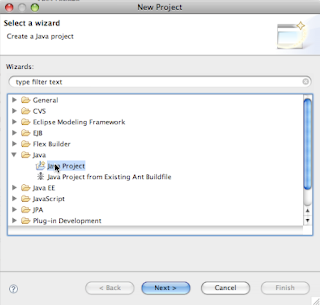


    3. Type a name for the project and click Finish.
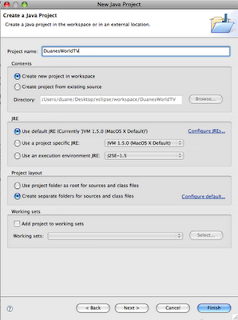


    4. When the new project opens in your workspace navigator, right-click (Windows) or Control-click (Mac) on the src folder under the project.

    5. Choose New > Package.
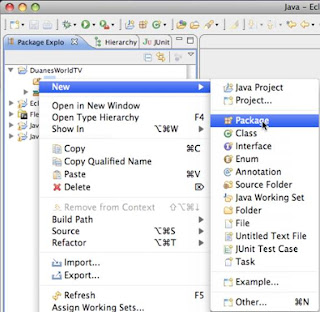


    6. Type a name for your package (I used “org.duanesworldtv.samples”) and click Finish. This step is important because it keeps your class files distinct from other class files with the same names under your workspace by namespace qualifying them.

    7. Right-click on the package name you just created (under your project) and choose New > Class to create a new class file.
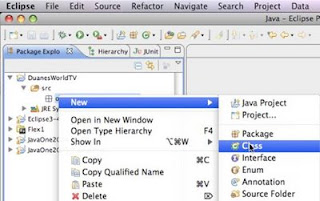


    8. In the New Java Class dialog box, type the name for your class (I used “CreatePDF”) and click Finish.
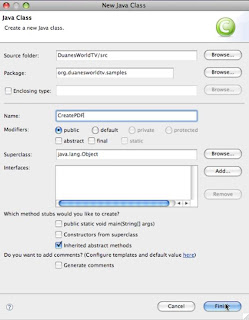


    9. You should see some skeleton code under your new project. Highlight all code below the package name and delete it.

    10. Replace the deleted skeleton code with this source code:

    package org.duanesworldtv.samples;

    /*
    * This Java Quick Start uses the following JAR files
    * 1. adobe-distiller-client.jar
    * 2. adobe-livecycle-client.jar
    * 3. adobe-usermanager-client.jar
    * 4. adobe-utilities.jar
    * 5. jbossall-client.jar (use a different JAR file if LiveCycle ES is not deployed
    * on JBoss)

    *
    * These JAR files are located in the following path:
    * /Adobe/LiveCycle8/LiveCycle_ES_SDK/client-libs
    *
    * For complete details about the location of these JAR files,
    * see "Including LiveCycle ES library files" in Programming
    * with LiveCycle ES
    */
    import java.io.File;
    import java.io.FileInputStream;
    import java.util.Properties;
    import com.adobe.livecycle.generatepdf.client.CreatePDFResult;
    import com.adobe.idp.Document;
    import com.adobe.idp.dsc.clientsdk.ServiceClientFactory;
    import com.adobe.idp.dsc.clientsdk.ServiceClientFactoryProperties;
    import com.adobe.livecycle.distiller.client.DistillerServiceClient;

    public class CreatePDF {

    public static void main(String[] args)
    {
    try
    {
    //Set connection properties required to invoke LiveCycle ES
    Properties ConnectionProps = new Properties();
    ConnectionProps.setProperty(ServiceClientFactoryProperties.DSC_DEFAULT_SOAP_ENDPOINT, "http://{your_server_IP}:{HTTP_PORT}");
    ConnectionProps.setProperty(ServiceClientFactoryProperties.DSC_TRANSPORT_PROTOCOL,ServiceClientFactoryProperties.DSC_SOAP_PROTOCOL);
    ConnectionProps.setProperty(ServiceClientFactoryProperties.DSC_SERVER_TYPE, "JBoss");
    ConnectionProps.setProperty(ServiceClientFactoryProperties.DSC_CREDENTIAL_USERNAME, "{username_of_privileged_user}");
    ConnectionProps.setProperty(ServiceClientFactoryProperties.DSC_CREDENTIAL_PASSWORD, "{password}");

    // Create a ServiceClientFactory instance
    ServiceClientFactory factory = ServiceClientFactory.createInstance(ConnectionProps);

    DistillerServiceClient disClient = new DistillerServiceClient(factory );

    // Get a PS file document to convert to a PDF document and populate a com.adobe.idp.Document object
    String inputFileName = "/Users/duane/Desktop/eclipse/workspace/JavaOne2009-docs/test.ps";
    FileInputStream fileInputStream = new FileInputStream(inputFileName);
    Document inDoc = new Document(fileInputStream);

    //Set run-time options
    String adobePDFSettings = "Standard";
    String securitySettings = "No Security";

    //Convert a PS file into a PDF file
    CreatePDFResult result = new CreatePDFResult();
    result = disClient.createPDF(
    inDoc,
    inputFileName,
    adobePDFSettings,
    securitySettings,
    null,
    null
    );

    //Get the newly created document
    Document createdDocument = result.getCreatedDocument();

    //Save the PDF file
    createdDocument.copyToFile(new File("/Users/duane/Desktop/eclipse/workspace/JavaOne2009-docs/DuanesWorldTest.pdf"));
    }
    catch (Exception e) {
    e.printStackTrace();
    }
    }
    }


    11. When you paste this code into your project, you will notice several red Xs beside various lines. This is because you have not yet imported any of the LiveCycle ES JAR files.

    There are a couple of gotchas you need to know about with respect to these JARs.

    First, the JARs must be from the same release of LiveCycle as the instance you are going to connect to. JARs from 8.0, for example, might not always work with an 8.2.1 instance.

    Second, the JARs are in various locations and not always easy to grab. (See above for the exact locations.)

    We put our jars into a parallel directory that we created under our Eclipse workspace called “JavaOne2009_libs”. This allows us to easily use these JAR files for multiple projects.
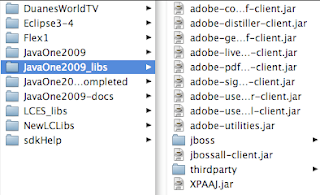


    12. To add the JARs to your project, highlight the project name in the navigator tab, then right-click and open the project Properties dialog box.
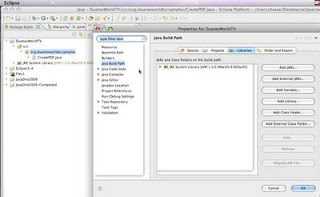


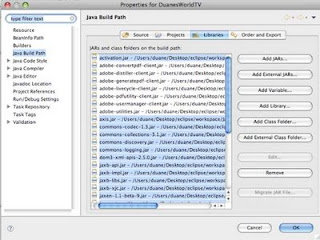
    13. Select Java Build Path and then the Libraries tab. Click Add External Jars. Select all the JARs under the “thirdparty” folder (for SOAP only – these are not required for EJB endpoints invocation). You will also need to import the Adobe LiveCycle Client JARs. (Note: In the image below we have highlighted some extra jars because we plan to add more class files to this project later.)
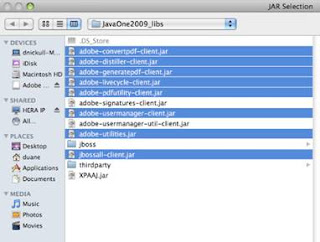


    14. Once your JAR files are added, your build path should look similar to this:


    15. Click OK, check any warnings in Eclipse, and correct as needed.

    16. Now locate the lines of code that set the connection properties. They are at around line 14 and look like this:


    //Set connection properties required to invoke LiveCycle ES
    Properties ConnectionProps = new Properties();
    ConnectionProps.setProperty(ServiceClientFactoryProperties.DSC_DEFAULT_SOAP_ENDPOINT, "http://{your_server_ip}:{http_port}");
    ConnectionProps.setProperty(ServiceClientFactoryProperties.DSC_TRANSPORT_PROTOCOL,ServiceClientFactoryProperties.DSC_SOAP_PROTOCOL);
    ConnectionProps.setProperty(ServiceClientFactoryProperties.DSC_SERVER_TYPE, "JBoss");
    ConnectionProps.setProperty(ServiceClientFactoryProperties.DSC_CREDENTIAL_USERNAME, "{username_of_privileged_user}");
    ConnectionProps.setProperty(ServiceClientFactoryProperties.DSC_CREDENTIAL_PASSWORD, "{password}");


    17. You will have to change three values. The first is the server IP address and port. If the server is on the same machine, http://localhost:8080 should suffice. Change it as required to match your server's location.

    18. Next, you will be required to supply a username and password of a user with the right privileges. We used the username "kvarsen" because it is installed by default when you install the LiveCycle ES samples. The matching password for kvarsen is “password”, all lowercase.

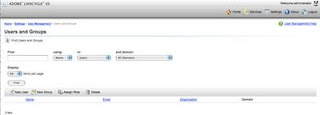
    To run the code in this tutorial, however, you will need to update the roles assigned to kvarsen. To do this, you must have administrator access to the LiveCycle Server you wish to connect to. Log in to the adminui at http://{your_server_ip}:{http_port}/adminui. For example, ours was http://duanesworldtv.org:8080/adminui. Once inside, navigate to Home > Settings > User Management > Users and Groups.


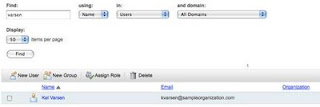
    19. Type the user's name in the Find text box (for Kel Varsen, type “varsen”) and click Find. The user's name will come up in the list with a hyperlink. Click on the name to show what permissions the user has.


    20. Click the Role Assignments tab.
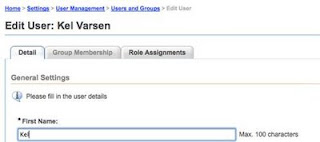


    21. This will bring up a screen that shows all the roles and permissions that this particular user has. For this tutorial, you want to ensure that Kel Varsen is privileged with the PDFG (PDF Generation) service. (In the screenshot below the user is already assigned the PDFG User role; your setup will likely not show this yet.)
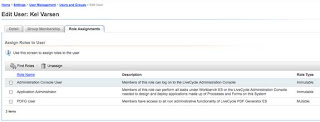


    22. To find the appropriate roles, click Find Roles, which will bring up a list.
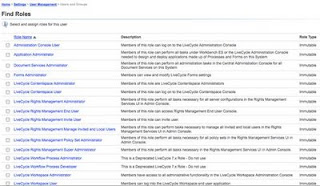


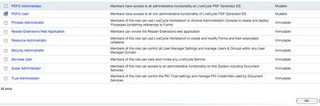
    23. Locate and select the PDFG User role, and then click OK. You can then log out of the adminui console.


    24. You are almost ready to run the code. Back in Eclipse, you will notice two lines of code that contain path references. One is a reference to a PostScript document. You need to change this to correspond to an absolute path to a PostScript document on your hard drive. The path we used is:

    // Get a PS file document to convert to a PDF document and populate a com.adobe.idp.Document object
    String inputFileName = "/Users/duane/Desktop/eclipse/workspace/JavaOne2009-docs/test.ps";


    25. Replace this path with a path to a valid Postscript file.

    26. You also need to specify the path used to save the file when it comes back from LiveCycle ES. This is around line 72 and looks something like the code below. Change the path to a location on your system for which you have access.

    //Save the PDF file
    createdDocument.copyToFile(new File("/Users/duane/Desktop/eclipse/workspace/JavaOne2009-docs/DuanesWorldTest.pdf"));


    27. Now run the application. You should see the console output working with no errors. Go to the location you referenced in the previous step and you should find a file there titled “DuanesWorldTest.pdf” or whatever you named your file.

    Congratulations – you have just invoked your first remote SOAP endpoint using LiveCycle ES!

    Friday, March 27, 2009

    LiveCycle Error Code Dictionary Online

    Have you ever worked with Adobe LiveCycle ES and got error codes like the following?

    ALC-DSC-031-000: com.adobe.idp.dsc.net.DSCNamingException: Remote EJBObject lookup failed for ejb/Invocation provider at com.adobe.idp.dsc.provider.impl.ejb.EjbMessageDispatcher.initialise(EjbMessageDispatcher.java:97) at com.adobe.idp.dsc.provider.impl.ejb.EjbMessageDispatcher.doSend(EjbMessageDispatcher.java:130)
    ... 10 more

    If so, you know the frustration of not having anywhere to look it up. Well - that has now changed. Next time you get one of these cryptic messages, jump on over to


    http://help.adobe.com/en_US/livecycle/8.2/errorCodeReference.pdf

    Note that not all error codes are on this but it is a great start! Happy debugging.

    Wednesday, March 04, 2009

    Adobe Cloud Computing now available!

    It is official! We're live and open - http://livecycle.express.adobe.com. Adobe LiveCycle ES running on the cloud. How cool is that? Very!

    How it works:

    LiveCycle ES has both a server component and a desktop workbench. Workbench is configured to talk to the server and the server knows the context of how to talk back to the workbench. In the cloud configuration, a small application called LC DX (Developer Express) sits on the same machine and intercepts all communications to localhost: and translates it to speak to the corresponding LC ES server instance in the cloud. It actually talks to a proxy on the other end so neither the server nor workbench are aware of where the other is. In fact, they both think they are talking to their counterpart at a different location so there is no complexity. Brilliant, simple and clean architecture!

    The 1.1 release of Adobe LiveCycle ES Developer Express introduces support for LiveCycle ES 8.2.1 running on Microsoft Windows 2003 Server Enterprise Edition within Amazon EC2, using JBoss 4.2.0 and Microsoft SQL Server 2005 Express. The new Windows-based virtual instances can be selected in the instance type pulldown menu of the "Start Instance" dialog. I blogged earlier about this here:
    http://technoracle.blogspot.com/2009/01/adobe-cloud-computing-livecycle-es.html


    Here is the screenshot:


    The Windows-based virtual instances of LiveCycle ES are configured with all of the same features as the existing RedHat Linux-based virtual images, including support for BAM, Contentspace, and PDF Generation using OpenOffice. The backup/restore behavior of the Windows-based virtual instances is identical to the behavior of the existing RedHat Linux-based instances.

    The 1.1 release also contains a collection of bug fixes and usability improvements.

    The LiveCycle Express Networking Application (client) has been updated to include a TCP port forwarding rule for Remote Desktop connections to the new Windows-based virtual instances. With the networking application connected to the instance, Remote Desktop connections can be made to "localhost:3390".

    Thursday, January 15, 2009

    Adobe Cloud Computing - LiveCycle ES Cloud instances!

    BIG NEWS!!!!

    In case you missed the big news on January 12, Adobe is now offering Adobe LiveCycle ES Developer Express. This is Adobe's first (but not last) major foray into the world of enterprise cloud computing. The LC ES Developer Express software is a full version of Adobe LiveCycle ES that is hosted in the Amazon Web Services cloud computing environment and provides a virtual, self-contained development environment where enterprise developers can prototype, develop, and test LiveCycle applications (*.lca files).

    Feature set?
    • Provides pre-installed, pre-configured virtual instances of LiveCycle ES.
    • Reduce time required to download, install, and boot new server instances.
    • Develop LC ES applications in a fraction of the time.
    • Virtual instances can be used to build proof-of-concepts

    The base installation provides the following LiveCycle ES server applications pre-installed:

    • LiveCycle Forms ES
    • LiveCycle Reader Extensions ES
    • LiveCycle Rights Management ES
    • LiveCycle Barcoded Forms ES
    • LiveCycle Digital Certificate ES
    • LiveCycle Output ES
    • LiveCycle Process Management ES
    • LiveCycle Content Services ES
    • LiveCycle PDF Generator ES
    LiveCycle Production Print, LiveCycle BAM, and LiveCycle PDFG 3D are not included in this installation. In the Developer Express installation, LiveCycle is running on the JBoss application server and the MySQL database. The first screenshot below shows one of my three instances up and running:


    Once you get an instance up and running, it appears to be virtually running on localhost:8080. There is a small download called LiveCycle Developer Express (shown below), which then allows you to log in to the instance running in the cloud.

    Once you log in, select the instance:

    and hit "Connect". Once you connect, you will be able to log in by accessing the admin panel via a browser. The URL is http://localhost:8080/adminui/secured/admin.faces. Note below that I am now logged in as Admin while running it in the cloud from my Mac. What does this mean? LC ES on the Mac!!!


    From here you can browse all running services on the instance:


    or manage endpoints:


    The service, available to all members of the Adobe Enterprise Developer Program, allows developers to bullet-proof their applications without having to invest in a development environment or test lab. I will be unveiling more on a future episode of Duane's World when we get into SOA and ESB cloud architecture.

    Wednesday, January 14, 2009

    LiveCycle ES Out of Memory Error

    Due to repeated posts on this topic on the Google LiveCycle Developers list, I am posting this technical bulletin in its entirety on my blog to help inform people.

    Out of Memory errors with LiveCycle ES JBoss turnkey installation

    TechNote Details

    Last Update:11-18-2008
    ID:kb406231
    Permanent Link:http://www.adobe.com/go/kb406231

    Tuesday, September 16, 2008

    How to run LC ES 8.0 and 8.2 on the same machine!

    Okay - if you read the headline and are now reading this, you are a geek, a developer or both. There is no way normal people would read up on this topic. What about me though - I wrote it. Dang!!

    About a week or two ago on the Google LiveCycle Developers list, Jochem van Dietem posted a question asking if it was possible to run two versions of LiveCycle ES (8.0 and 8.2) side by side. After some preliminary advice from members, we basically realized this was new ground and Jochem graciously agreed to be a guinea pig and see if it was possible. Not even Adobe Product Management had done this (to be fair, there is not really any valid use case for this other than developers who want to write and test Adobe LiveCycle applications on two different versions).

    Jochem got both the install done and then documented how to install and run the two versions. The articles are here:

    http://jochem.vandieten.net/2008/09/15/installing-multiple-versions-of-livecycle-es/

    And the followup article about running them simultaneously:

    http://jochem.vandieten.net/2008/09/16/running-multiple-versions-of-livecycle-es-simultaneously/

    Friday, August 22, 2008

    An Adobe LiveCycle ES course not to be missed

    At Adobe MAX 2008, Bob Bailey is going to teach a full day long course on LiveCycle ES. Adobe's LiveCycle ES has been heralded by many architects as the best SOA platform for business process automation and is driving a resurgence in service bus thinking. The key platform has all the core tenets of the OASIS Reference Model for SOA baked in as well as a rich business process modeling and deployment toolset.

    The Abstract is reprinted here for your information.

    LiveCycle ES: Building Applications

    Learn how to develop and deploy applications with Adobe LiveCycle ES (Enterprise Suite). By enabling service-oriented architecture (SOA) and business process management (BPM), LiveCycle ES allows both business and IT professionals to visually assemble end-to-end processes that unify systems, people, business rules, and web services quickly and flexibly. We'll develop a LiveCycle based application using LiveCycle solution components and determine how to implement business rules in a process. We'll also cover process deployment and the LiveCycle workspace and use the record and playback feature to debug an application.

    You may register here:

    http://max.adobe.com/na/experience/#?s=3&p=0

    Wednesday, July 30, 2008

    Duane's World Episode 7

    In this episode we explore LiveCycle ES including demonstrating an AIR Client written by Jorg Knippschild on Adobe in Munich. Dave Liao and Vlad Ghelesel from Ensemble Systems are interviewed and discuss trends in LiveCycle ES development including coupling Flex and AIR. The Code and Tunes segment features great high-quality Imperial metal from my good friend Kurt Phillips' band Warhag.


    The code samples will be uploaded to duanesworldtv.org later.