AIR has worked with PDF since version 1.0. When Adobe AIR first launched, there was a great amount of focus on the PDF inclusion within the runtime and it was given equal billing with both Flash and HTML. For some reason, much of the focus on AIR development trends has been on working with ActionScript and MXML rather than PDF. Nevertheless, there is a steady and growing community of developers who find themselves facing the task of making AIR and PDF work together. This tutorial will help you understand the basic architecture and structure of an application.
The finished Flex 4 project can be downloaded from the location below (it is named MAXABC04-PDF.fxp). This application was compiled with Flash Builder 4, Flex SDK 4.01 and AIR SDK 2.5 http://www.22ndcenturyofficial.com/ForBlogDoNotDelete/
How it works:
Architecturally, the runtime engine for HTML within Adobe AIR is WebKit (http://www.webkit.org/), an open source implementation that supports many HTML 5 features. The exact version of the WebKit library varies based on the AIR version you are using. To display PDF content, the AIR runtime uses a PDF plug-in to the AIR WebKit library. For developers, you communicate to the PDF document object through the HTML DOM and by using a scripting bridge within the PDF document itself.
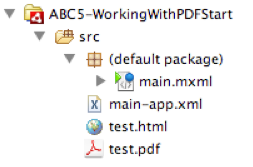
To build the overall project, you need four main components – a main.mxml application, an HTML file that contains a reference to the PDF, the AIR application descriptor file, and a PDF document.

The PDF document is basically a 4 page long document containing a bunch of random Latin words. The following script has been added to the PDF document.

You can examine this PDF yourself by taking it from the project referenced above and opening it with Acrobat X and using the JavaScript Editor (Reader and Acrobat both have JavaScript VMs that work at runtime).
This script simply listens for an incoming message. There are four handled messages: ZoomIn, ZoomOut, PageUp and PageDn. The switch-case statement shown above maps these messages to specific instructions known natively to the plug-in that match the basic semantics of the message.
In order to talk to the PDF, you first have to load an HTML page within your AIR project. The basic AIR source code is as follows:

On line 11, the function init() simply enables the four buttons as the HTML DOM is loaded. This is triggered via the initialize event of the application.
Line 23 contains the key function sendMessage(), which sends one of four messages to the HTML DOM. This function accepts one parameter, which is the String message sent to it based on which button is clicked. As you try to type line number 27, you will notice that the code complete does not work in Flash Builder. This is because these are dynamic objects. Line 27 creates a new Object variable called pdfObj by referencing the pdfhtml (a variable name given to the HTML component on line 28) htmlLoader.window.document object and calls the method getElementByID(). The parameter name “PDFObj” matches the name of the Object within the HTML page. Line 28 simply sends the message that corresponds to the button pushed, which then gets picked up by the script in the PDF document.
Below is a screenshot of the AIR application with the buttons that can navigate forwards and backwards, and zoom in or out.
 That is pretty much a basic starter for controlling PDFs from AIR. To get more advanced functionality, you will need to study up on the scripting functions available within the PDF runtime environment and then add the script bridge necessary to control those functions. Good luck!.
The finished Flex 4 project can be downloaded from the location below (it is named MAXABC04-PDF.fxp). This application was compiled with Flash Builder 4, Flex SDK 4.01 and AIR SDK 2.5 http://www.22ndcenturyofficial.com/ForBlogDoNotDelete/
How it works:
Architecturally, the runtime engine for HTML within Adobe AIR is WebKit (http://www.webkit.org/), an open source implementation that supports many HTML 5 features. The exact version of the WebKit library varies based on the AIR version you are using. To display PDF content, the AIR runtime uses a PDF plug-in to the AIR WebKit library. For developers, you communicate to the PDF document object through the HTML DOM and by using a scripting bridge within the PDF document itself.
To build the overall project, you need four main components – a main.mxml application, an HTML file that contains a reference to the PDF, the AIR application descriptor file, and a PDF document.
The HTML file is only tasked with loading up the PDF as an object. The file is very simplistic.


You can examine this PDF yourself by taking it from the project referenced above and opening it with Acrobat X and using the JavaScript Editor (Reader and Acrobat both have JavaScript VMs that work at runtime).
This script simply listens for an incoming message. There are four handled messages: ZoomIn, ZoomOut, PageUp and PageDn. The switch-case statement shown above maps these messages to specific instructions known natively to the plug-in that match the basic semantics of the message.
In order to talk to the PDF, you first have to load an HTML page within your AIR project. The basic AIR source code is as follows:

On line 11, the function init() simply enables the four buttons as the HTML DOM is loaded. This is triggered via the initialize event of the application.
Line 23 contains the key function sendMessage(), which sends one of four messages to the HTML DOM. This function accepts one parameter, which is the String message sent to it based on which button is clicked. As you try to type line number 27, you will notice that the code complete does not work in Flash Builder. This is because these are dynamic objects. Line 27 creates a new Object variable called pdfObj by referencing the pdfhtml (a variable name given to the HTML component on line 28) htmlLoader.window.document object and calls the method getElementByID(). The parameter name “PDFObj” matches the name of the Object within the HTML page. Line 28 simply sends the message that corresponds to the button pushed, which then gets picked up by the script in the PDF document.
Below is a screenshot of the AIR application with the buttons that can navigate forwards and backwards, and zoom in or out.


