For developers, we want to invite you to a series of webinars on authoring content and code for mobile screens. Yeah - there has been a lot of talk about how you can just "write once, run everywhere" but the devil is in the details. Developers who have been at the cutting edge are preparing to reveal some best practices and tips, tricks you should at least be aware of when authoring for multiple screens to take advantage of new features of Flash Player 10.1 and AIR 2. These webinars will run from June 22-24, 2010.
Best practices in optimizing web content for Flash Player 10.1
Tuesday, June 22, 9AM – 10AM Pacific Time - REGISTER
The quickest way to build cross-platform apps with AIR 2
Tuesday, June 22, 1PM – 2PM Pacific Time - REGISTER
Rich Internet App development with Flash Builder 4 for Flash Player 10.1 and AIR 2
Wednesday, June 23, 9AM – 10AM Pacific Time - REGISTER
Multi-screen web content development with Flash Pro CS5
Thursday, June 24 9AM – 10AM Pacific Time - REGISTER
Showing posts with label Developer Express. Show all posts
Showing posts with label Developer Express. Show all posts
Wednesday, June 09, 2010


Thursday, January 15, 2009
Adobe Cloud Computing - LiveCycle ES Cloud instances!
BIG NEWS!!!!
In case you missed the big news on January 12, Adobe is now offering Adobe LiveCycle ES Developer Express. This is Adobe's first (but not last) major foray into the world of enterprise cloud computing. The LC ES Developer Express software is a full version of Adobe LiveCycle ES that is hosted in the Amazon Web Services cloud computing environment and provides a virtual, self-contained development environment where enterprise developers can prototype, develop, and test LiveCycle applications (*.lca files).
Feature set?
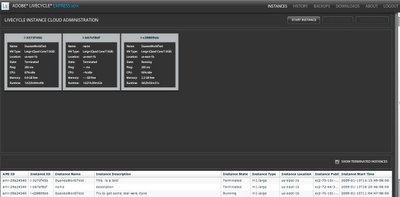
Once you get an instance up and running, it appears to be virtually running on localhost:8080. There is a small download called LiveCycle Developer Express (shown below), which then allows you to log in to the instance running in the cloud.
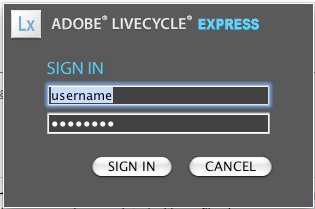 Once you log in, select the instance:
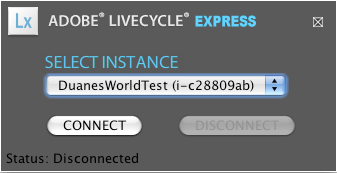 and hit "Connect". Once you connect, you will be able to log in by accessing the admin panel via a browser. The URL is http://localhost:8080/adminui/secured/admin.faces. Note below that I am now logged in as Admin while running it in the cloud from my Mac. What does this mean? LC ES on the Mac!!!
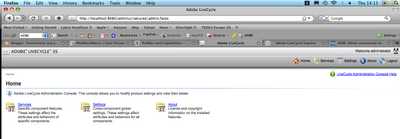
From here you can browse all running services on the instance:
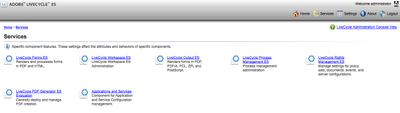
or manage endpoints:
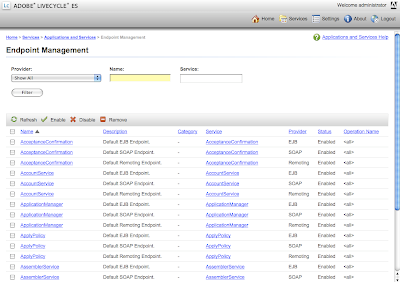
The service, available to all members of the Adobe Enterprise Developer Program, allows developers to bullet-proof their applications without having to invest in a development environment or test lab. I will be unveiling more on a future episode of Duane's World when we get into SOA and ESB cloud architecture.
In case you missed the big news on January 12, Adobe is now offering Adobe LiveCycle ES Developer Express. This is Adobe's first (but not last) major foray into the world of enterprise cloud computing. The LC ES Developer Express software is a full version of Adobe LiveCycle ES that is hosted in the Amazon Web Services cloud computing environment and provides a virtual, self-contained development environment where enterprise developers can prototype, develop, and test LiveCycle applications (*.lca files).
Feature set?
- Provides pre-installed, pre-configured virtual instances of LiveCycle ES.
- Reduce time required to download, install, and boot new server instances.
- Develop LC ES applications in a fraction of the time.
- Virtual instances can be used to build proof-of-concepts
The base installation provides the following LiveCycle ES server applications pre-installed:
- LiveCycle Forms ES
- LiveCycle Reader Extensions ES
- LiveCycle Rights Management ES
- LiveCycle Barcoded Forms ES
- LiveCycle Digital Certificate ES
- LiveCycle Output ES
- LiveCycle Process Management ES
- LiveCycle Content Services ES
- LiveCycle PDF Generator ES

Once you get an instance up and running, it appears to be virtually running on localhost:8080. There is a small download called LiveCycle Developer Express (shown below), which then allows you to log in to the instance running in the cloud.
 Once you log in, select the instance:
 and hit "Connect". Once you connect, you will be able to log in by accessing the admin panel via a browser. The URL is http://localhost:8080/adminui/secured/admin.faces. Note below that I am now logged in as Admin while running it in the cloud from my Mac. What does this mean? LC ES on the Mac!!!
From here you can browse all running services on the instance:

or manage endpoints:

The service, available to all members of the Adobe Enterprise Developer Program, allows developers to bullet-proof their applications without having to invest in a development environment or test lab. I will be unveiling more on a future episode of Duane's World when we get into SOA and ESB cloud architecture.
Subscribe to:
Posts (Atom)