You may think this is a funny title from a guy who is stuck in a city with 40 cm of snow and no drinking water (a temporary streak of bad luck for the otherwise "good luck city" Vancouver, BC). Nevertheless, I will explain why I think it is significant for the industry.
Redmonk is an analyst firm that "gets it". They are not just a group of suits who you can give money to in order to justify a point of view of have them endorse some bad idea like SOA 2.0. In fact, I am not sure I have ever seen any of them in suits. They are one of the few analyst firms I know that actually will tell you your idea is full of "it" if is bad. At a recent Adobe conference, I witnessed a senior Redmonk analyst sitting across the table from one of our executives deliver a very pointed stream of thought about a technology subject he felt passionate about. Some (not all) other analyst firms would have just been the typical "yes men" and caressed a square peg into a round hole. Redmonk is not like that. Redmonk tells you straight up where you are doing good and where you can do better. CAVEAT: Yes - I know James, Steven and Cote just as friends too. I think that despite a personal friendship though, my opinions are objective.
Today I was shown some rather great news that gave me the same sort of "stoke" factor as being at Whistler in 1 meter of fresh powder listening to the newest Pennywise CD (well maybe not quite that much). Anne Zelanka has joined forces with Redmonk. Anne has a great following in the technology space and to my knowledge has the distinction of being the first ever blogger (as opposed to anaylyst/press) invited by Adobe to attend the MAX conference. Nevertheless, a following is moot unless there is some substance to back it up and in Anne's blog, Anne 2.0, there is a lot of good substance.
So what does this mean for the established analyst industry? Could it just be that they have a stronger and more formidable competitor. Perhaps but to me I see Redmonk as opening a new sector, perhaps something like an open knowledge/intelligence transfer sector or community. They are a part of an evolving ecosystem that is responsible for intelligence and knowledge transfer on a mass scale to all companies and individuals (not just large enterprise clients although Redmonk has some of those). They fill a unique and valuable niche in the marketplace to be a little more cutting edge, a lot more candid, a huge amount more open and present the knowledge back in a package that is accessible to more than just large multi-national corporations. They have a lot of what the rappers call "street cred" (credibility on the street with the average IT worker or gang members in the case of rappers). Maybe Redmonk should make a rap CD on Mix2r.com?
However you package this news up, one thing is for sure - Redmonk will be on every analyst company's radar after today.
Monday, November 27, 2006


Friday, November 24, 2006
Great LiveCycle Resources
I just came across this site
http://livecycleportal.org/. As far as I know, this is not published by Adobe yet is by far one of the best resources available for LiveCycle Developers. There is also a Google Group set up for LiveCycle Developers. I would encourage anyone interested in LiveCycle to join and contribute to the conversations. The group may be reached at http://groups-beta.google.com/group/livecycle?hl=en.
I have been asked numerous times about LiveCycle 8 given the excitement about the first truly SOA platform coming from Adobe. I cannot answer this question but would encourage people to check the Adobe Enterprise Developer Site at http://www.adobe.com/enterprise/developer/
Other than that, please post questions on this blog and I'll always try to get you an answer from inside Adobe.
peace!
http://livecycleportal.org/. As far as I know, this is not published by Adobe yet is by far one of the best resources available for LiveCycle Developers. There is also a Google Group set up for LiveCycle Developers. I would encourage anyone interested in LiveCycle to join and contribute to the conversations. The group may be reached at http://groups-beta.google.com/group/livecycle?hl=en.
I have been asked numerous times about LiveCycle 8 given the excitement about the first truly SOA platform coming from Adobe. I cannot answer this question but would encourage people to check the Adobe Enterprise Developer Site at http://www.adobe.com/enterprise/developer/
Other than that, please post questions on this blog and I'll always try to get you an answer from inside Adobe.
peace!
Thursday, November 16, 2006
Webinar: Getting to know Apollo
For those who contacted me on the last entry wanting to know more about Apollo, there is a scheduled session to reveal the basics and more. It runs Nov 28 and you can register for it here.
I also got asked why this is truly revolutionary. Part of this is because it frees Flex and Flash developers from the limitations of running in a browser. The security model prevents scripts from executing in a browser that would potentially jeopardize the clients system. This means that every aspect of interaction between a Flash RIA running in a browser and a local resource has to be explicitly permissed. The Apollo Application Window replaces the browser and allows the RIA to interact with local resources as any other application would.
The distribution model is interesting and will likely be discussed during this call. The runtime environment model is similar to Java. In that model, the Java Virtual Machine (JVM) supports the runtime environment and maps the java functionality to the lower level operating system and platform, freeing developers from having to write code to target each platform. The motto of write once, run everywhere is appealing to developers.
More on Apollo later - I am going to test the M2 build today.
I also got asked why this is truly revolutionary. Part of this is because it frees Flex and Flash developers from the limitations of running in a browser. The security model prevents scripts from executing in a browser that would potentially jeopardize the clients system. This means that every aspect of interaction between a Flash RIA running in a browser and a local resource has to be explicitly permissed. The Apollo Application Window replaces the browser and allows the RIA to interact with local resources as any other application would.
The distribution model is interesting and will likely be discussed during this call. The runtime environment model is similar to Java. In that model, the Java Virtual Machine (JVM) supports the runtime environment and maps the java functionality to the lower level operating system and platform, freeing developers from having to write code to target each platform. The motto of write once, run everywhere is appealing to developers.
More on Apollo later - I am going to test the M2 build today.
Wednesday, November 15, 2006
Adobe Apollo Groundswell!
I am an evangelist! I evangelize things. How did I become an evangelist? Simple - I declared "I am an evangelist" and went forth and evangelized. So what do I evangelize about? A lot of things but nothing that I am not excited about. Today I want to talk about Apollo.
Apollo is the code name for a cross-operating system runtime being developed by Adobe that allows developers to leverage their existing web development skills (Flash, Flex, HTML, JavaScript, Ajax) to build and deploy Rich Internet Applications (RIAs) to the desktop. The possibilities and results are truly amazing. I compiled my first Apollo application while Mike Chambers was doing his talk at MAX. The process is fairly easy, especially if you are familiar with Flex Builder. When you set up your Flex project, all you have to do is import an extra *.swc file for the Application Window and use it in your project. There are some minor tweaks that need to be done now such as manually adding a new namespace but for the most part, the Application Window is the big item. It hosts the flash application but unlike the Flash Player which acts as a sandbox to run flash apps within a browser, the Application Window runs the flash applications as standalone apps with access to system resources. Give the power of Flex is you can rapidly build applications, these two technologies are going to be the cornerstone of new app development in the next decade (me thinks).
So how many people are getting stoked on this stuff? 4-5 months ago I did a search on google for "Adobe Apollo" and got 3,500 hits or thereabouts. Today it is at 196,000 - http://www.google.com/search?hl=en&q=%22adobe+%2B+apollo%22&btnG=Google+Search
Tschuss!
Apollo is the code name for a cross-operating system runtime being developed by Adobe that allows developers to leverage their existing web development skills (Flash, Flex, HTML, JavaScript, Ajax) to build and deploy Rich Internet Applications (RIAs) to the desktop. The possibilities and results are truly amazing. I compiled my first Apollo application while Mike Chambers was doing his talk at MAX. The process is fairly easy, especially if you are familiar with Flex Builder. When you set up your Flex project, all you have to do is import an extra *.swc file for the Application Window and use it in your project. There are some minor tweaks that need to be done now such as manually adding a new namespace but for the most part, the Application Window is the big item. It hosts the flash application but unlike the Flash Player which acts as a sandbox to run flash apps within a browser, the Application Window runs the flash applications as standalone apps with access to system resources. Give the power of Flex is you can rapidly build applications, these two technologies are going to be the cornerstone of new app development in the next decade (me thinks).
So how many people are getting stoked on this stuff? 4-5 months ago I did a search on google for "Adobe Apollo" and got 3,500 hits or thereabouts. Today it is at 196,000 - http://www.google.com/search?hl=en&q=%22adobe+%2B+apollo%22&btnG=Google+Search
Tschuss!
Tuesday, November 07, 2006
Web 2.0:: FAST re-born?
I am attending the talk on search produced from FAST, the search engine company out to tackle Google. As first I was a bit skeptical but Bjorn Olstad is a smart guy and started making sense. I'm going to give FAST a try and start doing my searches on it.
Interestingly enough, it raises a question brought up in the previous session I attended. How do I transfer my content from Google to Fast? I have a google start page made with quite an impressive array of widgets and information. This is my normal dashboard when I get online. The first things I want to see are Adobe's current stock price, weather reports, news from /., CNET, BBC, the Onion's RSS feed and a bunch of other stuff. How easy is it for me to transfer this information from Google to Fast? Has Google created an unfair market for Search based on adding so many periferal bits? Probably no but it is something I want to be conscious of in the future.
Fast - here I come. Send me some results. The Fast guys are smart, think I'll have some beers with them later. I also want to talk to them about how Adobe might work with them.
FTI ( /. means "Slashdot" for those who didn't get it)
Interestingly enough, it raises a question brought up in the previous session I attended. How do I transfer my content from Google to Fast? I have a google start page made with quite an impressive array of widgets and information. This is my normal dashboard when I get online. The first things I want to see are Adobe's current stock price, weather reports, news from /., CNET, BBC, the Onion's RSS feed and a bunch of other stuff. How easy is it for me to transfer this information from Google to Fast? Has Google created an unfair market for Search based on adding so many periferal bits? Probably no but it is something I want to be conscious of in the future.
Fast - here I come. Send me some results. The Fast guys are smart, think I'll have some beers with them later. I also want to talk to them about how Adobe might work with them.
FTI ( /. means "Slashdot" for those who didn't get it)
Confused over Mozilla and AVM?
Hey y'all. So here I am at Web 2.0 and I am getting tons of people coming up to me stating some pretty wierd interpretations of our announcement today. For the record, the official announcement is here:
http://www.adobe.com/aboutadobe/pressroom/pressreleases/200611/110706Mozilla.html
Please read this carefully to avoid the top 5 misperceptions:
1. We are donating Flash to open source. This is not true. We contributed source code for the ActionScript Virtual Machine (AVM) to the Mozilla Foundation. AVM is the scripting language engine which interprets Actionscript during runtime. It is a very advanced and well thought out software application but like any other can benefit from new fresh contributions.
2. We have not donated the Flash Player to open source. Note that several /.ers think we are. It is also not true. FP != AVM.
3. We did not purchase Mozilla. One girl told me and several others ina hallway we did. I won't even get into this one....
4. We control the project in Mozilla caled Tamarin. No we don't - in fact giving the code to Mozilla is just the opposite.
5. We are not making flash director open source.
Folks - please read the release carefully....
Thanks
http://www.adobe.com/aboutadobe/pressroom/pressreleases/200611/110706Mozilla.html
Please read this carefully to avoid the top 5 misperceptions:
1. We are donating Flash to open source. This is not true. We contributed source code for the ActionScript Virtual Machine (AVM) to the Mozilla Foundation. AVM is the scripting language engine which interprets Actionscript during runtime. It is a very advanced and well thought out software application but like any other can benefit from new fresh contributions.
2. We have not donated the Flash Player to open source. Note that several /.ers think we are. It is also not true. FP != AVM.
3. We did not purchase Mozilla. One girl told me and several others ina hallway we did. I won't even get into this one....
4. We control the project in Mozilla caled Tamarin. No we don't - in fact giving the code to Mozilla is just the opposite.
5. We are not making flash director open source.
Folks - please read the release carefully....
Thanks
Hello from Web 2.0 2006 in San Francisco

I am at the Web 2.0 conference today. I have been treated like royalty today thanks to the huge announcement today that Adobe donated source code for the ActionScript Virtual machine (AVM - the code behind Flash) to Mozilla. The renewed and invigorated commitment to open source software has made us hugely popular with the crowds here. As an opportunist, I will be honest and state that I will accept any offers of free drinks on behalf of Adobe ;-)
A great session was put together to examine the subject of impact of SaaS and other W2P0 paradigms on Small Business. Google, Etelos, Soho and Microsoft were panel members. Some concerns that SMB’s voiced were the lack of good software use models (trials etc) are in contravention of the needs of SMB’s. Despite being standing room only, the session was pretty active. Danny from Etelos is a smart guy with a funny sense of humour (note the Canadian Spelling - I do this to poke fun at his USA accent and spelling mistakes WRT the queen's english. maybe he'll comment back ;-)
I pointed out during the discussion that Adobe has made huge strides in the area of SaaS to recognize that not all PDF users will pay $500 for a copy of acrobat if they think they will only ever need to make 5-10 PDF’s. We also offer the functionality of Acrobat Connect (formerly Breeze) and Adobe LiveCycle Policy Server as a Service. The question posed back was – when will Photoshop be a service? Interesting idea. There are a few good ideas that came out of this during the ensuing conversations:
1. Would someone make a web service to compile MXML into Flash files (*.SWF)?
2. Will our Web Service for PDF be extended to accept pure XML input and what format will that input be? Perhaps PxDF – an XML version of PDF?
3. What services will Adobe offer that can be used in Mashups? Currently, we enable many other companies to expose their services in a way they can be consumed.
The main conclusions drawn from this session are that ecosystems are good for services and there has to be trust in the service provider. SMB’s also need to know they are not locked in when using SaaS models.
Friday, October 27, 2006
Beyond MAX is Apollo - First Mac OSX Application
Well here I am, back home from MAX 2006. The event was killer! Tagged with the Marketing slogan "Beyond Boundaries", it turned out to be so pulling that we never made it "Beyond the Hotel". So what was the biggest pull? The LiveCycle Birds of a Feather was cool (yes - my boss John H. will shoot me when he gets the bill for the beers I bought for everyone) but Apollo was my favorite. Being on the inside at Adobe is cool. Really really cool. I get first dibs on new technology and get to whip up samples to test. Watching Mike Chambers at Max 2006 was inspirational. He is soft spoken and very humble while showing us potentially the coolest of the cool.
Apollo is an internal code name for an application framework that uses flash yet does not require a browser to render like Flex Applications or Flash (*.swf) files. Apollo applications use a parent container as a frame that will eventually be able to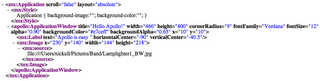
The MXML file above can be compiled alongside an "application.xml" file that declares the pieces to the application. In this case, it is simple and there are only two files. The end result is the *.air file which renders in Flash but skinned as a complete application.
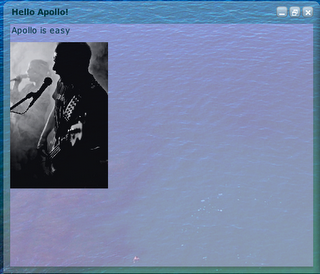
Flex 2 is cool but sorry - I think Apollo is gonna be *way* cooler. If you are coming to Web 2.0, stop by the Adobe booth to say Hi and I'll give you a quick demo of Apollo.
Apollo is an internal code name for an application framework that uses flash yet does not require a browser to render like Flex Applications or Flash (*.swf) files. Apollo applications use a parent container as a frame that will eventually be able to
The MXML file above can be compiled alongside an "application.xml" file that declares the pieces to the application. In this case, it is simple and there are only two files. The end result is the *.air file which renders in Flash but skinned as a complete application.

Flex 2 is cool but sorry - I think Apollo is gonna be *way* cooler. If you are coming to Web 2.0, stop by the Adobe booth to say Hi and I'll give you a quick demo of Apollo.
Wednesday, October 25, 2006
Grabbing XMP Data with XPAAJ
During Max 2006, I am helping out Gunar Penekis with a talk on XMP and demonstrating our XMP SDK toolkit written in C. The Adobe SDK uses James Clarke's Expat Parser and has some custom classes to grab XMP and manipulate it. The samples directory also has some great examples to get anyone up and running.
However....
Being a bit more of a Java head, I felt like being productive. During Matt Butler's excellent 3 hour hands on tutorial on LiveCycle, I got inspired to write an extension to the XPAAJ sample I posted earlier for getting XMP out of a PDF document. The source code is here (sorry about the formatting - email me if you want to get the real file via dnickull (at) adobe (dot) com):
import java.io.*;
import java.util.*;
import java.awt.image.DataBuffer;
import com.adobe.pdf.*;
/* XMPExtractSample
* by Duane Nickull, Adobe Systems Inc. dnickull@adobe.com
* Copyright (c) 2006 - all rights reserved
*
* Use this at your own risk and don't whine to me if it doesn't work.
* You will need to have XPAAJ.jar from Adobe.com. Written and tested
* with JDK 1.5 on a mac w/osx 10.4.7
*/
public class XMPExtractSample {
public static void main(String[] args)
throws FileNotFoundException, IOException
/* Make sure we have the correct args.length() and call PDFExtract() */
{
String inPdfName;
if(args.length != 1 )
{
System.out.println("\nCommand line format: java DuanePDFClass1 pdf-file");
return;
}
else
{
inPdfName = new String(args[0]);
PDFExtract(inPdfName);
}
}
public static void PDFExtract(String inPdfName)
throws FileNotFoundException, IOException
{
System.out.println("\nOpening PDF with DuanePDFClass1...");
PDFDocument doc = null;
boolean b = false;
FileInputStream inPdfFile = new FileInputStream(inPdfName);
try {
doc = PDFFactory.openDocument(inPdfFile);
} catch (IOException e) {
System.out.println("Error opening PDF file :" + inPdfName);
System.out.println(e);
}
if(doc == null)
System.out.println("Cannot open PDF file : " + inPdfName);
else
System.out.println( "\n" + inPdfName + " was successfully opened.");
// Export the xmp metadata from the document
try {
//Call the PDFDocument object's exportXMP method.
InputStream myXMPStream = doc.exportXMP();
//Get the byte size of the InputStream object.
int numBytes = myXMPStream.available();
System.out.println("\nNumber of XMP Bytes found is " + numBytes + "\n");
// Read into a Buffered Reader Stream.
BufferedReader d = new BufferedReader(new InputStreamReader(myXMPStream));
// Iterate through the XMP object and print each line
String xmpLine;
while((xmpLine = d.readLine()) != null)
{
System.out.println(xmpLine);
}
// Find the Physical Memory Reference of the object
System.out.println("\nXMP InputStream is in physical memory at -> " + d);
//Create an array of bytes. Allocate numBytes of memory.
byte [] MDBytes = new byte[numBytes];
//Read the XMP metadata by calling the InputStream object’s read method.
myXMPStream.read(MDBytes);
} catch (IOException e){
System.out.println("it went really bad" + e );
}
System.out.println("\nXMP Extraction has finished.");
}
}
However....
Being a bit more of a Java head, I felt like being productive. During Matt Butler's excellent 3 hour hands on tutorial on LiveCycle, I got inspired to write an extension to the XPAAJ sample I posted earlier for getting XMP out of a PDF document. The source code is here (sorry about the formatting - email me if you want to get the real file via dnickull (at) adobe (dot) com):
import java.io.*;
import java.util.*;
import java.awt.image.DataBuffer;
import com.adobe.pdf.*;
/* XMPExtractSample
* by Duane Nickull, Adobe Systems Inc. dnickull@adobe.com
* Copyright (c) 2006 - all rights reserved
*
* Use this at your own risk and don't whine to me if it doesn't work.
* You will need to have XPAAJ.jar from Adobe.com. Written and tested
* with JDK 1.5 on a mac w/osx 10.4.7
*/
public class XMPExtractSample {
public static void main(String[] args)
throws FileNotFoundException, IOException
/* Make sure we have the correct args.length() and call PDFExtract() */
{
String inPdfName;
if(args.length != 1 )
{
System.out.println("\nCommand line format: java DuanePDFClass1 pdf-file");
return;
}
else
{
inPdfName = new String(args[0]);
PDFExtract(inPdfName);
}
}
public static void PDFExtract(String inPdfName)
throws FileNotFoundException, IOException
{
System.out.println("\nOpening PDF with DuanePDFClass1...");
PDFDocument doc = null;
boolean b = false;
FileInputStream inPdfFile = new FileInputStream(inPdfName);
try {
doc = PDFFactory.openDocument(inPdfFile);
} catch (IOException e) {
System.out.println("Error opening PDF file :" + inPdfName);
System.out.println(e);
}
if(doc == null)
System.out.println("Cannot open PDF file : " + inPdfName);
else
System.out.println( "\n" + inPdfName + " was successfully opened.");
// Export the xmp metadata from the document
try {
//Call the PDFDocument object's exportXMP method.
InputStream myXMPStream = doc.exportXMP();
//Get the byte size of the InputStream object.
int numBytes = myXMPStream.available();
System.out.println("\nNumber of XMP Bytes found is " + numBytes + "\n");
// Read into a Buffered Reader Stream.
BufferedReader d = new BufferedReader(new InputStreamReader(myXMPStream));
// Iterate through the XMP object and print each line
String xmpLine;
while((xmpLine = d.readLine()) != null)
{
System.out.println(xmpLine);
}
// Find the Physical Memory Reference of the object
System.out.println("\nXMP InputStream is in physical memory at -> " + d);
//Create an array of bytes. Allocate numBytes of memory.
byte [] MDBytes = new byte[numBytes];
//Read the XMP metadata by calling the InputStream object’s read method.
myXMPStream.read(MDBytes);
} catch (IOException e){
System.out.println("it went really bad" + e );
}
System.out.println("\nXMP Extraction has finished.");
}
}
Tuesday, October 24, 2006
LiveCycle Tracks at Max are busy
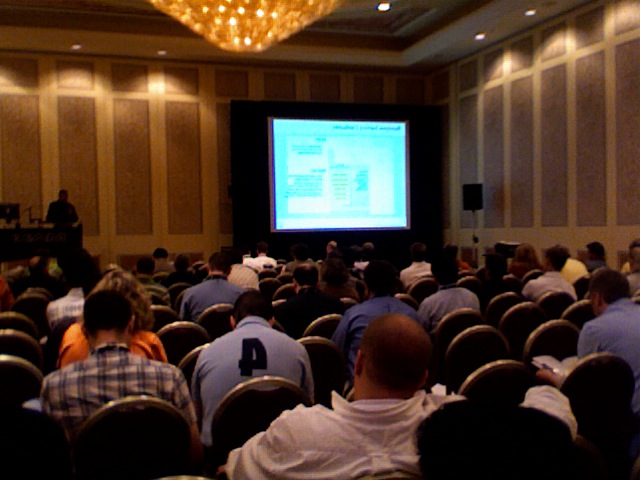
Okay - who would have believed this a few weeks ago. The LiveCycle tracks at max are filling up. The photo above is from Sanga's LiveCycle 8: What's coming talk this AM. Despite a late start due to the general session running over, the talk filled up. The lunch hall was filled to boot!
have to run and prepare for two back to back talks - first one I have to build our new XMP SDK 4.0 in xCode on the Mac to demonstrate the functionality. My C skills are a bit rusty. Later, Christoph Rooms and I are doing our first talk on LiveCycle Security Architecture.
MAX 2006 - Shantanu and Blue Men
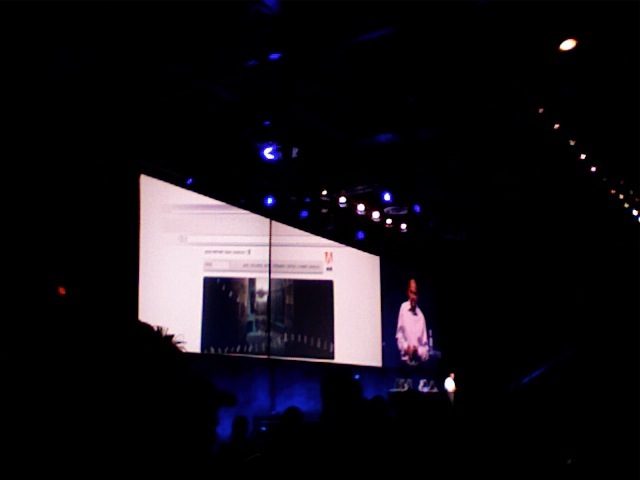
During the morning keynote we were treated to a performance by the Blue Man Group. Think heavy metal music with magic tricks, art and paint. Lots of paint. Mostly blue paint.
Shantanu is giving a great keynote speech right now. He also issued a challenge to everyone here to try and solve the Semaphore puzzle on the roof of the Adobe building in San Jose. No one has solved it yet. There are several observations on this blog for anyone interested.
Shantanu also re-iterated Adobe’s aim to bring the internet to more than 1 billion people in China and India via cell phones. Kevin Lynch then kicked off a series of demos including new integration between Dreamweaver and Photoshop. As a former web head, this is a huge improvement in the workflow most webmasters go through. The workflow also includes the Spry Framework for AJAX (very cool). Spry makes AJAX easier for website designers.
More to come...
Monday, October 23, 2006
Day One from MAX 2006 (Report from a personal perspective)
Okay – I’m just going to say it and you can label me a hype – “Max is rad”! Not only is the Venetian a really cool place to have a conference but this is one of the best conferences in terms of the cool factor I have been to in a while. Yes – it has all the usually JavaOne type things like the Bean Bag chairs, Ted Patrick’s Maxup and tons of corners, ad-hoc groups and meetings but it is also something more. I think people are generally really excited about Max 2006 given it is the first time Macromedia and Adobe have joined forces to deliver the show. The complexion is something no one could have predicted. Tracks like LiveCycle, an Adobe set of technologies and servers, are in popular demand at a conference typically dominated by Cold Fusion, Flex, Flash, Firefox and Dreamweaver zealots. Matt Butler’s LiveCycle track is actually sold out!! Who would have predicted.
Candidly, Adobe culture can generally use some influence from macromedia in terms of how to have fun, but MAX is really a demonstration that the two companies have truly become one. Despite the corporate directions at the staff meetings like “have fun” which were delivered in a way that sounded akin to a declaration of war, the people here are having fun. I think this would have happened without the official direction but c’est la vie. It’s all good now that we’re unwinding.
I spent the first half of my day attending the usual Adobe mandatory meetings, doing last minute planning for the talks I am presenting and other housekeeping items, but in the afternoon I had the change to attend some tracks. My favorite was David Gassner’s Developing rich internet applications with Flex and Java. In all fairness, this was one of the few that I was able to attend given most of the others including Simon Horvath’s were completely sold out and no standing at the back was permitted. I guess it pays to plan ahead – something I might start doing one day.
David’s course is a hands on course with 25 computers in the room (2 people to a room). It is amazing to see the level of technical knowledge transplanted by David into the attendees. In the last 4 hours, I got to see people with no or little J2EE experience actually write a Flex app that called specific methods available on the app server. Simply stated, the room was full of “lights going on” moments.
Tonight is the pre-party at the Cabana’s and will be tons of fun (tons of free drink and food for all near open swimming pools with wet slippery floors has huge entertainment potential).
Word up – if you’re coming next year register early and pre-register for the sessions. Don’t wait till the last minute like me.
More later.
Candidly, Adobe culture can generally use some influence from macromedia in terms of how to have fun, but MAX is really a demonstration that the two companies have truly become one. Despite the corporate directions at the staff meetings like “have fun” which were delivered in a way that sounded akin to a declaration of war, the people here are having fun. I think this would have happened without the official direction but c’est la vie. It’s all good now that we’re unwinding.
I spent the first half of my day attending the usual Adobe mandatory meetings, doing last minute planning for the talks I am presenting and other housekeeping items, but in the afternoon I had the change to attend some tracks. My favorite was David Gassner’s Developing rich internet applications with Flex and Java. In all fairness, this was one of the few that I was able to attend given most of the others including Simon Horvath’s were completely sold out and no standing at the back was permitted. I guess it pays to plan ahead – something I might start doing one day.
David’s course is a hands on course with 25 computers in the room (2 people to a room). It is amazing to see the level of technical knowledge transplanted by David into the attendees. In the last 4 hours, I got to see people with no or little J2EE experience actually write a Flex app that called specific methods available on the app server. Simply stated, the room was full of “lights going on” moments.
Tonight is the pre-party at the Cabana’s and will be tons of fun (tons of free drink and food for all near open swimming pools with wet slippery floors has huge entertainment potential).
Word up – if you’re coming next year register early and pre-register for the sessions. Don’t wait till the last minute like me.
More later.
Thursday, October 19, 2006
Flash Player 9 for Linux arrives!
Yes - it is finally out. The beta version of Adobe Flash Player 9 for Linux is now available on Adobe Labs, at http://labs.adobe.com/technologies/flashplayer9/.
Additionally, the Flex 2.0 compiler for Linux is available. The Flash Player 9 Update Beta for Linux includes the features of Flash Player 9 Update, with the exception of full-screen mode and SSL support (SSL support is currently available in the Linux Plugin but not the Linux Standalone Player). Full-screen mode and SSL support will be available in the final release. We've also posted a Linux Beta FAQ on the Flash Player wiki on Adobe Labs.
Now you can develop and test on your Linux machine. Use the free Adobe Flex 2 SDK , which includes the command-line compiler to develop and deploy Flex-based applications entirely on Linux machines. Flex Data Services is also supported on Linux. More info here on the Flex 2 for Linux wiki on Adobe Labs.
And, because this will be the next question now that we've satisfied your beta player needs: the Adobe Flash Player team is working on support for 64-bit platforms as part of our ongoing commitment to the cross-platform compatibility of Adobe Flash Player. We have not announced timing or release dates.
Known Issues - Linux
* Full-screen mode is not available for the Linux player yet. This feature will be implemented for the final release.
* SSL support is not available in the Linux Standalone Player. This feature will be implemented for the final release.
* Express Install is an unsupported feature due to the variety of Linux platforms, each handling the Adobe Flash Player plug-in installation in different ways.
* The plugin does not currently work in Opera browsers. We are working with Opera on these issues.
* Artifacts may appear when video initially plays.
* System fonts may appear differently between Linux distributions. Formatting issues may result.
* AMF3 connections do not work over RTMP. (186958)
* Right clicking outside of Flash Player while the context menu is displayed doesn't make the context menu disappear. Workaround: Left-click to turn off the context menu. (187957)
* IME is not available (no international text input). (184489)
* Acrobat Connect Add-In installation is not working at this time. (188318)
* The Standalone Player is available in English only. (184237)
More info on system requirements and fixed issues for Mac and Win in the release notes. You should also check any detection you've built for your demo sites -- we fixed the problem where the first beta was 9.0.18.x but we had already released the Intel Mac version as 9.0.20.x. Sorry about the confusion. Now Update 1 has been bumped up to 9.0.21.x across all available platforms.
Additionally, the Flex 2.0 compiler for Linux is available. The Flash Player 9 Update Beta for Linux includes the features of Flash Player 9 Update, with the exception of full-screen mode and SSL support (SSL support is currently available in the Linux Plugin but not the Linux Standalone Player). Full-screen mode and SSL support will be available in the final release. We've also posted a Linux Beta FAQ on the Flash Player wiki on Adobe Labs.
Now you can develop and test on your Linux machine. Use the free Adobe Flex 2 SDK , which includes the command-line compiler to develop and deploy Flex-based applications entirely on Linux machines. Flex Data Services is also supported on Linux. More info here on the Flex 2 for Linux wiki on Adobe Labs.
And, because this will be the next question now that we've satisfied your beta player needs: the Adobe Flash Player team is working on support for 64-bit platforms as part of our ongoing commitment to the cross-platform compatibility of Adobe Flash Player. We have not announced timing or release dates.
Known Issues - Linux
* Full-screen mode is not available for the Linux player yet. This feature will be implemented for the final release.
* SSL support is not available in the Linux Standalone Player. This feature will be implemented for the final release.
* Express Install is an unsupported feature due to the variety of Linux platforms, each handling the Adobe Flash Player plug-in installation in different ways.
* The plugin does not currently work in Opera browsers. We are working with Opera on these issues.
* Artifacts may appear when video initially plays.
* System fonts may appear differently between Linux distributions. Formatting issues may result.
* AMF3 connections do not work over RTMP. (186958)
* Right clicking outside of Flash Player while the context menu is displayed doesn't make the context menu disappear. Workaround: Left-click to turn off the context menu. (187957)
* IME is not available (no international text input). (184489)
* Acrobat Connect Add-In installation is not working at this time. (188318)
* The Standalone Player is available in English only. (184237)
More info on system requirements and fixed issues for Mac and Win in the release notes. You should also check any detection you've built for your demo sites -- we fixed the problem where the first beta was 9.0.18.x but we had already released the Intel Mac version as 9.0.20.x. Sorry about the confusion. Now Update 1 has been bumped up to 9.0.21.x across all available platforms.
Wednesday, October 04, 2006
Adobe Looking for Canadian Students
We're looking for a University Student in Canada
Are you currently enrolled in a computer science or engineering program at a university in Canada? We're looking for volunteers to help co-ordinate events that we are planning at universities across Canada. The ideal candidate should have the following qualifications:
* Is an active member of student population with strong communication skills
* Is involved in extra-curricular university programs and / or be a member of student associations / committees
* Understands technical concepts and stays current with emerging technologies
* Proven experience and ability to create, maintain, and manage a blog
* Demonstrates good time management skills and ability to work independently
* Experience in planning and managing events is highly desirable
We're calling these positions "Adobe Ambassadors". Here's a list of expected responsibilities:
* Organizing student events that are open to all students and members of the faculty. The purpose of each event would be to educate and provide information to the attendees on Adobe’s current and emerging technologies. A budget will be provided to pay for costs associated with the event. One event per study term is expected, and the Ambassador will be responsible for all stages of planning and managing the event with collaboration from the Adobe Enterprise and Developer team.
* The Ambassador will be given opportunities to present at the planned events, sometimes in conjunction with Adobe technical evangelists.
* Become an Ambassador for Adobe’s products within the student body and provide valued feedback to the Adobe on how students and faculty use their technology in studies, and the user experience of using Adobe technology.
* The Ambassador will work closely with the school’s student organization and be responsible for preparing and aid in advertising for any Adobe on-campus events.
* The Adobe Ambassador will be the conduit of information between the university’s student population and Adobe. Regular on-going communication and feedback on the program in general is expected.
* The Adobe Ambassador will maintain a blog, and will publish information on Adobe technologies, news and articles, information regarding upcoming events, and more.
The positions are currently open and available to students at the following universities in Canada. They are not available at any other university. We'll be expanding the program in the future, but we're limiting it to the following schools: University of British Columbia, Simon Frasier University, BC Institute of Technology (BCIT), University of Western Ontario, Waterloo University, University of Ottawa, Queen's University, University of Toronto, McMaster University and McGill University.
If you have any questions about the position, please post them in this blog. If you would like to apply, please send your resume to adoberep@adobe.com.
Are you currently enrolled in a computer science or engineering program at a university in Canada? We're looking for volunteers to help co-ordinate events that we are planning at universities across Canada. The ideal candidate should have the following qualifications:
* Is an active member of student population with strong communication skills
* Is involved in extra-curricular university programs and / or be a member of student associations / committees
* Understands technical concepts and stays current with emerging technologies
* Proven experience and ability to create, maintain, and manage a blog
* Demonstrates good time management skills and ability to work independently
* Experience in planning and managing events is highly desirable
We're calling these positions "Adobe Ambassadors". Here's a list of expected responsibilities:
* Organizing student events that are open to all students and members of the faculty. The purpose of each event would be to educate and provide information to the attendees on Adobe’s current and emerging technologies. A budget will be provided to pay for costs associated with the event. One event per study term is expected, and the Ambassador will be responsible for all stages of planning and managing the event with collaboration from the Adobe Enterprise and Developer team.
* The Ambassador will be given opportunities to present at the planned events, sometimes in conjunction with Adobe technical evangelists.
* Become an Ambassador for Adobe’s products within the student body and provide valued feedback to the Adobe on how students and faculty use their technology in studies, and the user experience of using Adobe technology.
* The Ambassador will work closely with the school’s student organization and be responsible for preparing and aid in advertising for any Adobe on-campus events.
* The Adobe Ambassador will be the conduit of information between the university’s student population and Adobe. Regular on-going communication and feedback on the program in general is expected.
* The Adobe Ambassador will maintain a blog, and will publish information on Adobe technologies, news and articles, information regarding upcoming events, and more.
The positions are currently open and available to students at the following universities in Canada. They are not available at any other university. We'll be expanding the program in the future, but we're limiting it to the following schools: University of British Columbia, Simon Frasier University, BC Institute of Technology (BCIT), University of Western Ontario, Waterloo University, University of Ottawa, Queen's University, University of Toronto, McMaster University and McGill University.
If you have any questions about the position, please post them in this blog. If you would like to apply, please send your resume to adoberep@adobe.com.
Friday, September 29, 2006
Adobe Acrobat 8: One upgrade you won't want to skip!!
Acrobat will release yet another version this year bring the number of major releases to 8. Many people, including myself, start to wonder “what can be done in version 8 to warrant another major release?” with great skepticism. After all, don’t most people just use acrobat for making PDF’s? Well hold on to your seats! This release is major. Acrobat 8 is by far the largest single functional gain I have ever seen in any product release from one version to the next.
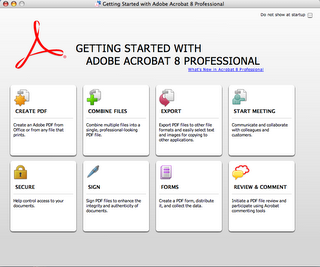
For starters – take a look at the welcome screen. The first two, “Create PDF” and “Combine Files” are not that compelling and have been done before, but the other six are very noteworthy. First – being able to “start a meeting” is something that seems foreign to Acrobat, but makes as much sense here as it does in Mac OS/X and Win 32. Think about it. You write documents to capture thoughts and share them with others. Why not have a live meeting (aka video phones of the future) to go over the ideas? When you click “Start meeting”, the menus give you options to connect to another group of people. You can screen share documents and presentations, set up a virtual meeting URL to communicate anytime, anywhere, set up a conference on the fly and much more with no software downloads for other participants. The meeting is given via a complimentary 90 day trial to Acrobat Connect (formerly the software known as Macromedia Breeze). Note – be sure to register your trial of purchased copy of Acrobat 8. You will get an email that provides free services as part of the package.
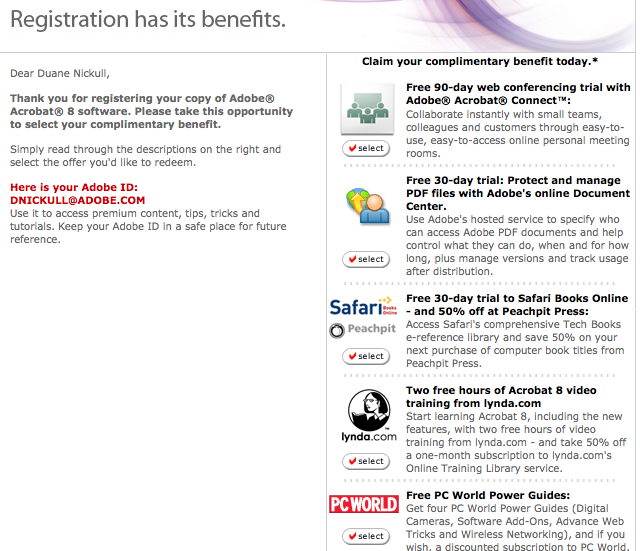
Another immensely cool thing is how Acrobat 8 integrates with Adobe LiveCycle Policy Server. Adobe has fully embraced the Software as a Service (SaaS) model (very web 2.0-ish). The hosted policy server allows you to place default policies on all documents you create. This gives you great control over the documents. You can revoke a document after distribution (Policy Server works with a new model of “persistent policy protection”). You can also audit and track who has read your document. No more “suspecting” your colleagues haven’t read your important documents – now you can tell for sure.
Another really cool feature is the ability to make any document into an electronic PDF form. This is far easier than in previous versions of Acrobat. There are automated wizards to help you make a form based on an existing form, existing document or from scratch.
Long and short – this is a killer upgrade. If you skipped 6 or 7, you will want to go right to Acrobat 8 Pro. It established Adobe as a serious player in the whole “web 2.0” movement (note that we still don’t know what “web 2.0” really means, but think it is cool).

For starters – take a look at the welcome screen. The first two, “Create PDF” and “Combine Files” are not that compelling and have been done before, but the other six are very noteworthy. First – being able to “start a meeting” is something that seems foreign to Acrobat, but makes as much sense here as it does in Mac OS/X and Win 32. Think about it. You write documents to capture thoughts and share them with others. Why not have a live meeting (aka video phones of the future) to go over the ideas? When you click “Start meeting”, the menus give you options to connect to another group of people. You can screen share documents and presentations, set up a virtual meeting URL to communicate anytime, anywhere, set up a conference on the fly and much more with no software downloads for other participants. The meeting is given via a complimentary 90 day trial to Acrobat Connect (formerly the software known as Macromedia Breeze). Note – be sure to register your trial of purchased copy of Acrobat 8. You will get an email that provides free services as part of the package.
Another immensely cool thing is how Acrobat 8 integrates with Adobe LiveCycle Policy Server. Adobe has fully embraced the Software as a Service (SaaS) model (very web 2.0-ish). The hosted policy server allows you to place default policies on all documents you create. This gives you great control over the documents. You can revoke a document after distribution (Policy Server works with a new model of “persistent policy protection”). You can also audit and track who has read your document. No more “suspecting” your colleagues haven’t read your important documents – now you can tell for sure.
Another really cool feature is the ability to make any document into an electronic PDF form. This is far easier than in previous versions of Acrobat. There are automated wizards to help you make a form based on an existing form, existing document or from scratch.
Long and short – this is a killer upgrade. If you skipped 6 or 7, you will want to go right to Acrobat 8 Pro. It established Adobe as a serious player in the whole “web 2.0” movement (note that we still don’t know what “web 2.0” really means, but think it is cool).
Monday, September 18, 2006
Semaphore - earlier analysis is wrong (read this)
Earlier, a group of us reported seeing two unique concurrent streams coming from Semaphore. Apparently, this was not an accurate observation. Semaphore's broadcast is via Flash and when you load up the simulcast page, it sends your browser a flash object (*.swf) file within an HTML page. If you open another one, it should send you the same Flash object but may start playing it from a different reference point. If you take the time to analyze both streams, you will note that they are in fact the same.
This may also poke holes in the theory that Semaphore uses two or more rounds of encryption. It may be true but more likely that the rounds are linear rather than non-linear and generated on the fly.
Another topic that no one has mentioned before is the rotation of the glyphs. Some of them rotate clockwise and some rotate counter clockwise. Sometimes some go each way. I would be interested in any theories arising out of this.
This may also poke holes in the theory that Semaphore uses two or more rounds of encryption. It may be true but more likely that the rounds are linear rather than non-linear and generated on the fly.
Another topic that no one has mentioned before is the rotation of the glyphs. Some of them rotate clockwise and some rotate counter clockwise. Sometimes some go each way. I would be interested in any theories arising out of this.
Friday, September 15, 2006
What is he smoking?
I guess this is going to be my most political blog entry ever. I normally try to abstain from such but today I saw something that really got me angry. Before I repeat it, I want to clarify a few things.
1. I despise terrorism and enything done by those who would willingly kill a civilian to achieve some political or military objective.
2. I count Americans as a lot of my closest and dearest friends. I would do anything to help them. The USA is a great country.
3. 9/11 (both of them), the Oklahoma bombing and other attacks on the USA are despicable and need to be dealt with firmly.
I guess where you can see this is going. Today I saw a quote form a Bush speech:
Growing animated, President Bush said, "It's unacceptable to think that there's any kind of comparison between the behavior of the United States of America and the action of Islamic extremists who kill innocent women and children to achieve an objective."
http://www.forbes.com/entrepreneurs/feeds/ap/2006/09/15/ap3021182.html
Well guess what? Bombing Bagdad and killing an estimated 100,000 people including women and children IS killing innocent people to achieve an objective. Using weapons which to not discriminate against civilians (like "cluster bombs") is exactly that. The people who died probably don't feel any better knowing they were killed by either side.
I don't have all the answers and don't claim to know how to deal with Islamic terrorists, but I will speak out when I see blatant lies. Justifying murder with Morals doesn't negate the end result. Iraq had NOTHING to do with 9/11 nor was it going to pose any threat to the USA. Frankly, I am a lot more worried about the situation in Iran and North Korea right now than I ever was about Iraq.
End of rant....
1. I despise terrorism and enything done by those who would willingly kill a civilian to achieve some political or military objective.
2. I count Americans as a lot of my closest and dearest friends. I would do anything to help them. The USA is a great country.
3. 9/11 (both of them), the Oklahoma bombing and other attacks on the USA are despicable and need to be dealt with firmly.
I guess where you can see this is going. Today I saw a quote form a Bush speech:
Growing animated, President Bush said, "It's unacceptable to think that there's any kind of comparison between the behavior of the United States of America and the action of Islamic extremists who kill innocent women and children to achieve an objective."
http://www.forbes.com/entrepreneurs/feeds/ap/2006/09/15/ap3021182.html
Well guess what? Bombing Bagdad and killing an estimated 100,000 people including women and children IS killing innocent people to achieve an objective. Using weapons which to not discriminate against civilians (like "cluster bombs") is exactly that. The people who died probably don't feel any better knowing they were killed by either side.
I don't have all the answers and don't claim to know how to deal with Islamic terrorists, but I will speak out when I see blatant lies. Justifying murder with Morals doesn't negate the end result. Iraq had NOTHING to do with 9/11 nor was it going to pose any threat to the USA. Frankly, I am a lot more worried about the situation in Iran and North Korea right now than I ever was about Iraq.
End of rant....
Monday, September 11, 2006
Flex Builder 2.0 on Mac OSX - First Looks!!
(File this under "You heard it here first")
One advantage to being a technical evangelist for a large company is that I get first access to new technologies. Last week, while on an analyst tour in the UK, I got access to the pre-release version of Flex Builder for Mac OSX. (Note to self: I think I just admitted to being a geek). D’oh!!!
Installation is easy, in typical Mac style. All I had to do was unzip the file and double click on the app. The installer did the rest. Flex Builder 2.0 places an icon on both your desktop and toolbar on the Mac. Launching it is quicker than on my old PC (for comparison sake, I have a Macbook Pro (intel duo core chipset) running 2 GB RAM and OSX 10.4.7+). In fact, with Finder, Desktop, Word, Excel, PPT, FireFox, Safari, entourage, Acrobat Pro, System Profiler, Preview and my Cisco VPN client running, Flex Builder launches in 4 seconds from click to completion.
The first screens are largely the same as on Windows:

I wanted to try out the Hello World Application I wrote for my talks in the UK last week to see if any bugs were encountered before getting into more complex applications using E4X and other AS3 features. I used the Wizard to create a project in no time and it flawlessly set up the project and first main.mxml file.

Switching to the Design view worked perfectly too. I was able to quickly add a Panel, Text area and Button all within seconds. I decided to test out the text functionality so I switched the alignment to centre and changed the text size. No issues.

Code completion via Eclipse worked well too.

One minor glitch happened when I became lazy and decided to go to my PPT to cut and paste the syntax for the behavior on the button. When I searched the task bar for Flex Builder 2, it was advertised but as “Java”.

Of course, this is not a major issue as it was immediately clear to me what was going on. I had made a mistake on the syntax and saved the document. When I fixed the syntax and saved it a second time, the message disappeared (this was a pre-release bug in the PC version). I ran the program and it executed without a problem and only one minor nit. On a PC, when you run the program, it opens your browser and brings it to the front of the desktop so you can see your project (*.swf file within an HTML envelope) execute. On the Mac, I had to manually switch to the browser to see it. In fact, I had hit the run button twice not knowing that it had actually run the first time.
My early observations are very enthusiastic. My gut feeling is that it runs better on a Mac (certainly faster than the similarly equipped PC I was using). Hats off to the Flex Mac team!!! Stay tuned for more.
One advantage to being a technical evangelist for a large company is that I get first access to new technologies. Last week, while on an analyst tour in the UK, I got access to the pre-release version of Flex Builder for Mac OSX. (Note to self: I think I just admitted to being a geek). D’oh!!!
Installation is easy, in typical Mac style. All I had to do was unzip the file and double click on the app. The installer did the rest. Flex Builder 2.0 places an icon on both your desktop and toolbar on the Mac. Launching it is quicker than on my old PC (for comparison sake, I have a Macbook Pro (intel duo core chipset) running 2 GB RAM and OSX 10.4.7+). In fact, with Finder, Desktop, Word, Excel, PPT, FireFox, Safari, entourage, Acrobat Pro, System Profiler, Preview and my Cisco VPN client running, Flex Builder launches in 4 seconds from click to completion.
The first screens are largely the same as on Windows:
I wanted to try out the Hello World Application I wrote for my talks in the UK last week to see if any bugs were encountered before getting into more complex applications using E4X and other AS3 features. I used the Wizard to create a project in no time and it flawlessly set up the project and first main.mxml file.
Switching to the Design view worked perfectly too. I was able to quickly add a Panel, Text area and Button all within seconds. I decided to test out the text functionality so I switched the alignment to centre and changed the text size. No issues.
Code completion via Eclipse worked well too.
One minor glitch happened when I became lazy and decided to go to my PPT to cut and paste the syntax for the behavior on the button. When I searched the task bar for Flex Builder 2, it was advertised but as “Java”.
Of course, this is not a major issue as it was immediately clear to me what was going on. I had made a mistake on the syntax and saved the document. When I fixed the syntax and saved it a second time, the message disappeared (this was a pre-release bug in the PC version). I ran the program and it executed without a problem and only one minor nit. On a PC, when you run the program, it opens your browser and brings it to the front of the desktop so you can see your project (*.swf file within an HTML envelope) execute. On the Mac, I had to manually switch to the browser to see it. In fact, I had hit the run button twice not knowing that it had actually run the first time.
My early observations are very enthusiastic. My gut feeling is that it runs better on a Mac (certainly faster than the similarly equipped PC I was using). Hats off to the Flex Mac team!!! Stay tuned for more.
Friday, September 08, 2006
MAX 2006 is gonna be really cool!
There are some pretty cool new things coming out from LiveCycle at MAX this year that should be of great interest to Macromedia fans. This is not simply a rehash of existing stuff. In fact, some of the debuts will be the first time anyone outside Adobe has access to the technology. I wanted to blog as the LC track coordinator to make sure you are aware of what you might see and also to prepare you to chose the tracks.
First – the new Adobe Policy Server will be unveiled. For the first time ever, the Policy Server will be able to policy protect Word and CATIA (cad format) documents. We will also be discussing our future plans for supporting other file formats. We are very eager to seek developer and business input to our product roadmap.
Second – Matt Butler will be presenting a 3 hour session on LC including a 30 minute panel session to allow developers to directly access members of the team and other key people. Matt is a “rock star” in the LiveCycle development and this presents and unparalleled opportunity to enter into direct dialog with him. Not an opportunity to be missed.
Third – the new LC platform incorporating the core tenets of SOA will be unveiled. Most of the content on the future of the platform and its embedded registry runtime environment will be explored in great detail as well as a deep look at the service container architecture and deployment models. This will be very interesting to Macromedia fans to see where technologies like Cold Fusion and Flex might fit in.
Additionally, there will be hands on session to enhance your core skills at LiveCycle. These include working with the various API’s and GUI’s. Over 75% of this content has never been taught before. Other luminaries like Ben Forta will also be on hand to teach courses and meet.
In short, MAX presents and unparalleled opportunity to see how Adobe and Macromedia are doing in their everyday life now that the marriage and honeymoon are over.
First – the new Adobe Policy Server will be unveiled. For the first time ever, the Policy Server will be able to policy protect Word and CATIA (cad format) documents. We will also be discussing our future plans for supporting other file formats. We are very eager to seek developer and business input to our product roadmap.
Second – Matt Butler will be presenting a 3 hour session on LC including a 30 minute panel session to allow developers to directly access members of the team and other key people. Matt is a “rock star” in the LiveCycle development and this presents and unparalleled opportunity to enter into direct dialog with him. Not an opportunity to be missed.
Third – the new LC platform incorporating the core tenets of SOA will be unveiled. Most of the content on the future of the platform and its embedded registry runtime environment will be explored in great detail as well as a deep look at the service container architecture and deployment models. This will be very interesting to Macromedia fans to see where technologies like Cold Fusion and Flex might fit in.
Additionally, there will be hands on session to enhance your core skills at LiveCycle. These include working with the various API’s and GUI’s. Over 75% of this content has never been taught before. Other luminaries like Ben Forta will also be on hand to teach courses and meet.
In short, MAX presents and unparalleled opportunity to see how Adobe and Macromedia are doing in their everyday life now that the marriage and honeymoon are over.
Friday, September 01, 2006
Using Adobe's XPAAJ.jar via Line Command on Mac OSX (Intel chipset)
For those of you who have been not using the XPAAJ.jar library only because you are Mac based, you may want to read this post. While the library does not claim to be supported on Mac, I did manage to get it to work but had to re-tweak a few things in the sample code and also study my Unix-Java Command line syntax. The tweaked code is at the bottom.
Adobe's XPAAJ:
XPAAJ is an API library from Adobe for PDF documents. The acronym means Adobe® XML/PDF Access API for Java™ (XPAAJ). It can now be downloaded freely from the Adobe Developer Network at http://www.adobe.com/devnet/livecycle/downloads/xpaaj.html. Once you download the zip, unzip it to a directory where you will work on it. The directory structure will be as follows:
Xpaaj_sdk
|
|-- xpaaj.jar
|---/samples
|---/docs
Open a terminal and navigate to the /xpaaj_sdk/samples/command-line/ConsoleSample/ directory. There you will see some sample classes and a test.pdf file. I did not have luck with all the sample files so I opened PDFExtract and modified it a bit.
For the record, my java –version is:
java version "1.5.0_06"
Java(TM) 2 Runtime Environment, Standard Edition (build 1.5.0_06-112)
Java HotSpot(TM) Client VM (build 1.5.0_06-64, mixed mode, sharing)
Mac is OSX 10.4.7 on the MacBook Pro.
If you want to run some samples, I recommend cutting and pasting the text at the end of this blog and saving it as the file “DuanePDFClass1.java” on your hard drive. One thing you also might want to consider is to also copy the xpaaj.jar file to the ~/ConsoleSample directory to make it easier to use to compile and run the DuanePDFClass1 class since you can simply cut and paste the line commands below.
From that directory, compile the sample by typing in the following:
javac -classpath ./XPAAJ.jar DuanePDFClass1.java
It should compile. Try typing ls –la to make sure that the resulting class file exists and that it is executable. To run it, type:
java -classpath ./xpaaj.jar: DuanePDFClass1 test.pdf
test.pdf is the argument for the test file that it will open, tell you a few tings about and save. You should see the following appear in your line command window:
duane-nickulls-computer:~/code/xpaaj_sdk/samples/command-line/ConsoleSample nickull$ java -classpath ./xpaaj.jar: DuanePDFClass1 test.pdf
Opening PDF with DuanePDFClass1...
test.pdf was successfully opened.
PDF version = %PDF-1.5
Number of pages = 1
Saving document ...
Document was saved to file : test_saved_by_DuanePDFClass1.pdf
Execution of DuanePDFClass1 has finished.
Anyhow, that is all for now. I will be demonstrating this during the Adobe Developer Week in London, UK next Wednesday. Here is the classfile text (use at your own risk, no guarantees blah blah blah....):
import java.io.*;
import java.util.*;
import java.awt.image.DataBuffer;
import com.adobe.pdf.*;
public class DuanePDFClass1 {
public static void main(String[] args)
throws FileNotFoundException, IOException
{
String inPdfName;
if(args.length != 1 )
{
System.out.println("\nCommand line format: java DuanePDFClass1 pdf-file");
return;
}
else
{
inPdfName = new String(args[0]);
PDFExtract(inPdfName);
}
}
public static void PDFExtract(String inPdfName)
throws FileNotFoundException, IOException
{
System.out.println("\nOpening PDF with DuanePDFClass1...");
PDFDocument doc = null;
boolean b = false;
FileInputStream inPdfFile = new FileInputStream(inPdfName);
try {
doc = PDFFactory.openDocument(inPdfFile);
} catch (IOException e) {
System.out.println("Error opening PDF file :" + inPdfName);
System.out.println(e);
}
if(doc == null)
System.out.println("Cannot open PDF file : " + inPdfName);
else
System.out.println( inPdfName + " was successfully opened.");
/* Try some methods here */
System.out.println ("PDF version = " + doc.getVersion());
System.out.println ("Number of pages = " + doc.getNumberOfPages());
/*Save PDF to file*/
System.out.println ("\nSaving document ... ");
int j = inPdfName.lastIndexOf(".");
String outPdfName = inPdfName.substring(0, j) + "_saved_by_DuanePDFClass1" + ".pdf";
InputStream inputStream;
inputStream = doc.save();
b = false;
try {
b = saveFile(inputStream, outPdfName);
} catch (Exception e) {
System.out.println("Error saving PDF file.");
System.out.println(e);
}
if(b == true)
System.out.println ("Document was saved to file : " + outPdfName);
else
System.out.println("Document was not saved to file.");
System.out.println("\nExecution of DuanePDFClass1 has finished.");
}
/**
method to save InputStream to a file.
*/
public static boolean saveFile(InputStream is, String filePath)
throws Exception
{
boolean retVal=false;
byte[] buffer = new byte[10240];
FileOutputStream outStream = null;
try
{
outStream = new FileOutputStream(filePath);
int len=0;
while (true)
{
len = is.read(buffer);
if (len == -1)
break;
outStream.write(buffer, 0, len);
}
outStream.close();
retVal = true;
}
catch (IOException io)
{
System.out.println("Writing the array of bytes into the file "
+ filePath + " failed.");
throw new Exception(
"Writing the array of bytes into the file "+ filePath +
" failed in saveFile");
}
return retVal;
}
/* TODO: add some more methods here?? */
}
Adobe's XPAAJ:
XPAAJ is an API library from Adobe for PDF documents. The acronym means Adobe® XML/PDF Access API for Java™ (XPAAJ). It can now be downloaded freely from the Adobe Developer Network at http://www.adobe.com/devnet/livecycle/downloads/xpaaj.html. Once you download the zip, unzip it to a directory where you will work on it. The directory structure will be as follows:
Xpaaj_sdk
|
|-- xpaaj.jar
|---/samples
|---/docs
Open a terminal and navigate to the /xpaaj_sdk/samples/command-line/ConsoleSample/ directory. There you will see some sample classes and a test.pdf file. I did not have luck with all the sample files so I opened PDFExtract and modified it a bit.
For the record, my java –version is:
java version "1.5.0_06"
Java(TM) 2 Runtime Environment, Standard Edition (build 1.5.0_06-112)
Java HotSpot(TM) Client VM (build 1.5.0_06-64, mixed mode, sharing)
Mac is OSX 10.4.7 on the MacBook Pro.
If you want to run some samples, I recommend cutting and pasting the text at the end of this blog and saving it as the file “DuanePDFClass1.java” on your hard drive. One thing you also might want to consider is to also copy the xpaaj.jar file to the ~/ConsoleSample directory to make it easier to use to compile and run the DuanePDFClass1 class since you can simply cut and paste the line commands below.
From that directory, compile the sample by typing in the following:
javac -classpath ./XPAAJ.jar DuanePDFClass1.java
It should compile. Try typing ls –la to make sure that the resulting class file exists and that it is executable. To run it, type:
java -classpath ./xpaaj.jar: DuanePDFClass1 test.pdf
test.pdf is the argument for the test file that it will open, tell you a few tings about and save. You should see the following appear in your line command window:
duane-nickulls-computer:~/code/xpaaj_sdk/samples/command-line/ConsoleSample nickull$ java -classpath ./xpaaj.jar: DuanePDFClass1 test.pdf
Opening PDF with DuanePDFClass1...
test.pdf was successfully opened.
PDF version = %PDF-1.5
Number of pages = 1
Saving document ...
Document was saved to file : test_saved_by_DuanePDFClass1.pdf
Execution of DuanePDFClass1 has finished.
Anyhow, that is all for now. I will be demonstrating this during the Adobe Developer Week in London, UK next Wednesday. Here is the classfile text (use at your own risk, no guarantees blah blah blah....):
import java.io.*;
import java.util.*;
import java.awt.image.DataBuffer;
import com.adobe.pdf.*;
public class DuanePDFClass1 {
public static void main(String[] args)
throws FileNotFoundException, IOException
{
String inPdfName;
if(args.length != 1 )
{
System.out.println("\nCommand line format: java DuanePDFClass1 pdf-file");
return;
}
else
{
inPdfName = new String(args[0]);
PDFExtract(inPdfName);
}
}
public static void PDFExtract(String inPdfName)
throws FileNotFoundException, IOException
{
System.out.println("\nOpening PDF with DuanePDFClass1...");
PDFDocument doc = null;
boolean b = false;
FileInputStream inPdfFile = new FileInputStream(inPdfName);
try {
doc = PDFFactory.openDocument(inPdfFile);
} catch (IOException e) {
System.out.println("Error opening PDF file :" + inPdfName);
System.out.println(e);
}
if(doc == null)
System.out.println("Cannot open PDF file : " + inPdfName);
else
System.out.println( inPdfName + " was successfully opened.");
/* Try some methods here */
System.out.println ("PDF version = " + doc.getVersion());
System.out.println ("Number of pages = " + doc.getNumberOfPages());
/*Save PDF to file*/
System.out.println ("\nSaving document ... ");
int j = inPdfName.lastIndexOf(".");
String outPdfName = inPdfName.substring(0, j) + "_saved_by_DuanePDFClass1" + ".pdf";
InputStream inputStream;
inputStream = doc.save();
b = false;
try {
b = saveFile(inputStream, outPdfName);
} catch (Exception e) {
System.out.println("Error saving PDF file.");
System.out.println(e);
}
if(b == true)
System.out.println ("Document was saved to file : " + outPdfName);
else
System.out.println("Document was not saved to file.");
System.out.println("\nExecution of DuanePDFClass1 has finished.");
}
/**
method to save InputStream to a file.
*/
public static boolean saveFile(InputStream is, String filePath)
throws Exception
{
boolean retVal=false;
byte[] buffer = new byte[10240];
FileOutputStream outStream = null;
try
{
outStream = new FileOutputStream(filePath);
int len=0;
while (true)
{
len = is.read(buffer);
if (len == -1)
break;
outStream.write(buffer, 0, len);
}
outStream.close();
retVal = true;
}
catch (IOException io)
{
System.out.println("Writing the array of bytes into the file "
+ filePath + " failed.");
throw new Exception(
"Writing the array of bytes into the file "+ filePath +
" failed in saveFile");
}
return retVal;
}
/* TODO: add some more methods here?? */
}
Subscribe to:
Posts (Atom)