Anyone who uses Adobe LiveCycle should definitely consider this year's MAX as a primary place to be in 2007. We have worked hard on making almost 4 full days of content available for the enterprise track and have lined up great sessions and speakers. This is ground zero for anyone who considers themselves a LiveCycle developer. Please also check out the discount available via the Google LiveCycle Developers list.
Organizing a track at MAX is hard. I now have 1163 emails in my MAX 2007 folder and already almost 100 in my Adobe MAX 2008 folder. Thanks to Charlton Barreto the Enterprise and Collaboration track is on track.
Yes - we are maxed out. Puns intended....
Friday, August 24, 2007


Tuesday, August 21, 2007
Convergence - Web 2.0::Television 2.0
Today is an important milestone in the journey to converge digital media streaming through the Internet. Adobe announced it upgraded its Flash Player with support for the H.264 video-encoding standard and improved audio-compression technology. The changes are astounding! Don't believe me, click on the screen below to experience it. You may have to download the new player first.

Code named "Moviestar," the Flash Player upgrade permits the playback of video encoded using the same standard deployed in Blu-ray and HD DVD high-definition video players for increased compression without quality degradation. It is currently available in beta as a free download, and the final version is expected this fall.
What this means:
Full-screen, TV broadcast quality images over the Internet. It really has to be experienced to be believed.
Code named "Moviestar," the Flash Player upgrade permits the playback of video encoded using the same standard deployed in Blu-ray and HD DVD high-definition video players for increased compression without quality degradation. It is currently available in beta as a free download, and the final version is expected this fall.
What this means:
Full-screen, TV broadcast quality images over the Internet. It really has to be experienced to be believed.
Friday, August 17, 2007
Canadian National Cycling Team needs your help!
As a former professional cyclist who raced for Canada at the World Championships and a world cup veteran of 8 years, I found a very troubling email in my inbox today. Chris Colbeck, a good friend, formidable cycling opponent and now coach of our national team sent out a plea for funding. It seems that our own national cycling body has disgracefully cut all funding from the downhill racing discipline while giving more funding to the Cross Country riders. Chris is not one to sit by while the world turns and has created a national organization to help get funding.
Not only is this move by the Canadian Federation a disgusting slap in the face to one of the largest contingents of mountain bike racers and cyclists in general, it seems to contravene the mandate of UCI, the world's governing organization. The UCI constitution clearly states in Article 3:
To me, this implies equality in funding. Factoring in an adjustment for numbers, this still means we should be getting funding for all disciplines at some level, not putting all our money towards one form of the sport.
The Constitution also goes on to state in Article 6:
This implies that the Canadian organization should incorporate the equality, across not only discipline but gender and other considerations.
Downhill Mountain Bike racers have never fared well with respect to funding. At the 1996 World Championships, we were given used national team jerseys to wear, some of which had to be returned. We paid all our own expenses with the exception of Andrew Shandro, being the #1 seed based on being national champion. Our Dual Slalom squad was totally neglected despite having several top 50 finishes in world cup qualifying (myself included).
The news release is pasted below. I want to urge anyone reading this to please do what you can to help Chris help our 2007 national downhill squad and whatever country you come from, please consider helping to make an athletes dream come true. Representing your country at the world championships or Olympics is the highest honor any athlete can have. To have this taken away by a short sighted lack of funding is horrible.
Not only is this move by the Canadian Federation a disgusting slap in the face to one of the largest contingents of mountain bike racers and cyclists in general, it seems to contravene the mandate of UCI, the world's governing organization. The UCI constitution clearly states in Article 3:
"The UCI will carry out its activities in compliance with the principles of: a) equality between all the members and all the athletes, licence-holders and officials, without racial, political, religious, or other discrimination".
To me, this implies equality in funding. Factoring in an adjustment for numbers, this still means we should be getting funding for all disciplines at some level, not putting all our money towards one form of the sport.
The Constitution also goes on to state in Article 6:
"As members, the federations shall comply with the Constitution and Regulations of the UCI, as well as with all decisions taken in accordance therewith. Likewise, they shall have the Constitution, Regulations and decisions of the UCI complied with by all persons concerned.
2. The Regulations of the UCI shall be incorporated in the corresponding regulations of the federations."
This implies that the Canadian organization should incorporate the equality, across not only discipline but gender and other considerations.
Downhill Mountain Bike racers have never fared well with respect to funding. At the 1996 World Championships, we were given used national team jerseys to wear, some of which had to be returned. We paid all our own expenses with the exception of Andrew Shandro, being the #1 seed based on being national champion. Our Dual Slalom squad was totally neglected despite having several top 50 finishes in world cup qualifying (myself included).
The news release is pasted below. I want to urge anyone reading this to please do what you can to help Chris help our 2007 national downhill squad and whatever country you come from, please consider helping to make an athletes dream come true. Representing your country at the world championships or Olympics is the highest honor any athlete can have. To have this taken away by a short sighted lack of funding is horrible.
Media Release August 16, 2007
FOR IMMEDIATE RELEASE
National Downhill Cycling Foundation of Canada “NDCFC”
&
2007 Canadian National DH Cycling Team
www.NDCFCanada.com / www.NDCFCanada.ca
HEADLINE: National DH Cycling Team making history!
NDCFC and the 2007 National DH cycling team is making history this month!
The team is facing the reality of having no funding! Canadian Cycling Association will offer no direct funding to the Downhill Cycling discipline which is directly inline with the levels of funding received by Sport Canada.
With 10 members on the National DH Team and no funding, manager/coach Chris Colbeck and the athletes have come up with a way to help themselves and the future of the sport! All are trying to travel to the biggest event of the year, the 2007 World Mountain Bike Championships in Fort William, Scotland September 8/9.
Chris Colbeck manager/coach of the 2007 National DH cycling team and former member himself is heading up the National Downhill Cycling Foundation of Canada “NDCFC”. “I will not sit back and watch the athletes struggle year after year after year financially! It paralyzes the future growth of the sport” We have organized a major fundraiser in Vancouver, BC to help the athletes.
For more information please visit our web site or contact Chris Colbeck directly.
Contact Name:
Chris Colbeck
NDCFC President/Founder
National DH Cycling Team Manager
Mobile: 604-932-0809
Ccolbeck@telus.net
PO Box 960 Whistler, BC. V0N1B0 Canada
Thursday, August 16, 2007
Has Wikipedia been Hijacked?
I have become concerned over the last few years of the growing tendency for Wikipedia to censor or delete information that they alone determine is irrelevant. I have always been a fan of Wikipedia in general, but I feel that someone needs to stand up and state clearly that the Emperor has no clothes. Wikipedia is a volunteer driven organization with many good editors. However there appears to be vast discrepancies regarding content. Lately, there have been incidents where editors seem to be acting like dictators. I feel compelled to write becaues of the latest series of incidents that has been brought to my attention, all detailed below with references. I encourage you to read these and contribute to this conversation.
On the Ontolog Forum, I recently conversed with and traded email with a scientist by the name of Jon Awbrey. I decided to look up his name on Google to see what other articles he might have available on the subjects of Computational Intelligence and Ontology/Semantics. I found this link:
http://en.wikipedia.org/wiki/User:Jon_Awbrey
For those of you who do not know Jon, he is a respected member of Ontology circles and has been very active in several groups. He has a long history of useful contributions in a remarkably contentious domain of knowledge. Jon has made numerous contributions to Wikipedia including a lot of information about Charles Peirce. I read Wikipedia's Ban Policy which is well worded and written with seemingly good intent. Wikipedia also seems to be fairly transparent (albeit somewhat cryptic) in their rationale for the ban and publishes the conversations. What I really don't understand is how the politics work.
Sadly, this is not the only incident. Last year my friend Sim Simeonov built an entry for "Social Commerce" which was a challenge because an Internet Explorer crash lost his information (who saw that coming?). Sim's thoughts on Social Commerce are fantastic and worthy of reading by anyone attempting to understand Web 2.0. Sadly, the Wikipedia page was deleted. Sim writes:
"Update: Well, despite the fact that to my knowledge at least 5-6 people contributed to the page and the content was starting to look pretty good, we weren’t able to defeat the Wikipedia bots–they auto-deleted the page, probably due to lack of references. Hard to have references to a new concept… It didn’t help that during that period I had to do a lot of travel and so had limited time to contribute. How about this–put some content in comments to this post and then I’ll try again early next year."
It appears that bots were not the only ones to delete his page. Mailer Diablo, a known Wikipedia editor, apparently deleted the Wikipedia Social Commerce page as described here:
14:52, 13 December 2006 Mailer diablo (Talk | contribs) deleted "Social commerce" (Wikipedia:Articles for deletion/Social commerce)
It is interesting to note that the German page for Social Commerce still exists.
I don't know who Mailer Diablo is but other users have had issues with him including a non-profit organization trying to keep the Wikipedia entry for "Camp Mendocino". Mailer Diablo deleted the page and wouldn't even give the courtesy of replying to the email asking for clarification. The contributor also offered to change the article to meet guidelines. The conversation is public here:
*********************REQUEST***********************
Another good friend of mine, Dick Hardt, had to struggle to save his Wikipedia page. One of the concerns was around "notability" however as user Lori P writes to Wikipedia:
"Not sure why "notability" would be a concern. Dick passes your "google test", with over 160,000 references to him.)".
I too have had run-ins with Wikipedia. Matt MacKenzie and I have derived an Architectural Patterns metamodel from the gang of fours work and updated it to speak to business users as well as to add more details for developers. It comes up #1 in Google for the search term "Architectural Patterns Metamodel" as evidence of its popular use. When listed on the Patterns page (one simple line noting it's existence so people needing a template could download and use it), it was quickly deleted by someone from Wikipedia. I complained and suggested they at least read it. The editor who deleted the line item had no clue as to the contents or usefulness of the template to those who architect, design and develop software.
Conclusions?
In all fairness, it is obviously a hard job to try and keep Wikipedia as a source of fact despite the fact there are valid, opposing opinions. Surely someone who doesn't know Dick or care might think he is not worthy but anyone using Perl considers him an icon. Those who live at Camp Mendocino might have trouble reconciling the fact Wikipedia does not think they exist with their reality. This unfortunately happens at the expense of knowledge for the rest of us.
Wikipedia editors do need to be *very* careful. I am very concerned over the apparent trend to censor information based on the decision of a few individuals. I favor a wider approach and a community that can keep itself in check. I am concerned that the people making these decisions do not have the necessary level of intellect to make the judgment calls on the items they are editing too. Who will contradict Sim's theories on Social Commerce?
We all need to be a bit more vigilant and run to the aid of those who need our help to maintain their Wikipedia pages.
Thoughts? Anyone else think Wikipedia is being hijacked?
On the Ontolog Forum, I recently conversed with and traded email with a scientist by the name of Jon Awbrey. I decided to look up his name on Google to see what other articles he might have available on the subjects of Computational Intelligence and Ontology/Semantics. I found this link:
http://en.wikipedia.org/wiki/User:Jon_Awbrey
For those of you who do not know Jon, he is a respected member of Ontology circles and has been very active in several groups. He has a long history of useful contributions in a remarkably contentious domain of knowledge. Jon has made numerous contributions to Wikipedia including a lot of information about Charles Peirce. I read Wikipedia's Ban Policy which is well worded and written with seemingly good intent. Wikipedia also seems to be fairly transparent (albeit somewhat cryptic) in their rationale for the ban and publishes the conversations. What I really don't understand is how the politics work.
Sadly, this is not the only incident. Last year my friend Sim Simeonov built an entry for "Social Commerce" which was a challenge because an Internet Explorer crash lost his information (who saw that coming?). Sim's thoughts on Social Commerce are fantastic and worthy of reading by anyone attempting to understand Web 2.0. Sadly, the Wikipedia page was deleted. Sim writes:
"Update: Well, despite the fact that to my knowledge at least 5-6 people contributed to the page and the content was starting to look pretty good, we weren’t able to defeat the Wikipedia bots–they auto-deleted the page, probably due to lack of references. Hard to have references to a new concept… It didn’t help that during that period I had to do a lot of travel and so had limited time to contribute. How about this–put some content in comments to this post and then I’ll try again early next year."
It appears that bots were not the only ones to delete his page. Mailer Diablo, a known Wikipedia editor, apparently deleted the Wikipedia Social Commerce page as described here:
14:52, 13 December 2006 Mailer diablo (Talk | contribs) deleted "Social commerce" (Wikipedia:Articles for deletion/Social commerce)
It is interesting to note that the German page for Social Commerce still exists.
I don't know who Mailer Diablo is but other users have had issues with him including a non-profit organization trying to keep the Wikipedia entry for "Camp Mendocino". Mailer Diablo deleted the page and wouldn't even give the courtesy of replying to the email asking for clarification. The contributor also offered to change the article to meet guidelines. The conversation is public here:
*********************REQUEST***********************
Please undelete "Camp Mendocino"
Hi!
I didn't get an answer to this, so I will try again.
You can also find this in your archives:
http://en.wikipedia.org/wiki/User_talk:Mailer_diablo/Archive_%CE%B7
http://en.wikipedia.org/wiki/User_talk:Chiefcoolbreeze
Hello,
If possible, I would like to see the article "Camp Mendocino" undeleted.
Excerpt from deletion notice:
22:22, 15 January 2007 Mailer diablo (Talk | contribs) deleted "Camp Mendocino"
(Proposed deletion expiring after 5 days, 9/1/2007)
I'm not sure why it was deleted. Camp Mendocino belongs to a non profit organization, is very traditional, and has existed since the 1930s. If the article requires changes, please let me know.
Thank you in advance.
User:Chiefcoolbreeze
*********************END RQUEST******************Another good friend of mine, Dick Hardt, had to struggle to save his Wikipedia page. One of the concerns was around "notability" however as user Lori P writes to Wikipedia:
"Not sure why "notability" would be a concern. Dick passes your "google test", with over 160,000 references to him.)".
I too have had run-ins with Wikipedia. Matt MacKenzie and I have derived an Architectural Patterns metamodel from the gang of fours work and updated it to speak to business users as well as to add more details for developers. It comes up #1 in Google for the search term "Architectural Patterns Metamodel" as evidence of its popular use. When listed on the Patterns page (one simple line noting it's existence so people needing a template could download and use it), it was quickly deleted by someone from Wikipedia. I complained and suggested they at least read it. The editor who deleted the line item had no clue as to the contents or usefulness of the template to those who architect, design and develop software.
Conclusions?
In all fairness, it is obviously a hard job to try and keep Wikipedia as a source of fact despite the fact there are valid, opposing opinions. Surely someone who doesn't know Dick or care might think he is not worthy but anyone using Perl considers him an icon. Those who live at Camp Mendocino might have trouble reconciling the fact Wikipedia does not think they exist with their reality. This unfortunately happens at the expense of knowledge for the rest of us.
Wikipedia editors do need to be *very* careful. I am very concerned over the apparent trend to censor information based on the decision of a few individuals. I favor a wider approach and a community that can keep itself in check. I am concerned that the people making these decisions do not have the necessary level of intellect to make the judgment calls on the items they are editing too. Who will contradict Sim's theories on Social Commerce?
We all need to be a bit more vigilant and run to the aid of those who need our help to maintain their Wikipedia pages.
Thoughts? Anyone else think Wikipedia is being hijacked?
Wednesday, August 15, 2007
Semaphore Publicly Solved
The Adobe Semaphore riddle, subject of many previous posts and community speculation, has been solved by a non-Adobe person as reported today here. Thank you to everyone who contributed ideas back to this blog previously and read the hints and clues.
Thursday, August 09, 2007
Vancouver RIA/Flex Camp

The Vancouver RIA Camp is filling up. We have now added a code camp to the schedule. Here is a video of a similar event in San Francisco (above). The schedule is below.

Last day to pre-register for MAX 2007
Anyone interested in going should note that tomorrow is the last day for early bird registration for MAX 2007. You can still register for the discounted price of $1095. Prices increase to $1295 Friday night at midnight PT.
Disclaimer:
I'm not trying to sell you anything, just save you money if you are going.
Disclaimer:
I'm not trying to sell you anything, just save you money if you are going.
Wednesday, August 08, 2007
Adobe MAX 2008
Adobe MAX 2007 has not yet happened but it will on Sept 30-Oct 3. So why a blog post about Adobe MAX 2008? Simple - I am interested in your opinions on what we should be thinking about now for this event. Here are some questions for MAX 2008:
1. What should we add that is not present for Adobe MAX 2007?
2. Which speakers/sessions would you like to see more of at MAX 2008? (Choices = technical, marketing, demos, roadmaps, other....)
3. What venue would you like to see MAX at in North America (Examples - San Francisco, Whistler, New York)?
4. What types of parties, extracurricular activities would you like to see more of? (For example - a side ski trip if in Whistler)?
Please also ping me by email dnickull at adobe dot com to let me know of any other ideas you have for MAX 2008.
1. What should we add that is not present for Adobe MAX 2007?
2. Which speakers/sessions would you like to see more of at MAX 2008? (Choices = technical, marketing, demos, roadmaps, other....)
3. What venue would you like to see MAX at in North America (Examples - San Francisco, Whistler, New York)?
4. What types of parties, extracurricular activities would you like to see more of? (For example - a side ski trip if in Whistler)?
Please also ping me by email dnickull at adobe dot com to let me know of any other ideas you have for MAX 2008.
Tuesday, August 07, 2007
Adobe MAX 2007 gets Ryan Stewart
Ryan Stewart has just become another one of our evangelist team members to speak at MAX 2007 in Chicago. Ryan will be tackling a cool subject of manipulating PDF within Adobe AIR (formerly Apollo) applications. The abstract is:
Leveraging PDF within Adobe AIR Applications
Skill: Intermediate
Adobe AIR is a cross-OS runtime that allows developers to leverage their existing web development skills (Flash, Flex, HTML,PDF, JavaScript, Ajax, etc.) to build rich Internet applications that can be deployed to the desktop. This session will examine how Adobe AIR applications can utilize PDF content alongside HTML and Flash. We will explore how PDF content can be interacted with using Adobe AIR functionality, integration, and scripting.
At Adobe MAX 2007, there are so many cool additions now that it is hard to track all of them. Be sure to catch the latest breaking news by subscribing to the MAX list. See you there!
Leveraging PDF within Adobe AIR Applications
Skill: Intermediate
Adobe AIR is a cross-OS runtime that allows developers to leverage their existing web development skills (Flash, Flex, HTML,PDF, JavaScript, Ajax, etc.) to build rich Internet applications that can be deployed to the desktop. This session will examine how Adobe AIR applications can utilize PDF content alongside HTML and Flash. We will explore how PDF content can be interacted with using Adobe AIR functionality, integration, and scripting.
At Adobe MAX 2007, there are so many cool additions now that it is hard to track all of them. Be sure to catch the latest breaking news by subscribing to the MAX list. See you there!
Silverlight on Mac OS X? It truly sucks!
Today I had my second experience with Microsoft's Silverlight on a Macintosh. The first experience resulted in a hung app which is okay given it was billed as early alpha. This time I decided to be a bit more picky as this version of Silverlight is billed as a Release Candidate. For the record, this is a MacBook Pro (latest edition) with 2.4 GHz processors (Intel Core 2 Duo) with 4 GB of RAM. I was looking at some old email and found some spam inviting me to a MS doo here in Vancouver. It invited me to go to a certain URL.
"Look forward to seeing you there – to RVSP, simply reply to this email or visit the Event page at the Experience Expression homepage"
Upon reaching the URL, I was asked to enter and given a choice of a Silverlight site or non-Silverlight. I wanted to really see Silverlight in action so I chose the Silverlight option. When I tried to reach the site, the first warning I got was this:

I figured that the "OK" button was safe to hit but upon hitting it, the alert disappeared along with all the content behind the page. I guess I was supposed to remember it from just looking or something??? The page now looked like this:

Even reloading the page did not return me to a place where I could get the URL. Luckily, I had made a copy of the screen because I was going to document a different problem I had experienced on another Mac in my house. I hit the URL and was redirected to a page at http://www.microsoft.com/SILVERLIGHT/default_ns.aspx After a few guesses I found the page to download their Release Candidate 1 (RC).
The install went well and reported success:

When I went back to the page to view the invitation to the event, I was redirected to the page saying I needed to install Microsoft Silverlight -- despite the fact I had just installed it.

Okay. Starting to get annoyed. Now I want to point out that I work for Adobe, largely viewed as the company owning the biggest rival to Silverlight (called Flash). Some people have wrongly compared Adobe AIR to Silverlight (Silverlight is akin to Flash but does not really have anywhere near the advanced capabilities of AIR). Despite my employment, I like to think I can be pragmatic and appreciate good software. After all, I do use Entourage, Word, and PowerPoint regularly. My counterparts at Microsoft also use PDF, Acrobat, and Photoshop. Anyways, read on and try the links yourself if you want to make your own judgment.
I clicked on the "Get Silverlight" button to try again and was directed to another page with a really bad graphic (presumably Silverlight-based). If this is an example of Silverlight's graphics, I am sticking with Flash and Flex.

Cautiously, I reloaded the page and this time it recognized that I had installed Silverlight. There was even a link to get back to previous page.

Now this seems reasonable yet a bit weird. If you can recognize the Silverlight player is installed, why send the user running around? I clicked on "Return to the previous page" only to find a page that tells me I need to install Silverlight to view it. Further attempts to view the content result in getting redirected to this page:

Okay - time to give up. I am trying hard to be balanced about this and to not push a "pick Adobe Flash vs. Microsoft Silverlight" battle, but the inescapable conclusion is that my experience was suboptimal. I hope someone from Microsoft reads this and can maybe offer some help as to what happened and a way to work around it.
After two attempts, the score is Silverlight 2, Me 0. I actually do really want to see it. Does that mean I have to go back to (cough) Win-D'ohs?
Anyone else have luck with the URLs?
"Look forward to seeing you there – to RVSP, simply reply to this email or visit the Event page at the Experience Expression homepage"
Upon reaching the URL, I was asked to enter and given a choice of a Silverlight site or non-Silverlight. I wanted to really see Silverlight in action so I chose the Silverlight option. When I tried to reach the site, the first warning I got was this:

I figured that the "OK" button was safe to hit but upon hitting it, the alert disappeared along with all the content behind the page. I guess I was supposed to remember it from just looking or something??? The page now looked like this:

Even reloading the page did not return me to a place where I could get the URL. Luckily, I had made a copy of the screen because I was going to document a different problem I had experienced on another Mac in my house. I hit the URL and was redirected to a page at http://www.microsoft.com/SILVERLIGHT/default_ns.aspx
The install went well and reported success:

When I went back to the page to view the invitation to the event, I was redirected to the page saying I needed to install Microsoft Silverlight -- despite the fact I had just installed it.

Okay. Starting to get annoyed. Now I want to point out that I work for Adobe, largely viewed as the company owning the biggest rival to Silverlight (called Flash). Some people have wrongly compared Adobe AIR to Silverlight (Silverlight is akin to Flash but does not really have anywhere near the advanced capabilities of AIR). Despite my employment, I like to think I can be pragmatic and appreciate good software. After all, I do use Entourage, Word, and PowerPoint regularly. My counterparts at Microsoft also use PDF, Acrobat, and Photoshop. Anyways, read on and try the links yourself if you want to make your own judgment.
I clicked on the "Get Silverlight" button to try again and was directed to another page with a really bad graphic (presumably Silverlight-based). If this is an example of Silverlight's graphics, I am sticking with Flash and Flex.

Cautiously, I reloaded the page and this time it recognized that I had installed Silverlight. There was even a link to get back to previous page.

Now this seems reasonable yet a bit weird. If you can recognize the Silverlight player is installed, why send the user running around? I clicked on "Return to the previous page" only to find a page that tells me I need to install Silverlight to view it. Further attempts to view the content result in getting redirected to this page:

Okay - time to give up. I am trying hard to be balanced about this and to not push a "pick Adobe Flash vs. Microsoft Silverlight" battle, but the inescapable conclusion is that my experience was suboptimal. I hope someone from Microsoft reads this and can maybe offer some help as to what happened and a way to work around it.
After two attempts, the score is Silverlight 2, Me 0. I actually do really want to see it. Does that mean I have to go back to (cough) Win-D'ohs?
Anyone else have luck with the URLs?
Monday, August 06, 2007
Web 2.0 - time for social networks to grow up, open up
Slashdot is having yet another raving discussion/permathread about social networking's lack of openness. This is a topic I have strong feelings about. The rise of microformats has made this type of thing possible but perhaps it is time for a more formal standards process to build interfaces between places such as Facebook, MySpace, Mix2r, YouTube, LinkedIn, etc.
What advantages would such a standard have?
First, it would allow any new social network startup to get enough information to seed their idea based on opt-in choices being made by those who own their data.
Second, an API would allow people who use the networks to quickly change their profile across multiple networks, instead of having to manually change things as is done today. An example of this is MySpace and Mix2r. When you put out a new mix of music, you have to manually upload it to both sites. If there was a standardized API for updating audio that could syndicate out to all control points, it would ease the maintenance of social networks.
Third, it would help with the synchronized web pattern. If a site is out of sync, it would be able to detect the error and notify the data owner to ask if they want it updated to reflect changes on other sites.
These are just a few examples of the architectural advantages of being open. Yes - owners of walled gardens do not often want to build gates, but they really need to get over themselves and start looking at what the community wants.
What advantages would such a standard have?
First, it would allow any new social network startup to get enough information to seed their idea based on opt-in choices being made by those who own their data.
Second, an API would allow people who use the networks to quickly change their profile across multiple networks, instead of having to manually change things as is done today. An example of this is MySpace and Mix2r. When you put out a new mix of music, you have to manually upload it to both sites. If there was a standardized API for updating audio that could syndicate out to all control points, it would ease the maintenance of social networks.
Third, it would help with the synchronized web pattern. If a site is out of sync, it would be able to detect the error and notify the data owner to ask if they want it updated to reflect changes on other sites.
These are just a few examples of the architectural advantages of being open. Yes - owners of walled gardens do not often want to build gates, but they really need to get over themselves and start looking at what the community wants.
Friday, August 03, 2007
OOXML Marketeers notch another "win"
As reported by Andy Updegrove "Massachusetts announced today that Ecma 376, the name given to the Microsoft Office Open XML formats following their adoption by Ecma, would be acceptable for use by the Executive Agencies of the Commonwealth." To be frank, this surprises me as Massachusetts appeared to be vehemently anti-Microsoft two years ago.
This news has been picked up on Slashdot where the discussion is raging over the Massachusetts open standards initiative failing.
What really surprises me is that this announcement comes despite uncertainty over the status of Ecma 376 within ISO/IEC JTC1. While OOXML has been approved as an Ecma standard, the push to fast-track it through ISO has bumped into negative reactions. South Africa voted against it 13-4 with Spain rejecting it by a narrower margin. There have been predictions that the fast-track status of OOXML will fail as P-members from various countries voice concern over it legitimacy.
My take? I have reservations. First, in the scope of mutable office formats for documents, there already is an open standard -- namely Open Document Format, a standard developed by OASIS. Why do we need another one? Second, there are major concerns with respect to patents in OOXML and Microsoft's apparent failure to guarantee not to sue. The failure to promise not to sue is not necessarily a show stopper by itself as it might be prudent for a company to reserve such a right in case a competitor tries to mutate the format. However, given Microsoft's past activity, this has a few people nervous.
I would love to see someone else implement OOXML and share their experiences to see if there are problems with it. To me, this will be the true litmus test.
This news has been picked up on Slashdot where the discussion is raging over the Massachusetts open standards initiative failing.
What really surprises me is that this announcement comes despite uncertainty over the status of Ecma 376 within ISO/IEC JTC1. While OOXML has been approved as an Ecma standard, the push to fast-track it through ISO has bumped into negative reactions. South Africa voted against it 13-4 with Spain rejecting it by a narrower margin. There have been predictions that the fast-track status of OOXML will fail as P-members from various countries voice concern over it legitimacy.
My take? I have reservations. First, in the scope of mutable office formats for documents, there already is an open standard -- namely Open Document Format, a standard developed by OASIS. Why do we need another one? Second, there are major concerns with respect to patents in OOXML and Microsoft's apparent failure to guarantee not to sue. The failure to promise not to sue is not necessarily a show stopper by itself as it might be prudent for a company to reserve such a right in case a competitor tries to mutate the format. However, given Microsoft's past activity, this has a few people nervous.
I would love to see someone else implement OOXML and share their experiences to see if there are problems with it. To me, this will be the true litmus test.
Thursday, August 02, 2007
Electric Dirt Bike
As a former dirt bike rider, I was highly skeptical of Zero Motorcycles' claim of high performance, light weight, and fun. Nevertheless, the technology of a lithium-ion battery powered electric dirt bike seems to be sufficiently advanced, especially when compared to how far the gas powered motorbikes had evolved in a similar place in their maturity cycle.
Anyways, don't just trust me - take a look for yourself:
Anyways, don't just trust me - take a look for yourself:
Friday, July 27, 2007
New Phorm Phor Phishing?
I have been getting telephone calls purporting to be from eBay. The calls are automated (female voice) and generally go like this:
Robotic voice: "Your PIN number is 1181. Your PIN number is 1181.Your PIN number is 1181. You've now completed the telephone portion of this process. Please return to eBay to continue. You may need to sign in again if you've signed out. Goodbye."
The calls come from a variety of different numbers but always from the 847 exchange. I have recorded a variety of sources including (847) 709 0211 and (847) 709 0211. Despite several calls to eBay to warn them, they don't seem to be interested in this. At first they denied the problem exists but have since realized it is happening.
So what is this form of phishing? I suspect someone has tapped into a phone line somewhere and has direct dialing capabilities and the ability to mask the true number of origin. I haven't figured out how they potentially compromise the victim's username and password unless they count on people hitting auto call-back then hit them with a "to validate who you are I have to ask you some questions...".
Anyone else get one of these? Anyone else perplexed by why eBay is not interested in getting the exact time, date, and return number of the call so they can trace where it comes from?
File this one under general weirdness...
Robotic voice: "Your PIN number is 1181. Your PIN number is 1181.Your PIN number is 1181. You've now completed the telephone portion of this process. Please return to eBay to continue. You may need to sign in again if you've signed out. Goodbye."
The calls come from a variety of different numbers but always from the 847 exchange. I have recorded a variety of sources including (847) 709 0211 and (847) 709 0211. Despite several calls to eBay to warn them, they don't seem to be interested in this. At first they denied the problem exists but have since realized it is happening.
So what is this form of phishing? I suspect someone has tapped into a phone line somewhere and has direct dialing capabilities and the ability to mask the true number of origin. I haven't figured out how they potentially compromise the victim's username and password unless they count on people hitting auto call-back then hit them with a "to validate who you are I have to ask you some questions...".
Anyone else get one of these? Anyone else perplexed by why eBay is not interested in getting the exact time, date, and return number of the call so they can trace where it comes from?
File this one under general weirdness...
Wednesday, July 25, 2007
Vancouver Flex, AIR and RIA training date set!
The Vancouver RIA training day is now set at August 30, 2007. You can register for it here:
www.massivetechshow.com/adobe/.
This day will be all about RIA development and feature training in Flex, Adobe AIR (formerly Apollo), AJAX and other technologies. Nitobi's Andre Charland has agreed to be one of the presenters as well as Ryan Stewart from Seattle. Ross Ladell will also be there and hopefully do some Flash stuff.
Register now - space is *very* limited.
If you can't make it to this one, also consider MAX 2007 as the place to be for 2007.
www.massivetechshow.com/adobe/.
This day will be all about RIA development and feature training in Flex, Adobe AIR (formerly Apollo), AJAX and other technologies. Nitobi's Andre Charland has agreed to be one of the presenters as well as Ryan Stewart from Seattle. Ross Ladell will also be there and hopefully do some Flash stuff.
Register now - space is *very* limited.
If you can't make it to this one, also consider MAX 2007 as the place to be for 2007.
Tuesday, July 17, 2007
AIR Custom Chrome 2: Apple-shaped Application
In a recent AIR tutorial I showed how to make a window with custom chrome. A reader wrote a comment asking, "What about odd shaped windows? For example, an apple shape…" This question was among other requests for multiple windows and resizing with custom chrome. Today I'll tackle the apple-shaped window. Here is a screenshot of the completed application:

The first thing you need is an image of an apple that has a transparent background. I recommend *.gif format. You can use Adobe Fireworks to set the transparency. After you use the magic wand tool to remove the background, click "Save as" then open up options and you can set the transparent colors. Alternatively, you can just use this image.
We can re-use the code from the Custom Chrome AIR Tutorial, but we will have to change a few lines to get this to work.
1. Set up a new project and give it a name as described in the first steps of the Custom Chrome example. Then, in Flex Builder, right-click (PC) or ctrl-Click (Mac) on the name of the project and select "New -> Folder". Name the folder "images" and copy the transparent apple.gif file (referenced above) to that folder. If you do this outside of Flex Builder, you will have to tell Flex Builder to "refresh" the folders under the project. To do this, right-click (PC) or ctrl-Click (Mac) on the name of the project and go down the list to click "refresh". Flex Builder now sees the file.
2. Since we are making a transparent window the shape of an apple, the root pane must not have any visible rectangular components.
To get rid of the rectangular title window, remove these lines of code (basically everything in between the opening and closing <mx:titlewindow> and </mx:titlewindow> elements):
Replace them with this code for the apple-shaped window (cut-and-paste this if you're lazy like me or simply grab the full code from the end):
If you named your directory something other than "images" you should change the code above to reflect this.
3. Now we need to add in the function "close()" that is called when the button is clicked. The function is only a few lines of code. Put this inside the existing <mx:script> element:
That’s basically it. The complete code is below. Of course, you could use other methods to close the window. I just put the ugly button in the middle of the apple for convenience since I only had 15 minutes to write this.
Complete code (please feel free to cut-and-paste, use for your own purposes):

The first thing you need is an image of an apple that has a transparent background. I recommend *.gif format. You can use Adobe Fireworks to set the transparency. After you use the magic wand tool to remove the background, click "Save as" then open up options and you can set the transparent colors. Alternatively, you can just use this image.

We can re-use the code from the Custom Chrome AIR Tutorial, but we will have to change a few lines to get this to work.
1. Set up a new project and give it a name as described in the first steps of the Custom Chrome example. Then, in Flex Builder, right-click (PC) or ctrl-Click (Mac) on the name of the project and select "New -> Folder". Name the folder "images" and copy the transparent apple.gif file (referenced above) to that folder. If you do this outside of Flex Builder, you will have to tell Flex Builder to "refresh" the folders under the project. To do this, right-click (PC) or ctrl-Click (Mac) on the name of the project and go down the list to click "refresh". Flex Builder now sees the file.
2. Since we are making a transparent window the shape of an apple, the root pane must not have any visible rectangular components.
To get rid of the rectangular title window, remove these lines of code (basically everything in between the opening and closing <mx:titlewindow> and </mx:titlewindow> elements):
<mx:TitleWindow  id="mainPanel" backgroundColor="#0326FD" layout="absolute" cornerRadius="15" alpha="1.0"
 color="#FFFEFE" width="465" height="160" backgroundAlpha="0.7" borderColor="#1FBDF7" themeColor="#2FE7FD"
 x="0" showCloseButton="true" close="closeEvent(event)">

 <mx:Label text="Look mom - no chrome!" width="400" textAlign="center" fontFamily="Verdana" fontSize="15" fontWeight="bold" x="22.5" y="10"/>
 <mx:Label x="62.5" y="92" text="(c) Duane Nickull - samples at technoracle.blogspot.com"/>
</mx:TitleWindow>
Replace them with this code for the apple-shaped window (cut-and-paste this if you're lazy like me or simply grab the full code from the end):
<mx:Image id="mainPanel"   x="42" y="10" width="363" height="343"
 source="images/apple.gif" scaleContent="true" autoLoad="true"/>
<mx:Button x="176" click="close()" y="305" label="Close" width="60" height="21"/>
If you named your directory something other than "images" you should change the code above to reflect this.
3. Now we need to add in the function "close()" that is called when the button is clicked. The function is only a few lines of code. Put this inside the existing <mx:script> element:
public function close():void {
   stage.window.close();
}
That’s basically it. The complete code is below. Of course, you could use other methods to close the window. I just put the ugly button in the middle of the apple for convenience since I only had 15 minutes to write this.
Complete code (please feel free to cut-and-paste, use for your own purposes):
<?xml version="1.0" encoding="utf-8"?>
<mx:Application xmlns:mx="http://www.adobe.com/2006/mxml" layout="absolute"
 xmlns:utils="utils.*" creationComplete="init()" height="424" width="465" >

    <mx:Style>
        Application
        {
            /*make app window transparent*/
            background-color:"";
            background-image:"";
            padding: 0px;
            margin-top: 0;
   margin-right: 0;
   margin-bottom: 0;
   margin-left: 0;
        }
    </mx:Style>

  <mx:Script>
   <![CDATA[
            import flash.display.Bitmap;
            import mx.events.CloseEvent;

    public function init():void {

         // Move the app when the panel is dragged
    mainPanel.addEventListener( MouseEvent.MOUSE_DOWN, startMove );

    }
   public function startMove(event:MouseEvent):void {
       stage.window.startMove();
    }

    public function close():void {
       stage.window.close();
    }
   ]]>

  </mx:Script>


  <mx:Image id="mainPanel"   x="42" y="10" width="363" height="343"
   source="images/apple.gif" scaleContent="true" autoLoad="true"/>
  <mx:Button x="176" click="close()" y="305" label="Close" width="60" height="21"/>


</mx:Application>
Monday, July 16, 2007
Vancouver Flash/Flex/AIR event!!
From Ross Ladell:
Wicked stuff. Vancouver is really starting to take off. Our August 30 RIA training is still in discussion but we are doing everything we can to put a full day together.
Thurday July 19th the Vancouver Flash User Group is hosting an evening
with Paul Ortchanian. We're flying Paul up from San Francisco to give
a 2 hour presentation on getting the most out of the powerful
BitmapData class. Paul will also be taking us through a number of the
flash experiments on his site, www.reflektions.com .
This event is FREE, but you will need to create an account on the
Flash User Group's meetup website: You can get more information on the
event here: http://flash.meetup.com/110/calendar/5982036/ .
The VFUG website is www.flashinvan.com.
Wicked stuff. Vancouver is really starting to take off. Our August 30 RIA training is still in discussion but we are doing everything we can to put a full day together.
What is up with Air Canada anyways?
A while ago, I wrote a blog post about some genius at Air Canada who decided the company really needed to start charging $2.00 for a blanket. This in itself is completely asinine but nothing compared to their IT system. Matt MacKenzie just had an experience that shows the fragile state of their IT organization. This is a good read and reveals just how bad the state of things is.
What is the issue? I really though that once they got rid of car salesman/CEO Robert Milton and got a really good CEO like Monty Brewer in charge things would change.
Here is another treat from the fine folks at Air Canada. When you become "Elite" you get this special card with "Air Canada Elite Priority Contacts" on the back. The number on the top left for Toll Free North American is 1-800-401-7201. These are purported to be "special" numbers only for elites. If you call in, it asks you to enter your mileage number, then redirects you based on your query to the inevitable conclusion - a recording that says "Please hang up and call the Air Canada Elite Priority Contact" number on the back of your card.
Now the staff at Air Canada are really nice people and for the large part they go over their heads to be nice, helpful, cheerful on flights. Some of the best service I have had has been on Air Canada but they have to fix their management. PLEASE!!!
What is the issue? I really though that once they got rid of car salesman/CEO Robert Milton and got a really good CEO like Monty Brewer in charge things would change.
Here is another treat from the fine folks at Air Canada. When you become "Elite" you get this special card with "Air Canada Elite Priority Contacts" on the back. The number on the top left for Toll Free North American is 1-800-401-7201. These are purported to be "special" numbers only for elites. If you call in, it asks you to enter your mileage number, then redirects you based on your query to the inevitable conclusion - a recording that says "Please hang up and call the Air Canada Elite Priority Contact" number on the back of your card.
Now the staff at Air Canada are really nice people and for the large part they go over their heads to be nice, helpful, cheerful on flights. Some of the best service I have had has been on Air Canada but they have to fix their management. PLEASE!!!
Friday, July 13, 2007
Making Custom Chrome AIR Applications — A Tutorial
So you’ve probably tried playing around with Adobe Integrated Runtime (AIR) and had an idea to make a custom chrome application. A custom chrome application is one that does not use the typical operating system-provided chrome or application control window. As a result, is does not have standard controls, for example, to close or move the application window. At first glance creating a custom chrome application seems easy but it turns out to be a bit harder than it looks.
This tutorial assumes you are somewhat familiar with Flex programming (MXML and ActionScript) and have already installed the Flex Builder 2.01 and AIR extensions. If you’ve not done this, please visit Adobe Labs.
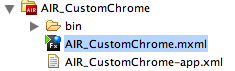
There are two important files you will have to work with to make your application chromeless. The first is the core AIR application, the second is the *-app.xml application descriptor file. This file is usually in the same directory as your base application. Go through the steps of setting up a new AIR project by selecting “File -> New –> AIR Project” from the Flex Builder Menu. Give your project a name (I called mine AIR_CustomChrome) and click “Finish”. You should have a file directory in the Navigator pane of your project that looks similar to this:
1. After you have set up a new project, you should be able to see the default code as follows:
2. In your *.MXML file, add the following lines of code to make the application. Insert them just below the “THIS IS WHERE TO ADD CODE” line:
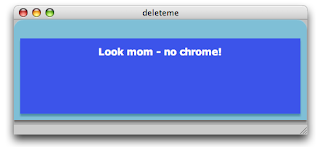
3. Test your application by running it. It should look like the image below. This application uses the system chrome, so on a Macintosh computer it will have the three little colored buttons on the top left and an application window to house the application.
4. Next, we are going to lose the system chrome. Open up the AIR_CustomChrome-app.xml file and locate the following line of code:
…and change it as follows (the parts highlighted in bold font) before saving and closing the file:
This tells the runtime not to use system chrome and that the application has support for transparency.
You might think this would be enough but it is not.
If you run the application again, you will get an application that looks like the one below. Not only are you still stuck with chrome, but it is even uglier than before. We can fix this in the next steps.
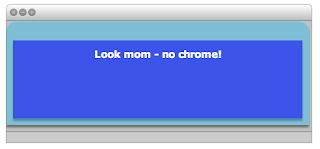
5. The cause of this is the root element used by default by AIR. This element is the <mx:windowedapplication> tag. Change both the opening and closing tags to <mx:application> Your code should look something like this now:
…and it will yield the application below when run.
This is somewhat problematic as we have almost rid ourselves of the standard native window but have not yet introduced functionality to replace the standard chrome for things like moving or closing the application. To close the application you will have to use native operating system methods (for example on a Mac, highlight the app then hit Command-Q)
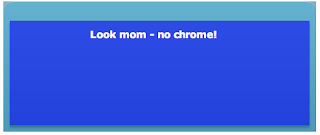
6. Note that the top right and left corners still have a tiny bit of gray color around the edges. This is still the default application window showing itself. To get rid of this, we have to introduce some lines of CSS inside the tag. Add these lines of code to your application just below the root tag.
This code sets the style for the Application component (now your root element) and will remove the gray. When you run the application again, it will be gone. Your application will also be semi-transparent as shown below.
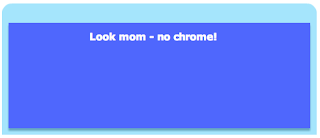
7. We still have no way to move or close the application. In order to do this, we have to introduce some simple scripting elements. Start by adding a <mx:script> tag just below your <mx:style> tag and add the following lines of code:
…and add the following method call to the root element:
…to call the init() function when the application starts up. When you run the application now, you can move it on your screen by clicking on it and dragging it.
8. We will want to add the ability to close the application. Luckily, the TitleWindow element has a built in close button. Add the following attributes to the <mx:titledwindow> element:
9. Now that we have added the Close button, we have to import the ability to detect the CloseEvent. Add the following line of code in the <mx:script> element to import this functionality:
…then add the following function to your code base.
Your complete code should now look like this:
Your application will now be chromeless and it actually can be closed by clicking on the Close button in the top right hand corner.

This tutorial assumes you are somewhat familiar with Flex programming (MXML and ActionScript) and have already installed the Flex Builder 2.01 and AIR extensions. If you’ve not done this, please visit Adobe Labs.
There are two important files you will have to work with to make your application chromeless. The first is the core AIR application, the second is the *-app.xml application descriptor file. This file is usually in the same directory as your base application. Go through the steps of setting up a new AIR project by selecting “File -> New –> AIR Project” from the Flex Builder Menu. Give your project a name (I called mine AIR_CustomChrome) and click “Finish”. You should have a file directory in the Navigator pane of your project that looks similar to this:

1. After you have set up a new project, you should be able to see the default code as follows:
<?xml version="1.0" encoding="utf-8"?>
<mx:WindowedApplication xmlns:mx="http://www.adobe.com/2006/mxml" layout="absolute">
 <!--THIS IS WHERE TO ADD CODE-->
</mx:WindowedApplication>
2. In your *.MXML file, add the following lines of code to make the application. Insert them just below the “THIS IS WHERE TO ADD CODE” line:
<mx:TitleWindow  id="mainPanel" backgroundColor="#0326FD"  layout="absolute" cornerRadius="15" alpha="1.0" color="#FFFEFE" width="465" height="160" backgroundAlpha="0.7" borderColor="#1FBDF7" themeColor="#2FE7FD" x="0">

<mx:Label text="Look mom - no chrome!" width="400" textAlign="center" fontFamily="Verdana" fontSize="15" fontWeight="bold" x="22.5" y="10"/>

</mx:TitleWindow>
3. Test your application by running it. It should look like the image below. This application uses the system chrome, so on a Macintosh computer it will have the three little colored buttons on the top left and an application window to house the application.

4. Next, we are going to lose the system chrome. Open up the AIR_CustomChrome-app.xml file and locate the following line of code:
<rootContent systemChrome="standard" transparent="false" visible="true">[SWF reference is generated]</rootContent>
…and change it as follows (the parts highlighted in bold font) before saving and closing the file:
<rootContent systemChrome="none" transparent="true" visible="true">[SWF reference is generated]</rootContent>
This tells the runtime not to use system chrome and that the application has support for transparency.
You might think this would be enough but it is not.
If you run the application again, you will get an application that looks like the one below. Not only are you still stuck with chrome, but it is even uglier than before. We can fix this in the next steps.

5. The cause of this is the root element used by default by AIR. This element is the <mx:windowedapplication> tag. Change both the opening and closing tags to <mx:application> Your code should look something like this now:
<?xml version="1.0" encoding="utf-8"?>
<mx:Application xmlns:mx="http://www.adobe.com/2006/mxml" layout="absolute" height="202" width="483">
<mx:TitleWindow  id="mainPanel" backgroundColor="#0326FD"  layout="absolute" cornerRadius="15" alpha="1.0" color="#FFFEFE" width="100%" height="100%" backgroundAlpha="0.7" borderColor="#1FBDF7" themeColor="#2FE7FD" x="0" >

<mx:Label text="Look mom - no chrome!" width="400" textAlign="center" fontFamily="Verdana" fontSize="15" fontWeight="bold" x="22.5" y="10"/>
</mx:TitleWindow>
</mx:Application>
…and it will yield the application below when run.
This is somewhat problematic as we have almost rid ourselves of the standard native window but have not yet introduced functionality to replace the standard chrome for things like moving or closing the application. To close the application you will have to use native operating system methods (for example on a Mac, highlight the app then hit Command-Q)

6. Note that the top right and left corners still have a tiny bit of gray color around the edges. This is still the default application window showing itself. To get rid of this, we have to introduce some lines of CSS inside the
<mx:Style>
        Application
        {
            /*make app window transparent*/
            background-color:"";
            background-image:"";
            padding: 0px;
            margin-top: 0;
   margin-right: 0;
   margin-bottom: 0;
   margin-left: 0;
        }
</mx:Style>
This code sets the style for the Application component (now your root element) and will remove the gray. When you run the application again, it will be gone. Your application will also be semi-transparent as shown below.

7. We still have no way to move or close the application. In order to do this, we have to introduce some simple scripting elements. Start by adding a <mx:script> tag just below your <mx:style> tag and add the following lines of code:
<mx:Script>
 <![CDATA[
   import flash.display.Bitmap;

   public function init():void {

   // Move the app when the panel is dragged
   mainPanel.addEventListener( MouseEvent.MOUSE_DOWN, startMove );

   }

   public function startMove(event:MouseEvent):void {
   stage.window.startMove();
   }
  ]]>
</mx:Script>
…and add the following method call to the root element:
creationComplete="init()"
…to call the init() function when the application starts up. When you run the application now, you can move it on your screen by clicking on it and dragging it.
8. We will want to add the ability to close the application. Luckily, the TitleWindow element has a built in close button. Add the following attributes to the <mx:titledwindow> element:
showCloseButton="true" close="closeEvent(event)"
9. Now that we have added the Close button, we have to import the ability to detect the CloseEvent. Add the following line of code in the <mx:script> element to import this functionality:
import mx.events.CloseEvent;
…then add the following function to your code base.
  public function closeEvent(event:CloseEvent):void {
     stage.window.close();
 }
Your complete code should now look like this:
<?xml version="1.0" encoding="utf-8"?>
<mx:Application xmlns:mx="http://www.adobe.com/2006/mxml" layout="absolute"
 xmlns:utils="utils.*" creationComplete="init()" height="160" width="465" >

    <mx:Style>
        Application
        {
            /*make app window transparent*/
            background-color:"";
            background-image:"";
            padding: 0px;
            margin-top: 0;
   margin-right: 0;
   margin-bottom: 0;
   margin-left: 0;
        }
    </mx:Style>

  <mx:Script>
   <![CDATA[
            import flash.display.Bitmap;
            import mx.events.CloseEvent;

    public function init():void {

         // Move the app when the panel is dragged
    mainPanel.addEventListener( MouseEvent.MOUSE_DOWN, startMove );

    }
   public function startMove(event:MouseEvent):void {
       stage.window.startMove();
    }

    public function closeEvent(event:CloseEvent):void {
       stage.window.close();
    }
   ]]>

  </mx:Script>

 <mx:TitleWindow  id="mainPanel" backgroundColor="#0326FD"  layout="absolute" cornerRadius="15" alpha="1.0"
  color="#FFFEFE" width="465" height="160" backgroundAlpha="0.7" borderColor="#1FBDF7" themeColor="#2FE7FD"
  x="0" showCloseButton="true" close="closeEvent(event)">

   <mx:Label text="Look mom - no chrome!" width="400" textAlign="center" fontFamily="Verdana" fontSize="15" fontWeight="bold" x="22.5" y="10"/>
   <mx:Label x="62.5" y="92" text="(c) Duane Nickull - samples at technoracle.blogspot.com"/>
  </mx:TitleWindow>
</mx:Application>
Your application will now be chromeless and it actually can be closed by clicking on the Close button in the top right hand corner.

Drag and Drop AIR Example
Adobe Integrated Runtime (AIR) offers developers some pretty cool features. Nevertheless, as we work towards version 1.0, there is still some catch up work being done to add in basic functionality for things like drag and drop, local file save, read, etc. One of the topics I wanted to write more about is the drag and drop functionality.
So what is drag and drop really? When you start to look at the architectural pattern, it is one of copying an original and showing a thumbnail of the original while in transit to being placed somewhere else in the environment. There are two types of drag – the copy drag and the move drag. In the copy drag, the original is left in place and the copy is placed in the target location. In the move drag, the original is removed. This requires a little more care as you have to be certain you do not destroy the original until you have confirmed the target is complete.
The first thing to do is to write a function that creates the bitmap of the item being dragged to produce a smooth effect while running. This function builds the object to drag and returns it:
So what is drag and drop really? When you start to look at the architectural pattern, it is one of copying an original and showing a thumbnail of the original while in transit to being placed somewhere else in the environment. There are two types of drag – the copy drag and the move drag. In the copy drag, the original is left in place and the copy is placed in the target location. In the move drag, the original is removed. This requires a little more care as you have to be certain you do not destroy the original until you have confirmed the target is complete.
The first thing to do is to write a function that creates the bitmap of the item being dragged to produce a smooth effect while running. This function builds the object to drag and returns it:
public function
createTransferableData(image:Bitmap, sourceFile:File):TransferableData{
var transfer:TransferableData = new TransferableData();
transfer.addData(image,"Bitmap",false);
transfer.addData(image.bitmapData,"bitmap",false);
transfer.addData(new Array(sourceFile),"file list",false);
return transfer;
}
The TransferableData object has some unique properties in the new AIR package. This object will come in four basic formats. They are "text" (string data), "url" (URL string), "file list" (array of File objects) and "bitmap". The key method is addData(),which builds the new object. It is important to note that transferable data objects may have redundant information in multiple formats -- this increases the likelihood that recipient applications will understand the object.
The DragManager object handles most of the actual operations at runtime. The code is relatively simple to set up:
private function onMouseDown(event:MouseEvent):void{
var bitmap:Bitmap = Bitmap(event.target.content);
var bitmapFile:File = new File(event.target.content.loaderInfo.url);
var transferObject:TransferableData = createTransferableData(bitmap,bitmapFile);
DragManager.doDrag(this,transferObject,bitmap.bitmapData,new
Point(-mouseX),(-mouseY));
}
Several things are happening with this code. First, the original copy is left in place when the drag operation starts. If your intent is merely to copy the object to the target, that might be okay. When moving, there are ways to make the original appear to go away but it is trickier than it seems because you have to take precautions to make sure the target gets dropped before destroying the original.
Another issue with this code as written is that by default, the copied image will appear offset to the original and this can be slightly ugly. The placement of the copied image can be tweaked by adding some fine tuning of the points as follows:
DragManager.doDrag(this,transferObject,bitmap.bitmapData,new
Point((-mouseX+65),(-mouseY+90)));
Now when you start the drag, the drag object (in the code below anyways) appears right where the original was regardless of where the mouse is placed.
If you want the original to simply disappear, you can do it easily by adding the following line of code into the onMouseDown() class:
bitmap.visible=false;
However, this removes both the original and the copy if the user releases the mouse button before the drag is complete. A better way hide the original is to set the visible property to false on the specific object, but the code is not as portable since each time it is used the object will have to be explicitly named.
The best way to really do this is with the NativeDragComplete event from the DragManager. A drag gesture involves the following event sequence:
nativeDragStart: A drag-and-drop gesture is begun by calling the DragManager.doDrag() method within a mouseDown or mouseMoved event handler. The DisplayObject passed to the doDrag() method becomes the initiating object and will dispatch a nativeDragStart event. (If the drag and drop starts outside of an AIR application, the rest of the sequence of events is the same, but there is no initiating object.)
nativeDragEnter, nativeDragOver: When a drag gesture passes over a DisplayObject, that object will dispatch a nativeDragEnter event. While the drag gesture remains over the DisplayObject, it will continually dispatch nativeDragOver events. In response to either of these events, an object that serves as a potential drop target should check the properties of the event object to decide whether it can accept the drop. If the data format and allowed actions are appropriate, then the event handler for these events must call DragManager.acceptDrop(), passing in a reference to the target object. The user will then be able to drop the dragged item onto the target.
nativeDragExit: When a drag gesture passes out of a DisplayObject, the object dispatches a nativeDragExit event. If the object earlier called the DragManager.acceptDrop() method, that call is no longer valid and acceptDrop() must be called again if the gesture re-enters the DisplayObject.
nativeDragDrop: When a DisplayObject has called DragManager.acceptDrop() and the user releases the drag gesture over the object, that object dispatches a nativeDragDrop event. The handler for that event can access the data in the transferable property of the event object and should set the DragManager.dropAction property to signal which action should be taken by the initiating object.
nativeDragComplete: When the user releases the mouse at the end of a drag gesture, the initiating object dispatches a nativeDragComplete event (whether or not the drop itself was consummated). The handler for this event can check the dropAction property of the event object to determine what, if any, modification should be made to its internal data state, such as removing a dragged-out item from a list. If dropAction==DragActions.NONE, then the dragged item was not dropped on an eligible target.
Here is a screenshot of me dropping an image of the Leela Palace Hotel into this document, minus the mouse pointer:

The code to play around with this is below:
<?xml version="1.0" encoding="utf-8"?>
<mx:WindowedApplication xmlns:mx="http://www.adobe.com/2006/mxml" layout="absolute">
<mx:Script>
<![CDATA[
import flash.desktop.DragManager;
import flash.desktop.TransferableData;
import flash.desktop.DragManager;
import flash.filesystem.File;
import flash.events.NativeDragEvent;
private function onMouseDown(event:MouseEvent):void{
var bitmap:Bitmap = Bitmap(event.target.content);
var bitmapFile:File = new
File(event.target.content.loaderInfo.url);
var transferObject:TransferableData =
createTransferableData(bitmap,bitmapFile);
DragManager.doDrag(this,transferObject,bitmap.bitmapData,new
Point((-mouseX+65),(-mouseY+90)));
bitmap.visible=false; //makes the original disappear
}
public function createTransferableData(image:Bitmap, sourceFile:File):TransferableData{
var transfer:TransferableData = new TransferableData();
transfer.addData(image,"Bitmap",false);
transfer.addData(image.bitmapData,"bitmap",false);
transfer.addData(new Array(sourceFile),"file list",false);
return transfer;
}
]]>
</mx:Script>
<mx:Panel x="10" y="10" width="310" height="361" layout="absolute" title="Panel 1">
<!--replace image with one from your own system-->
<mx:Image x="35" id="duaneImage" y="38" width="204" height="155"
mouseDown="onMouseDown(event)"
source="file:////Users/duane/Desktop/Picture 1.png"
mouseDownOutside="duaneImage.visible=(false)"/>
</mx:Panel>
</mx:WindowedApplication>
Subscribe to:
Posts (Atom)