Everything Electric, powered by Fully Charged, video features Robert driving a huge Mercedes rig.
Tuesday, April 30, 2024
Red Dwarf Fans! Robert Llewellyn drives a Class 8 Electric Truck


Wednesday, April 17, 2024
BC Hydro issues rare Call for Power; Seeks Clean, Renewable Sources
BC Hydro officially announced a call for power (CFP). Specifically, a call for clean ad affordable power.
According to the Crown Corporation, "Following months of engagement with the independent power industry, First Nations and stakeholders, BC Hydro has issued a request for proposals (RFP) to acquire approximately 3,000 gigawatt hours per year (GWh/y) of electricity. This is BC Hydro’s first competitive call for power in 15 years and will add 5% to its current supply, providing enough clean electricity to power 270,000 homes or approximately one million electric vehicles per year.
The development and construction of new clean-energy projects in response to the call for power will generate an estimated $2.3 billion to $3.6 billion in private capital spending throughout the province and create approximately 800 to 1,500 jobs on average annually."
Those inclined to answer the call can find out more at https://www.bchydro.com/work-with-us/selling-clean-energy/2024-call-for-power.html?utm_source=direct&utm_medium=redirect&utm_content=2024callforpower#:~:text=Questions%20and%20answers-,About%20the%20Call,energy%20to%20meet%20future%20needs.
Wednesday, March 13, 2024
Testing Home Energy and Sustainability - Everything Electric
We know homes need to be more efficient and sustainable - but how do things like insulation, ventilation, sustainable building materials or renewable energy sources actually solutions get tested and how do we know if they're actually going to make a difference?
Energy House Project 2 at Salford University has the answer! In this episode Fully Charged visited their very unique testing facility which puts new homes and home energy technology through the paces. Inside, two environmental chambers capable of accommodating two detached houses, recreate a wide variety of weather conditions with temperatures ranging between -20˚C to +40˚C and simulate wind, rain, snow and solar radiation. We look around to find out how this helps upgrade and future-proof homes and energy technologies!
On the topic of home energy savings, please come to the North American nexus of decarbonization, the @EverythingElectricShow (formerly "@fullychargedshow") being held in Vancouver, British Columbia September 6- 8, 2024 at the Vancouver Convention Center. We will have hundreds of EVs, electric motorbikes, eBikes, home energy devices, heat pumps and anything else that starts to put gas stations out of business.
00:00 It's -5 degrees!
00:21 Energy House Project 2
01:15 Inside the chambers
01:52 Extreme Testing Conditions?
02:44 Future-Proofing?!
04:11 Testing Tech
05:19 Technology for Refugee Camps
06:00 Flat Pack house!
06:33 What about existing homes?
08:20 Something for everyone
08:59 Outtakes...!
Wednesday, March 06, 2024
UK: Fully Charged's 'Everything Electric' Exhibitions to Restructure/Reduce UK ticket Pricing
For UK Residents, some good news for those attending the next Everything Electric event. Not many companies are lowering prices for anything so this came as a welcome surprise for those going to the next event.
Due to the prolonged cost of living crisis in the UK, confirmation of the UK's entry into a technical recession came as little surprise. Its impact on the electric vehicle market, and the knock-on adjacent markets, not least the residential EV charging sector is clear. The percentage of new car sales that are battery electric in the UK has, unlike other developed markets, plateaued at ~15%. Meanwhile, the cost of electrification technologies, in general, is perceived as high in the UK, and deemed unaffordable by many. While the reality is much more nuanced, and the economic case for these technologies is compelling, affordability is a critical factor. Mindful of ongoing cost consciousness, the organisers of the Everything Electric expos in the UK are significantly reducing entry prices.
A single-day ticket now starts at £19.50, reduced from the current cost of £30.00 as a reflection of recessionary conditions.
The organisers also accept that early mainstream visitors, who are not Fully Charged SHOW fans, might be less willing to pay a premium. Furthermore, in order that younger generations can better participate in the transition to cleaner tech, the free ticket criteria is being widened.
Previously tickets for those aged 15 and under have been free, and this to be extended all the way to those aged 25 and under*.
*This offer is subject to the condition that the individuals attend with a fee-paying adult, or as part of an officially sanctioned party.
This means that a family of four with two children (up to 25 years old) can access Everything Electric in the UK for less than £40.
Despite these cost reductions, the Everything Electric expos will incorporate all of the first-class attractions that they are famous for. Next up is Everything Electric LONDON at ExCel at the end of March; followed by Everything Electric NORTH at the Yorkshire Event Centre in May. Firm favourites such as more than 50 live sessions, the Energy Advice Zone, Zero Carbon Kitchen, and a highly-entertaining Kids Zone will ensure a fun-filled family day out.
Arguably the star of the show is the widest selection of Electric Vehicles available anywhere, including the world's most comprehensive EV Test Drive Programme.
Existing 2024 ticket holders at the higher price point will be offered cheaper tickets, that effectively refund the difference, for the equivalent show in 2025. The Everything Electric exhibitions also incorporate a significant amount of content for energy and transport trade professionals, who can attend the first day of each show free of charge.
Friday, March 01, 2024
Battery EV Repair or Despair?!
This week, Quentin Willson continues our mission to share facts with special guest Matt Cleevely, who is one of the country's most experienced and established EV servicing and repair specialists. There has been a lot of speculation about repairing EVs, especially when it comes to the battery. Many people believe that EV batteries are difficult to maintain and fix because of their complexity, cost, and safety concerns. However, Matt argues that this is not the case and shares examples from his busy workshop and national mobile repair business to support his argument.
During the conversation, Quentin and Matt also discuss the real challenges of repairing EVs and talk about the work that Matt is doing to share his business model within the service and repair industry. His goal is to help other garages and dealerships become EV-ready.
Thursday, February 29, 2024
Fully Charged LIVE confirms its return to Vancouver Convention Centre as Everything Electric CANADA this September
Fully Charged LIVE has announced that it will be returning to Vancouver Convention Centre this September as Everything Electric CANADA. This is great news for all of us who are passionate about reducing carbon emissions and promoting sustainable energy. In addition to this, fans of the TV show Red Dwarf will have a rare opportunity to meet its star Robert Llewellyn (who played Kryton), and even take a selfie with him (just like I did!).

Some of the main highlights of this event include:
British-based, global YouTube sensation, the Fully Charged SHOW confirms its return to Vancouver under the new brand Everything Electric
Confirmed return to Vancouver Convention Centre on 6th, 7th & 8th September
Organizers confirm they will double the exhibition size and target 20,000-25,000 attendees
New commercial appointments confirmed to accelerate growth
British Columbia’s clean energy provider, BC Hydro, returns as key partner
After a hugely successful launch event in September 2023 which saw over 17,000 attendees, Fully Charged LIVE will return to Vancouver under the new name of Everything Electric CANADA.
This re-brand of their 6 global events enables organisers to further target the early mainstream market as they seek to attract more 20,000-25,000 attendees to their second show in Vancouver this Fall.
Organisers confirm that the event will double in size as they secure additional exhibition space in the Vancouver Convention Centre to accommodate more exhibitors, extend the test drive activation and add new features for 2024.
As well as the familiar favourites returning which include the live theatre sessions, test drives and rides, home energy advice team and commercial vehicle zone, new features for 2024 will include the Zero Carbon Kitchen and the Electric Launchpad.
The Zero Carbon Kitchen will be hosted by a group of plant-based chefs with live cookery demonstrations throughout the event while the Electric Launchpad will showcase the very latest electric vehicles coming to market.
To reflect the growth targets of the event, organisers have installed a new Canadian commercial team on the ground with Ken Bokor in Toronto joining as Sales Director supported by Duane Nickull in Vancouver in his role as Sales Manager. This Canadian commercial team, along with the broader global commercial teams, is headed up by the new Chief Commercial Officer, Carlo Zoccali.
BC Hydro, who were instrumental in bringing Fully Charged LIVE to Vancouver in 2023, will return as headline sponsor of Everything Electric CANADA.
To exhibit, please reach out to duane.nickull@fullycharged.show
To exhibit, please reach out to duane.nickull@fullycharged.show
Wednesday, February 21, 2024
Is THIS the Solution to Tackling Fuel Poverty?

To see the full video, click https://youtu.be/BDoHWu98fy4
In the UK, Canada, USA and beyond, we are currently facing a significant housing crisis in addition to an increasing number of people living in fuel poverty. In this episode Imogen and the team went to Halton in Lancaster to talk to the Lune Valley Community Land Trust.
Having identified the lack of housing and the poor standard of housing available in Halton, the Lune Walk Community Led Development came about. The development is made up of 13 affordable rented and 7 shared ownership homes. Each home is Passivhaus accredited and generally needs 90% less energy for heating and hot water than standard UK buildings meaning that running costs are very low helping to reduce fuel poverty for residents.
Timestamps
0:00 Intro
00:12 The housing crisis
00:59 Lack of housing and fuel poverty
01:34 What is fuel poverty?
02:15 How the Lune Valley Community Land Trust came about
03:59 What is a Community Land Trust?
05:25 The role of South Lakes Housing
05:53 Why Passive Houses?
07:10 Eliminating fuel poverty
07:53 Construction of the houses
08:58 Regulatory changes and the future
09:59 Why passive houses just make sense
Why not come and join us at our next Everything Electric expo: https://everythingelectric.show
Support our StopBurningStuff campaign: https://www.patreon.com/STOPBurningStuff
To exhibit or sponsor the Canadian Event, email: duane.nickull@fullycharged.show
UPCOMING LIVE EVENTS:
Everything Electric LONDON, ExCel London - 28th, 29th & 30th March
Everything Electric NORTH, Yorkshire Event Centre - 24th, 25th & 26th May
Everything Electric CANADA - Vancouver Convention Centre - 6th, 7th & 8th September
Everything Electric SOUTH - Farnborough International - 11th, 12th & 13th October
Everything Electric EUROPE - RAI Amsterdam - Date Announcement Imminent
Monday, February 19, 2024
Japan Carmakers Forge Ahead With EV Investments Despite Slowdown
As reported by Bloomberg Business News, the top Japanese auto manufacturers are keeping their foot on the accelerator when it comes to investing in electric vehicles. Many in the industry were anticipating a decline in investment and production due to the short term slump in EV sales, but the North Star for this industry has not moved. Whether or not consumers believe in climate change, the facts remain:
1. It costs (in British Columbia, Canada) about $30 per month to power an EV. The same number of kilometers in an Internal Combustion Engined (ICE) powered car will cost about $550 in gasoline (regular - premium is more).
2. We are running out of fossil fuels. Top climate deniers will not admit this, but we have done work for the United States DOE and have seen the raw data.
EV sales growth is slowing (but still growing, not shrinking) and executives have said nonetheless, it shall continue to grow. While there are competing questions about other propulsion systems (like Hydrogen), Japan’s auto companies knew car buyers weren’t ready just yet to go electric as quickly as some hoped.
“The customer decides the speed of electrification,” Stephen Ma, Nissan Motor Co.’s chief financial officer, said this month. “Electrification is not linear growth, a straight line. It will go up and down. But long term, it will grow.”
Read the rest of the story on Bloomberg.
If you are on the hunt for your first EV, the Everything Electric show (formerly "Fully Charged LIVE") in Vancouver, BC is the central place where you will see all the top EV manufacturers not only displaying their vehicles but allowing test drives. Come to see us this fall - https://ca.everythingelectric.show/. Aside from EVs, you can test electric motorcycles, scooters and herds of micro mobility offerings (special test track available).
Friday, February 16, 2024
Fully Charged LIVE 2023 - a great interview with Chace@Edison Motors
So we thought we had seen everything that came out of Fully Charged LIVE 2023, but this great video from the Victoria Electric Vehicle Association (VicEVA) showing our friend Chace from Edison Motors somehow escaped us until now.
Wednesday, February 14, 2024
1,000 km on a Single Charge?
At the 2024 Consumer Electronics Show (CES), the spotlight was on groundbreaking developments in AI and healthcare. However, battery technology is the game-changer at the heart of these innovations, enabling greater power efficiency. Importantly, electric vehicles are where this technology is being applied most intensely.
Today’s EVs can travel around 700km on a single charge, while researchers are aiming for a 1,000km battery range. Researchers are fervently exploring the use of silicon, known for its high storage capacity, as the anode material in lithium-ion batteries for EVs. However, despite its potential, bringing silicon into practical use remains a puzzle that researchers are still working hard to piece together.
So what is the Breakthrough in Silicon-based Battery Technology?
Enter Professor Soojin Park, PhD candidate Minjun Je, and Dr. Hye Bin Son from the Department of Chemistry at Pohang University of Science and Technology (POSTECH). They have cracked the code, developing a pocket-friendly and rock-solid next-generation high-energy-density Li-ion battery system using micro silicon particles and gel polymer electrolytes. This work was recently published in the journal Advanced Science.
Challenges with Silicon as a Battery Material
Employing silicon as a battery material presents challenges: It expands by more than three times during charging and then contracts back to its original size while discharging, significantly impacting battery efficiency. Utilizing nano-sized silicon (10-9m) partially addresses the issue, but the sophisticated production process is complex and astronomically expensive, making it a challenging budget proposition.
Take action! Join us at Everything Electric in North American September 6-8, 2024 in Vancouver, BC. Learn more, join the discussion and move our planet ahead.
Tuesday, February 13, 2024
A Lost Battery Technology Gets Recharged with LiNa Energy | The Fully Charged Podcast
From Everything Electric (formerly "Fully Charged LIVE"). This week Imogen picks up the podcast duties and speaks with Arvind Sabharwal and Will Tope, Chairman and CEO of LiNa Energy, a UK based battery technology company.
Video Link: https://youtu.be/BPOYQRErieE
By utilizing one of the most abundant elements, sodium, the rediscovery of a previously forgotten battery chemistry and borrowing a few bits of technology garnered from fuel cell development, the team at LiNa have created a new, long duration stationary energy storage solution in the form of sodium solid state lithium free batteries.
This is a fascinating discussion with a company at the cutting edge of a critical technology.
How can you help our planet advance?
Why not come and join us at our next Everything Electric expo: https://everythingelectric.show
Support our StopBurningStuff campaign: https://www.patreon.com/STOPBurningStuff
Become a Fully Charged SHOW Patreon: https://www.patreon.com/fullychargedshow
Visit: https://FullyCharged.Show
#fullychargedpodcast #fullychargedshow #everythingelectric #fullychargedlive
Monday, February 12, 2024
Tesla-Rivaling 'Ionna' Charging Network From Seven Automakers Starts Taking Shape
In North America, there are primarily two main charging standards for electric vehicles:
SAE J1772: This is the standard connector for Level 1 and Level 2 charging. Level 1 charging typically involves using a standard household outlet (120 volts AC) and Level 2 charging involves using a dedicated charging station (240 volts AC). The SAE J1772 connector is widely used and compatible with most electric vehicles sold in North America.
CCS (Combined Charging System): CCS is an extension of the J1772 standard and is used for DC fast charging. It adds two additional pins to the J1772 connector to accommodate DC charging. CCS is widely adopted by many manufacturers and is becoming increasingly popular for DC fast charging infrastructure across North America.
These two standards cover the majority of electric vehicles on the market and provide compatibility for both slow and fast charging needs. Additionally, Tesla vehicles come with their proprietary connector and charging infrastructure, but adapters are available for Tesla vehicles to use public charging stations that support J1772 or CCS connectors.
Why is this important?
Compatibility: Charging standards ensure that EVs from different manufacturers can be charged at various charging stations. This interoperability is essential for EV owners, as they need assurance that they can charge their vehicles at any compatible charging point, regardless of the manufacturer.
Infrastructure Development: Standardized charging protocols encourage the development of charging infrastructure by providing a clear framework for equipment manufacturers, utilities, and governments to work within. This, in turn, helps in the expansion of charging networks, making EV ownership more convenient and accessible.
Consumer Confidence: Standardized charging solutions give consumers confidence in the reliability and safety of EV charging. Knowing that their vehicle can be charged at multiple locations using standardized connectors reduces anxiety about range limitations and encourages more people to consider electric vehicles as a viable transportation option.
Market Growth: Charging standards facilitate the growth of the EV market by streamlining the manufacturing process for charging equipment and reducing costs associated with developing proprietary solutions. This can lead to lower prices for charging infrastructure, making it more economically feasible for businesses and governments to invest in EV charging networks.
Regulatory Compliance: Standardized charging protocols often become part of regulations and standards set by governments and industry bodies. Compliance with these standards ensures that charging infrastructure meets safety and performance requirements, promoting trust among stakeholders and regulators.
Overall, charging standards play a crucial role in accelerating the adoption of electric vehicles by promoting interoperability, infrastructure development, consumer confidence, market growth, and regulatory compliance.
So what is Ionna and why is this news?
Last summer, seven of the world's biggest car companies announced they were joining forces to tackle America's EV charging woes head-on. Now that fast-charging joint venture has a name and a CEO.
Ionna has received approval from regulators and is officially spooling up operations, the company announced on Friday. Its CEO is Seth Cutler, who previously held various executive roles at EV Connect and Electrify America, two charging networks.
The venture, a collaboration between BMW, Honda, General Motors, Hyundai, Kia, Mercedes-Benz and Stellantis (the European owner of Jeep, Chrysler, Alfa Romeo and many other brands), aims to alleviate the charging anxiety that deters so many car buyers from going electric. Ultimately, that should help them sell more cars.
In July, those companies announced plans to blanket North America with at least 30,000 high-powered charge points, thousands more plugs than Tesla's vaunted Supercharger network currently offers. That's a welcome development for the EV world, seeing as America's charging infrastructure is kind of a hot mess right now.
There aren't enough public plugs available, and the ones that do exist suffer from nagging reliability issues. (The Supercharger network is the outlier here in terms of both user experience and convenience, but it was historically off-limits to non-Tesla owners.)
Where this Conversation leads?
Come to Everything Electric in Vancouver Canada, September 6-8, 2024. The event will be a focal point for groups with vested interests in all competing standards as well as a place for consumers to jump into the conversation.
The conversation needs more than corporate perspectives. It needs input from consumers, who ultimately have to pay the price for multiple standards.
Friday, February 09, 2024
Biktrix unveils new model - will be at Everything Electric 2024 (formerly "Fully Charged)
After a groundbreaking year of innovation and engineering mastery, Biktrix once again unleashes a model worthy of closer inspection. The first thing that struck me was the looks; it is a bike I would be happy to be seen in. After all, a bicycle is a fashion statement to some degree.

We are geeks though. This model will satisfy some very serious criteria for our needs. The Biktrix Juggernaut features on-demand throttle (check) and pedal assist (check), a stock battery boasting a 52V 25Ah capacity (check) with a range extender option (check), and premium suspension options for every version. It also features modern geometry and advanced suspension kinematics for an unparalleled ride.
Power (also a box to check)? It has 220Nm of torque with an advanced Torque+Cadence sensor for responsive, exhilarating power. Compare this to the Bafang 500W motor with 87Nm of torque. There is no shortage of hill climbing capability except the rider's choice of line and traction. 220Nm could spin around to lift a bike and rider vertically upwards with the right gearing.
We are hoping this will be at the Electric Everything 2024 LIVE event (formerly "Fully Charged") in Vancouver September 6-8, 2024. They will be at booth B260 and you can test ride their eBikes on the Micromobility test track.
Also note that Biktrix is making an unparalleled offer to attendees of this year's show - they are raffling off not one, but THREE eBike packages with complete bikes and an accessory package to show attendees, one per day! You need to be there to enter though, so get your tickets early.
Thursday, February 08, 2024
Brussels recommends new EU climate target: a 90% cut of all greenhouse gas emissions by 2040
As we already know - fossil fuels need to be transitioned away from. Regardless if you believe in climate change, we are simply running out of fossil fuels.
The 90% reduction, as compared to 1990s levels, would entail a massive deployment of renewable systems, the irreversible abolition of coal, and the near-total disappearance of gas from the bloc's energy system, as well as profound changes in transport, food, buildings, factories and waste management.
The target is necessary to keep the EU aligned with the 2015 Paris Agreement, which committed nations to keep the Earth's long-term average temperature well below 2°C and, preferably, below 1.5°C, a goal that each year appears to slip further away.
The sense of urgency dramatically ratcheted up when 2023 was declared the warmest year since records began in 1850, laying bare the ticking bomb set by the climate crisis.
Read the full story here:
Tuesday, February 06, 2024
Why (Education about) saving the earth is a passion!
Lately, I have been posting many messages about how to make our earth better. Specifically, I have been promoting alternative energy where the incumbent is Fossil fuels. We need to transition away from this. People like Donald Trump seem to think we can keep "Drilling" and things will be okay. Here in Canada, we have the same types of politicians. They al need education to understand the reality.
I want to ask all of you to separate your beliefs in climate change from a more practical sense of what it might mean to keep our lifestyles. The fact that people like Donald still believe in drilling is not going to help us. Regardless of what you believe in terms of climate change, we (the world) are running out of fossil fuels. The affordable oil is almost gone, perhaps at best another 50-80 years. So ask this - "When it gets scarce, how much will it cost and who will buy it (or even be able to buy it)?".
In 2045, gas will probably cost around $12 per gallon. Each year accessing fossil fuel reserves gets harder. At some point, given an oil-based economy, our civilization will falter on this point. People (largely Americans and Canadians) complain when gas hits $4 per gallon. That is roughly 4 liters of hydrocarbons.
I went to Punk Rock Bowling in Las Vegas and was confronted with people who readily complained about the price for gas. I talked to them in concession lineups. When they ordered, they paid $5 USD for a 375 ML bottle of water. Note that it takes 3 of these to make a liter, then times 4 to make a gallon. The end of this is that people who complain about $4 per gallon of gas willingly fork over $60 a gallon for water! ((3 * $5) * 4).
I am passionate about education in this regard. We all need to understand that fossil fuels, even at $20 per gallon, are ridiculously under-priced.
Deprecation of Technology?
When people went to music stores and bought 8-track tapes in 1980, if they had known that the 8-track player for cars was a goner, they might have changed their buying decisions and bought CDs instead. The same basic pattern is inherent today.
Join me at Fully Charged LIVE Canada 2024 (Vancouver Convention Center, Sep 6-8) to understand what this all means.
https://ca.fullycharged.live/
I will be there. It is my passion to help educate people on this topic, but more accurately, I wish to be able to help get you ahead of the curve, save you money both short and long-term, and help us all have a livable planet.
Come and join me!
Monday, February 05, 2024
A must watch video from Robert Llewellyn!
Ahead of this weekend's first Everything Electric AUSTRALIA expo in Sydney, Robert has pulled together his selection of topical News stories, including some stinky goings on in an EV transport vessel, a V2L set up that saved lives and the bikes that are saving the burning of 1 million barrels of oil a day!
https://www.youtube.com/watch?v=O4dS9u201x8
Wednesday, November 22, 2023
To our EU Friends - Fully Charged LIVE is an Electric Train Ride Away!
This weekend's show at the RAI in Amsterdam is once gain ground zero for anyone wanting to decarbonize their lives and for the hundreds of companies offering products and services to enable that path. We would attend in person if it were possible to get from North America to the EU without burning jet or Marine fuel. Someday, we hope companies like Duxion (https://www.duxion.com/) can offer electric Aviation options for air travel or that Acel Power (https://www.acelpower.com/) powered ships were in the Atlantic, ready to take passengers.
There are several notable companies at Fully Charged LIVE in the EU this weekend. One we highly recommend visiting (for the two-wheeled crowd) is Verge Motorcycles! They are out of Estonia and have a massively cool looking electric motorcycle (Photo below).
Get your tickets/learn more here: https://eu.fullycharged.live/

Tuesday, November 21, 2023
The World's Largest & Most Diverse Collection of EVs!
The Zeekr X is literally one of the many EVs that will be on display at Fully Charged LIVE in Amsterdam Nov 24-26 this year. Everything Electric's (formerly Fully Charged LIVE) Elliot goes for a spin in the new Zeekr X. A sister car to the excellent Volvo EX30 and Smart #1, but packed with more gadgets than the two combined, has Zeekr created a truly desirable, luxury family car - or just a gimmick on wheels?
The event this weekend is believed to be the world's single largest collection of diverse brands of EV ever. Don't take our word for it, attend and see for yourself. Tickets still available - https://eu.fullycharged.live/
Another Reason to see Fully Charged LIVE in Amsterdam at the RAI!
I live in Canada, the country of 1,000,000 lakes and 36,000,000 people who love to use them. Sadly, boating has a huge negative GHG footprint. We all strive to reduce our CO2 footprint but we also love boating. One of the coolest answers to this dilemna is shown off by Thames Electric in this interview with Robert Llewellyn.
If you are in Europe, come to Fully Charged LIVE in Amsterdam, November 24, 25 and 26 - https://eu.fullycharged.live/ Travel via EV, rail or your choice of non-greenhouse gas producing method of transport.
Thursday, November 02, 2023
Another First for British Columbia to Reduce GHGs
The innovative uses of technology to help the population reduce reduce their GHG footprint and (gasp) even complete decarbonization continues.
Following a visionary speech by CEO Daniel Sitnam at a climate event a few years ago where he pledged to reduce GHGs, Helijet announced plans to become the first Canadian air carrier to provide passenger and cargo services using electric vertical takeoff and landing (eVTOL). HeliJet has placed firm orders for ALIA eVTOL aircraft from BETA Technologies. Helijet President and CEO Danny Sitnam and BETA Sales Director Skye Carapetyan made the announcement with British Columbia Premier David Eby at Helijet’s Victoria Harbour Heliport.

Full Story at https://helijet.com/helijet-places-order-with-beta-technologies-for-first-passenger-service-evtol-aircraft-in-canada/
Tuesday, September 26, 2023
This EV Is 111 Years Young - And Still Going Strong!
This video on a 100 year old Battery Electric Vehicle (BEV) puts modern EVs into perspective. We (Fully Charged LIVE) will be back in 2024 with a bigger show! This means you may get a second chance to see this.
Wednesday, September 20, 2023
A Fully Charged Success!
I've now recovered after working Fully Charged LIVE. Not tired because the team wanted to me to work un-fathomable hours, only because I was so totally enthusiastic about working for this team that I pushed myself to the limits.
Fully Charged LIVE is literally the best thing I have been part of as a profession in the last decade. They are a global group of people 100% committed to solving the causes of climate change. As people, I witnessed the CEO and founder, Robert Llewellyn (of Red Dwarf fame) roll up his cleaves and putch in to move heavy iron gates as the show closed. I have almost never seen CEOs work at such tasks but it speaks volumes for their character.
Fully Charged LIVE is a show with one clear objective - to help educate people how to save our planet. The events are filled with information sessions exhibitors and keen individuals who are all working towards that goal.
I personally learned so much that I am still digesting the lessons. For example, running a 2 stroke leaf blower for one hour is as harmful to the environment as driving a modern car 500 KM. All modern autos have very advanced emissions control systems. Leaf blowers have zero emissions treatment and emit all the harmful gases to our atmosphere.
I also learned how to take steps to make my house more environmentally friendly. Starting with using a heat pump instead of gas heating, I also learned how to cook great dishes using induction stove tops rather than gas stove tops by two esteemed chefs.
Fully Charged LIVE is coming back to Vancouver in 2024. Although I am a contractor, I really hope to be involved in that event. It was the nexus of efforts to move our planet to a sustainable course.
More to come.
Monday, September 04, 2023
Fossil Fuel Subsidies rise to over $7 Billion; Why Fully Charged LIVE is Important!
- As reported by OilPrice.com, BP's CEO Bernard Looney and even the most pro-transition governments believe investing in immediate energy needs, like oil and gas, is essential, leading to record subsidies in 2022. This is WRONG from a perspective of saving our planet, but understandable? Why? Even the local government here in British Columbia makes a ton of revenue from Fossil Fuel taxes. Oh, you didn't know that? Understandable as it is well hidden. The taxes at the pump do fund many good things, but in the long run, they hurt us.
- A recent IMF report indicates that the majority of the $7 trillion in subsidies is "undercharging for global warming and local air pollution," while climate think tank IISD criticizes the G20 for record-breaking state support for the fossil fuel industry.
- The IMF also suggests that full fossil fuel price reform could reduce global CO2 emissions significantly but faces challenges from governments wary of public backlash due to increased living costs. We need to revise what we are doing here ASAP!
If you want to do something about this, join me at Fully Charged LIVE in Vancouver, September 8-10, 2023 and join the conversation to move to electrify everything. We do not need fossil fuels as much as we think we do. We need to transition now. Yes, in the sort term, they are a low cost way to get stuff done, but in the long term, the costs will be mind-blowingly more expensive.
I am not being sensationalist. Some outlets report that global fossil fuel subsidies are as much as $450 Billion annually! This is outrageous given climate change costs are far higher. Many leading organizations are now claiming that fossil fuel burning contributes to global annual costs that far outweigh the benefits.
If you want to help, come to Fully Charged LIVE Sep 8-10 in Vancouver. Join us in a conversation to end this madness.
Friday, September 01, 2023
A preview of the Fully Charged LIVE Show Program
You got it here first! Well, at least at the same time as other published it.
The 2023 Fully Charged LIve Vancouver, BC event, scheduled for Sep 8-10, 2023, it now live. The list of exhibitors, speakers, programmes, sessions and other activities is awesome. In full disclosure, I do work for Fully Charged LIVE and am very happy to be part of the team.
The official link is here -> https://cdn.asp.events/CLIENT_Fully_Ch_D9042DD3_D4AB_84B3_2DCA9BBA5BF50728/sites/flc-2023-canada/media/Fully-charged-live-Canada-Event-Guide.pdf
Great reading for your long holiday weekend!
Thursday, August 31, 2023
So what is Fully Charged LIVE? Fully Charged LIVE is an electric vehicle and renewable energy-focused event hosted by the YouTube channel "Fully Charged." The show aims to educate and engage the public about sustainable transportation, renewable energy technologies, and their environmental benefits.
For those who care about our planet, Fully Charged LIVE likely features informative sessions, workshops, and presentations about electric vehicles (EVs), clean energy solutions, and environmental sustainability. The show can play a crucial role in disseminating accurate information and dispelling myths surrounding these topics.
The event offers attendees the opportunity to see and experience the latest advancements in electric vehicles, renewable energy systems, and energy storage technologies. This can contribute to raising awareness about the rapid progress in these fields. If you are interested in reducing your CO2 footprint, this is a great place to learn.
Fully Charged LIVE is an inspiration for sustainable living. By highlighting the benefits of electric transportation and clean energy, the show could inspire individuals to adopt more sustainable lifestyles. It might motivate people to consider purchasing electric vehicles, installing solar panels, and making other environmentally conscious choices.
The event offers great opportunities for networking. Events like Fully Charged LIVE bring together enthusiasts, experts, industry professionals, and advocates from various fields. This fosters networking, collaboration, and the exchange of ideas, which can further accelerate the adoption of clean energy solutions.
FCL has many engaging presentations as well. The list of sessions is posted online, lead by BC Hydro. The show could feature engaging presentations, demonstrations, and interactive activities that make learning about EVs and renewable energy enjoyable for attendees of all ages.
Renewable energy is a focus of the show as well. By emphasizing the benefits of renewable energy sources like solar, wind, and hydroelectric power, the show contributes to increasing public support for the transition from fossil fuels to cleaner alternatives. Note that all attendees are encouraged to travel by the least harmful manner possible and if unavoidable, to offset their GHG footprints by whatever means are available.
As the world continues to grapple with the challenges of climate change and pollution, events like "Fully Charged LIVE" play a role in promoting solutions that can mitigate these issues. The show can contribute to a broader movement towards sustainability. People who are experts in helping corporations understand their impact and reduce their footprints are speaking at the event.
It's important to note that whether "Fully Charged LIVE" is the "best" show depends on individual preferences, interests, and the specific goals of the event. Different people might prioritize different aspects of the show based on what resonates with them the most. As of my last update, the show's reputation might have grown or evolved, so I recommend checking the latest reviews and information to gauge its current standing. The details are at https://ca.fullycharged.live/programme
Wednesday, August 30, 2023
Fully Charged LIVE - Vancouver, BC Sep 8-10, 2023
Well, I joined Fully Charged LIVE at the beginning of July 2023 and I am happy to say, the exhibit hall is full and we are fully on our way to an amazing show! BC Hydro, a company that has achieved stellar renewable vs non-renewable energy production, stepped up to lead the efforts and is totally engaged in making the show a huge success. All the major EV manufacturers are there with only one or two exceptions. Miss 604 is actively blogging leading up to the event and great companies like Sartee's, 7Gen, Fast Co (more on this in a bit), Innovabot (yes - the Eboo will launch in Vancouver!), Penguin Pickup, Vancouver Community College, Atlas-ESS, Zygg, Shaboardz, ENVO, Electrom, Ohm Cycles, Predator Designs and others including Porsche, Kia, Hyundai, etc will all be there. This is ground zero for those who want to reduce their CO2 footprints.
For anyone on the fence who also owns an EV, Fast Co is raffling off an amazing set of wheels at this event. Come by their booth to enter and have a chance to win a wicked prize! I am personally going to be checking out the Predator helmets and I do want an eSkateboard for commuting - Shaboardz!
Here is a quick overview of Fully Charged LIVE:
Billed as the World’s Number 1 Home Energy & Electric Vehicle Show, Fully Charged LIVE (FCL) is coming to Vancouver September 8-10, 2023. This will be one of only six Fully Charged Live events held around the world in 2023 and only one of two in North America. The Live show was forged from the massive success of the Fully Charged Show, which started as a single Youtube Channel in 2010 that has now grown to a Clean Tech media powerhouse online and through social media with nearly 1M subscribers and over 4M views per month.
It's unique digital first strategy delivers an audience ready to embrace and purchase new clean technologies.
FCL Canada will showcase what is new and next for electrification, renewable energy and clean technologies for consumers and businesses alike, all while hosting world class presentations from industry experts and Fully Charged personalities. Clean Energy is what FCL is all about and with the full support of our Title Sponsor BC Hydro, FCL is working with industry, government, the private sector, sustainable leaders and industry experts to showcase everything to help electrify our lives and our future.
The event has a strong emphasis on transportation with a major focus on EV’s but including everything from e-bikes to micro-mobility, transit, commercial vehicles, marine vessels and even airplanes, all while presenting charging options, mobility planning and various related products and services. Attendees can explore and even test pilot a wide variety of transportation and mobility options of all shapes and sizes to fit their lifestyle and needs. FCL has a variety of test drive/ride options including, an indoor/outdoor EV test drive, a LSV (Low Speed Vehicle) test drive, E-Bike track and Seawall access, and a Micro Machine test track.
FCL also presents ways of transforming your homes and businesses to be more efficient with solar and wind technologies, battery storage, heat pumps, insulation, smart control tech and the latest and greatest for efficiency and aesthetics. The internationally celebrated feature, the Home Energy Advice Team (HEAT), presented by Vancity, will allow attendees the opportunity to book one-on-one time with industry experts to discuss their personal household considerations and plans to be more energy conscious.
Government programs, municipal governments, trade associations, new innovations, education, fleet services, B2B connections/opportunities, will all be under the living green roof of the Vancouver Convention Centre at FCL. Our ‘whole industry approach to electrification’ ensures we are not simply an auto show nor a consumer marketplace, rather a multi-faceted platform where businesses and consumers can find real world solutions for today that will be future proof moving forward. FCL delivers a values-based audience that have their purchasing and lifestyle decisions rooted in doing better for the environment by way of clean energy solutions.
Get your tickets now!
Tuesday, August 29, 2023
EV Batteries - Essential Knowledge for Consumers! Come to Fully Charged LIVE to learn more.
As part of evangelizing the Fully Charged LIVE event in Vancouver, BC Sep 8-10, 2023, I have many people who are going tell me they are currently not considering an EV due to several preconceptions about the batteries. Aside from the show being a great place to learn about this, I wanted to post a few thoughts in this post to raise awareness over the key considerations.
One of the more common concerns is "What happens if you are driving on a long, lonely highway and your battery runs out of power?". My answer is basic - "Pretty much the same thing that happens in an internal combustion engine (ICE) car when you run out of gas. You're stranded until help arrives". The point is that any technology has the potential to run out of energy and if you manage to not run out of gas on a regular basis, you will probably be equally adept at not running out of electrical energy. In fact, EV's will warn you a lot more than ICE vehicles as the electronics are generally far more advanced.
The second concern is the battery. Yes, there are some horror stories about batteries eventually needing to be replaced. Here is a short primer on the lifespan of EV batteries (and batteries in general).
The lifespan of electric vehicle (EV) batteries can vary based on several factors, including the specific chemistry of the battery, how it's used, how it's charged, and the overall design and quality of the battery management system. Here is a short list of some factors consumers might want to understand.
Battery Chemistry: Different EVs use different battery chemistries, such as lithium-ion (Li-ion), lithium iron phosphate (LiFePO4), and others. Many eBikes and other Micromobility devices use similar batteries. Specific chemistries tend to have longer lifespans and better durability than others.
Usage Patterns: How an EV/eBike is driven and recharged can impact the battery lifespan. Aggressive driving, frequent rapid acceleration, and high-speed driving can all put more stress on the battery. On the other hand, gentle driving and moderate speeds can be less taxing.
Temperature: Operating in extreme temperatures, both hot and cold, can affect the performance and lifespan of EV batteries. High temperatures can accelerate battery degradation, while cold temperatures can reduce the battery's efficiency and capacity temporarily. Research Gate has an excellent article on this topic.

Charging Habits: The way an EV is charged also matters. Rapid charging and frequent deep discharges can contribute to faster degradation. Charging to 100% and keeping the battery at a very low state of charge for extended periods can also impact battery health.
Battery Management Systems: Quality battery management systems (BMS) can help extend battery life by monitoring and controlling the charging and discharging processes, ensuring balanced cell voltages, and protecting against overcharging or over-discharging.
Technology and the future will play a big part in mitigating some of these considerations. The EV industry (as well as cell phones, laptops, eBikes and a million other industries) is continuously working on improving battery technology, which includes developing more durable chemistries, better thermal management systems, and enhanced BMS.
So what can you do?
Many EV manufacturers provide warranties for a certain number of years or miles that guarantee a minimum amount of battery capacity retention over that period. This is a testament to their confidence in the longevity of their batteries. When you are shopping for an EV, ensure that you are asking questions about this.
At the same time, come to Fully Charged LIVE and ask the major EV companies about replacement costs. Eventually an EV may reach the point where the battery needs replacement. This can take several years, and by that time, technology advancements and decreasing battery costs may have made replacements more affordable but don't count on that. Ask for prices now and use those to weigh your decisions.
It's important to note that battery technology is evolving rapidly. In general, the lifespan of modern EV batteries is expected to be quite reasonable, often surpassing 100,000 miles (160,000+ kilometers) or more before significant degradation occurs. As EV technology improves, we can expect even longer-lasting batteries in the future. When considering costs of ICE vs EV, consider that things like timing belts, top end rebuilds, sensor replacements etc are all part of servicing an ICE vehicle and can add up. BY comparison, EV's do require less maintenance.
Monday, August 28, 2023
Lamborghini Lanzador 1,341 BHP EV Shatters Supercar and EV Expectations Alike (In a good way)
Like all major automobile manufacturers, Lamborghini is moving toward an electric future. The first major stake in the ground is the Lanzador concept, scheduled for arrival in 2028. The 2+2 Lanzador isn’t merely a design exercise, but rather an early look at the automaker’s first full EV entry. From what I see, I am impressed!
The "Lanzador" sets the bar with impressive power and features to compete with models like the Ferrari Purosangue and Rolls-Royce Spectre. Lamborghini is known for its bold and powerful vehicles, and the Lanzador certainly aligns with their design philosophy. True to its heritage, V12 or not, the Lanzador is purported to have a staggering power output of 1,341 BHP. The 100% torque of an EV means we are likely to see some rather fast 1/4 mile times.

The sleek, aerodynamic lines that define Lamborghini's aesthetic are reimagined in an electric context, exuding an aura of modernity and innovation. The silent hum of the electric powertrain doesn't diminish the unmistakable presence and aura that Lamborghini is renowned for. Inside, a futuristic cabin seamlessly integrates advanced infotainment and driver-assistance systems, ensuring that the Lamborghini electric isn't just a leap in performance but also a stride into the automotive future.
Friday, August 25, 2023
Landing on the Moon: I am so Proud for My Friends from India!
Chandrayaan-2 mission should give all of India a cause for celebrations. Just 75 years ago regarded as a third world country, India is now at the very edge of technological achievements. I've spent a ton of time over there teaching developers how to program in various languages and loved it. The people are fun loving, eager and smile more than most in North America. So how did we get here?
On September 6, 2019, India achieved a momentous milestone in its space exploration journey by successfully landing the Vikram lander of the Chandrayaan-2 mission on the lunar surface. The achievement placed India among a select group of nations capable of performing soft landings on the Moon, showcasing the country's technological prowess and commitment to space exploration.
Chandrayaan-2 was the Indian Space Research Organisation's (ISRO) second lunar exploration mission, following the success of Chandrayaan-1 in 2008. The mission's primary objective was to further investigate the Moon's south pole region, where water ice was suspected to exist in permanently shadowed craters. The presence of water on the Moon could hold significant implications for future lunar habitation and space exploration.
The Chandrayaan-2 mission was comprised of three main components: the Orbiter, the Vikram lander, and the Pragyan rover. The Orbiter, equipped with advanced scientific instruments, played a crucial role in mapping the lunar surface, studying the exosphere, and analyzing minerals. The Pragyan rover was designed to explore the surface and analyze soil samples.
The most critical phase of the Chandrayaan-2 mission was the descent of the Vikram lander to the Moon's surface. The world watched anxiously as the lander initiated its descent. However, as it approached the lunar surface during the final stages of its journey, communication with the lander was lost. The nation held its breath as ISRO engineers worked tirelessly to re-establish contact. After several tense moments, ISRO confirmed that the Vikram lander had experienced a hard landing, a setback that could have potentially overshadowed the entire mission. Despite the challenges, India's Prime Minister Narendra Modi praised the ISRO team's dedication and encouraged them to persevere in the face of adversity.
The discovery of water molecules on the lunar surface by the Orbiter was one of the mission's major accomplishments. This finding not only bolstered the scientific community's understanding of the Moon's geology and evolution but also opened doors to the possibility of sustainable human exploration on the lunar surface. Well done India!
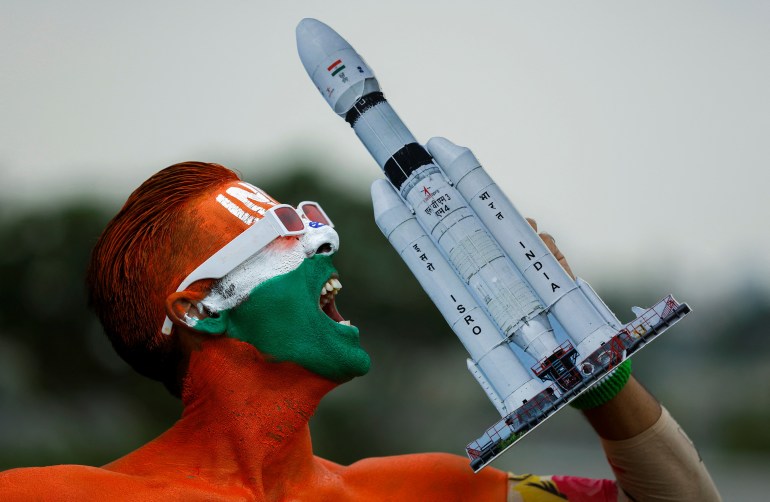
A Young Indian Space Enthusiast - courtesy Al Jazeera
India's space program has always been about more than just technological achievements; it's about inspiring future generations to dream big and pursue careers in science, technology, engineering, and mathematics (STEM) fields. Chandrayaan-2 exemplified this by sparking the imagination of young minds across the country.
I suspect today, there are armies of young Indian women, men and children all researching how to join the space program. If I were there, I'd be at the front of the line.
Thursday, August 24, 2023
Harnessing the Power of AI to Combat Climate Change
I have children. To me, our world is facing an urgent crisis in the form of climate change, a phenomenon that poses significant threats to our planet and its inhabitants. My children will be the ones affected which is why I am now exploring ways that computational intelligence can help us better understand and change our habits. Amid this challenge, a beacon of hope emerges from the realm of technology: Artificial Intelligence (AI). AI, with its unparalleled ability to process vast amounts of data and make intelligent decisions, has the potential to revolutionize our efforts to combat climate change. In this blog post, I will delve into the remarkable impact of AI on climate change and explore how it is being harnessed across various sectors to drive positive environmental change.
These are the proverbial "low hanging fruit" answers which come easily. Of course the devil is in the details.
AI Enhancing Climate Modeling & Prediction
NOTE: Please join me at Fully Charged LIVE in Vancouver, Sep 8-10, 2023. Travel in a way that does not suck for our planet and be easy on the planet but come and check out over 100 + exhibitors with ways to reduce your own CO2 footprint.
AI has the capability to significantly improve climate modeling and prediction, aiding scientists in understanding complex climate systems and making accurate forecasts. By analyzing historical climate data and considering numerous variables, AI algorithms can uncover hidden patterns and provide insights into the intricate interactions within Earth's ecosystems. These AI-powered climate models can offer more precise projections about future temperature changes, sea level rise, and extreme weather events, enabling governments and organizations to take proactive measures to mitigate potential impacts.
AI to Extend Energy Efficiency and Renewable Resources
AI is a powerful tool for optimizing energy consumption and promoting the transition to renewable resources. Smart grids equipped with AI algorithms can dynamically balance energy supply and demand, reducing waste and carbon emissions. Additionally, AI-driven systems can optimize the operation of wind farms and solar installations, enhancing their efficiency by predicting weather conditions and adjusting energy output accordingly. This not only maximizes energy generation but also minimizes disruptions to the power grid.
Sustainable Agriculture and Deforestation Monitoring
AI's capabilities extend to agriculture, playing a crucial role in ensuring food security while minimizing environmental damage. AI-driven precision agriculture techniques enable farmers to make data-informed decisions about planting, irrigation, and fertilization. This leads to increased crop yields, reduced resource wastage, and decreased use of harmful chemicals. Furthermore, AI-powered satellite imagery and machine learning algorithms can monitor deforestation activities in real-time, aiding in the protection of vital forest ecosystems.
Climate Change Adaptation and Resilience
If you can't fight, join? Nope! However, adapting to the changing climate requires innovative strategies, and AI can facilitate these efforts. By analyzing historical climate data and predicting future changes, AI systems can aid urban planners in designing resilient infrastructure that can withstand extreme weather events. Machine learning algorithms can process large datasets to identify areas prone to flooding or other climate-related hazards, guiding the development of effective disaster preparedness plans.
AI for Climate Research and Scientific Discovery
AI accelerates the pace of scientific discovery by processing and analyzing vast datasets that would be nearly impossible for humans to manage manually. Climate researchers can leverage AI to identify new trends, correlations, and potential solutions to climate-related challenges. This collaborative effort between AI and human experts can lead to groundbreaking insights and novel approaches to mitigating climate change.
The conclusions are a big vague, yet do appear to point in a direction worthy of more exploration. The intersection of AI and climate change presents an unprecedented opportunity to address one of the most pressing issues of our time. From improved climate modeling to sustainable energy solutions and resilient infrastructure, AI's impact on climate change is multifaceted and promising. However, it's essential to recognize that AI is not a panacea; its successful integration requires collaboration between governments, industries, researchers, and communities. As we continue to harness the power of AI, we must ensure that ethical considerations, transparency, and equitable access remain at the forefront of our efforts. By doing so, we can pave the way for a more sustainable and resilient future for generations to come.
Fully Charged LIVE - only 4 Exhibit Spaces left!
I have been working as a contractor for the 2023 Fully Charged LIVE show in Vancouver September 8-10. We re now down to the last 4 exhibit spaces being left for hire. The show is shaping up to be an all around epic event. To get more details, visit https://ca.fullycharged.live/

Wednesday, August 23, 2023
CanAm Dual Sport eBike
As first reported by ADV Pulse, Canadian CanAm has introduced the ultimate Dual Sport E-Motorcycle.
We are soooo excited to hear this news! Canadian-based Powersports vehicle maker Can-Am is returning to the motorcycle industry with the ‘Origin’ and ‘Pulse’ electric models leading their two-wheeled offerings. This new teaser video that gives a glimpse of the upcoming motorcycles in action.
CanAm always made great prodcuts. These are expected to be a step beyond. We hope they will come to exhibit at Fully Charged LIVE in Vancouver, BC Sep 8-10.
Subscribe to:
Comments (Atom)