This is an interview I did last year about the importance of geo-tagged data and mobile devices. It is interesting to look at these later to see how the predictions stack up against reality. In this case, it was particularly accurate. Enjoy!
Showing posts with label services. Show all posts
Showing posts with label services. Show all posts
Tuesday, August 02, 2011


Friday, October 19, 2007
How to install and run Adobe LiveCycle Data Services ES 2.5.1 on Mac OS X
This post outlines step-by-step instructions to get the latest Adobe LiveCycle Data Services ES (formerly Flex Data Services) running natively on a Mac. Okay – before you get excited, Adobe does not support this but I did some tinkering around with JBoss 4.2.1 GA and Adobe LiveCycle Data Services ES 2.5.1 and got it running natively on Mac OS X. Below is the screenshot in Safari.
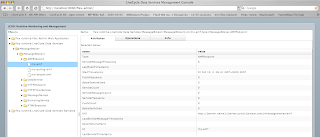
Before you read how to do this, please understand a few things. First, Adobe LiveCycle Data Services ES is not supported on Mac OS X. In fact, we do not even release it (but don’t worry, it is not hard to install). If you do not know what LiveCycle Data Services ES is, it used to be called Flex Data Services. It is now part of the LiveCycle Service platform and has lots of great features. It has a really cool server component that can do wicked messaging stuff to round trip between a J2EE environment and Adobe Flex, AIR, HTML or AJAX applications.
Why? I ported this over and posted this as a result of Adobe MAX 2007 in Barcelona. Macs were everywhere. At JavaOne and MAX, I suspect that about 50-60% of the developers are now using Macs. We used Macs in our hands-on training rooms and they got taken up first.
Here are the full instructions for getting LiveCycle Data Services ES running on a Mac. Please don’t complain if it doesn’t work. We don’t support it (currently -- but if you’re interested tell me and I’ll work on product management to see if we can get it supported) and we’re on our own for now. Here are the steps:
1. Go to JBoss.org and download the JBoss 4.2.1GA release. Unzip it somewhere (I put it on my desktop).
2. Grab a terminal and navigate to the/bin and enter “sh ./run.sh” as shown below. Note – you must run it with sufficient privileges. If you have trouble try entering “sudo sh ./run.sh” and you will be prompted for the SU password.
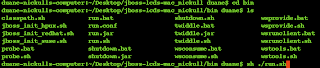
3. Grab Safari and go to http://localhost:8080 to verify it works. You should see a screen welcoming you to JBoss app server.
4. If it worked, stop the application server by going to the/bin and typing “sh ./shutdown.sh”, then hit enter. Or, you can simply put the cursor in the shell and hit “Control-C”. The latter is not recommended but it works.
5. Go to http://www.adobe.com/products/livecycle/dataservices/ and follow the steps to download LiveCycle Data Services ES version 2.5.1. Make sure you select the AIX version. When you finish downloading it, click the file and install it. (note: it does install even though Adobe does not claim it installs). It will create a directory on the Mac at/Adobe/ as shown below.
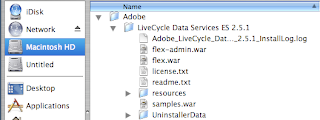
6. Now the important part. Expand the LiveCycle Data Services ES 2.5.1/resources/security/tomcat/ directory then copy the <lcds_install_root>/resources/security/tomcat/flex-tomcat-common.jar and <lcds_install_root>/resources/security/tomcat/flex-tomcat-server.jar into the jboss_root/server/default/lib folder of your JBoss install. This will allow custom authentication to work.
7. From the same location, copy <lcds_install_root>/resources/security/tomcat/context.xml to your JBoss under the WEB-INF directory or adjust an existing context.xml to add the <valve>. You’ll have to open the context.xml files to compare them. Copying works best if you have a fresh install of JBoss.
8. Expand your <lcds_install_directory> and copy the following files:
flex-admin.war flex.war samples.war
9. Paste those samples in the <jboss_install_directory>/server/default/deploy directory.
10. Restart JBoss as described above (Step 2). Get your browser and go to http://localhost:8080/samples and you should see this:
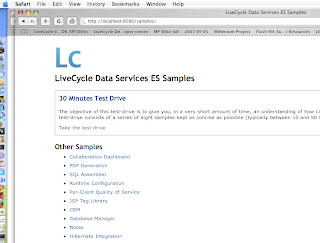
Now try the samples. If they work you have succeeded! Congratulations.
Running it on a Mac, I noticed several advantages. First, the start up time is really fast -- it started in 28 seconds. For contrast, at MAX 2007 in Barcelona, the same software on a PC with 2 GB RAM took about 1:35 to start. I have 4 GB of RAM on an Intel Core 2 Duo machine so it gives it a small advantage.
Enjoy! Let me know if you thought this was cool.

Before you read how to do this, please understand a few things. First, Adobe LiveCycle Data Services ES is not supported on Mac OS X. In fact, we do not even release it (but don’t worry, it is not hard to install). If you do not know what LiveCycle Data Services ES is, it used to be called Flex Data Services. It is now part of the LiveCycle Service platform and has lots of great features. It has a really cool server component that can do wicked messaging stuff to round trip between a J2EE environment and Adobe Flex, AIR, HTML or AJAX applications.
Why? I ported this over and posted this as a result of Adobe MAX 2007 in Barcelona. Macs were everywhere. At JavaOne and MAX, I suspect that about 50-60% of the developers are now using Macs. We used Macs in our hands-on training rooms and they got taken up first.
Here are the full instructions for getting LiveCycle Data Services ES running on a Mac. Please don’t complain if it doesn’t work. We don’t support it (currently -- but if you’re interested tell me and I’ll work on product management to see if we can get it supported) and we’re on our own for now. Here are the steps:
1. Go to JBoss.org and download the JBoss 4.2.1GA release. Unzip it somewhere (I put it on my desktop).
2. Grab a terminal and navigate to the

3. Grab Safari and go to http://localhost:8080 to verify it works. You should see a screen welcoming you to JBoss app server.
4. If it worked, stop the application server by going to the
5. Go to http://www.adobe.com/products/livecycle/dataservices/ and follow the steps to download LiveCycle Data Services ES version 2.5.1. Make sure you select the AIX version. When you finish downloading it, click the file and install it. (note: it does install even though Adobe does not claim it installs). It will create a directory on the Mac at

6. Now the important part. Expand the LiveCycle Data Services ES 2.5.1/resources/security/tomcat/ directory then copy the <lcds_install_root>/resources/security/tomcat/flex-tomcat-common.jar and <lcds_install_root>/resources/security/tomcat/flex-tomcat-server.jar into the jboss_root/server/default/lib folder of your JBoss install. This will allow custom authentication to work.
7. From the same location, copy <lcds_install_root>/resources/security/tomcat/context.xml to your JBoss under the WEB-INF directory or adjust an existing context.xml to add the <valve>. You’ll have to open the context.xml files to compare them. Copying works best if you have a fresh install of JBoss.
8. Expand your <lcds_install_directory> and copy the following files:
flex-admin.war flex.war samples.war
9. Paste those samples in the <jboss_install_directory>/server/default/deploy directory.
10. Restart JBoss as described above (Step 2). Get your browser and go to http://localhost:8080/samples and you should see this:

Now try the samples. If they work you have succeeded! Congratulations.
Running it on a Mac, I noticed several advantages. First, the start up time is really fast -- it started in 28 seconds. For contrast, at MAX 2007 in Barcelona, the same software on a PC with 2 GB RAM took about 1:35 to start. I have 4 GB of RAM on an Intel Core 2 Duo machine so it gives it a small advantage.
Enjoy! Let me know if you thought this was cool.
Thursday, September 20, 2007
SOA Anti-Patterns: Service Composition and Composite Applications!
FACT: Service Composition is not SOA. It is an anti-pattern of SOA. The same goes for Composite Applications.
I feel like I should have titled this post “The Emperor has no clothes: Part 16” as I have seemingly made a career by challenging the status quo. This post may be a bit of a rant but make sure you read it before passing judgment.
The SOA community has once again used poor judgment in terms of coining titles for aspects of SOA, namely Service Composition and Composite Applications. If these are truly built on an SOA infrastructure, most of them are in fact Service Aggregations and Aggregate Applications. Let me explain where the terms come from and what they really mean.
Composition and Aggregation are both types of Binary Relationships. They are also both specializations of the “whole-part” pattern, a pattern in which a whole “thing” has parts. In both cases, the Whole (in this case the so called Composite Applications and Service Compositions) rely and cannot exist without the Part(s) (the services). There are very subtle yet concrete differences between how Composition and Aggregation work though. The main difference is that in aggregation, the parts can exist without the whole. Wikipedia discusses aggregation (http://en.wikipedia.org/wiki/Object_composition#Aggregation):
“Aggregation differs from ordinary composition in that it does not imply ownership. In composition, when the owning object is destroyed, so are the contained objects. In aggregation, this is not necessarily true”
Composition (as defined by UML) is a special type of relationship where the part and the whole are inextricably linked. In short, the Whole IS MADE UP OF one or more Parts. If the Whole does not exist, neither can the Parts and their life cycle is tied directly to the life cycle of the Whole. The UML composition relationship is depicted below.

Aggregation is a different animal. In an aggregate binary relationship, the Parts may exist without the Whole and be used by more than one “thing”. The Whole CANNOT BE MADE UP OF the Parts. The UML aggregation relationship is depicted below.

Aggregation is akin to how services are utilized within an SOA environment. Services are not contained within the service consumer, services are independent entities within an SOA environment and “consumed” by the consumer. Services can therefore exist without the consumer being present, the opposite of a composition binary relationship. In fact, both services and consumers are usually considered first class entities within an SOA environment as commonly depicted amongst the SOA community. The UML relationship can be depicted below. Note this one is abstract of any stereotype such as <> or <> but these could be added. Consider this more of an existentialist binary relationship.

Given one of the core goals of SOA is the ability to “re-purpose” services amongst several consumers, it would be highly illogical (and an “anti-pattern” of SOA) to tie a service’s life cycle to one single consumer and to constrain that service to exist only within the consumer. That is in effect the pattern SOA strives to avoid. Note that once again, I have changed terms slightly. The term “re-purposed” has been used instead of “re-used”. Services that are re-used only by one consumer do not tend to offer huge advantages other than reducing dependencies and creating agility buy cleanly decoupling the consumer from the core functionality offered via the service.
Business Process Management (BPM), Service Aggregation and Aggregate Software Applications are all specialized types of service consumers. In all three cases they consume services but are not made out of services. The services exist without the consumer.
I am not confident that the industry will change but if you think this makes sense, please take a pledge to start at least making this distinction.
I feel like I should have titled this post “The Emperor has no clothes: Part 16” as I have seemingly made a career by challenging the status quo. This post may be a bit of a rant but make sure you read it before passing judgment.
The SOA community has once again used poor judgment in terms of coining titles for aspects of SOA, namely Service Composition and Composite Applications. If these are truly built on an SOA infrastructure, most of them are in fact Service Aggregations and Aggregate Applications. Let me explain where the terms come from and what they really mean.
Composition and Aggregation are both types of Binary Relationships. They are also both specializations of the “whole-part” pattern, a pattern in which a whole “thing” has parts. In both cases, the Whole (in this case the so called Composite Applications and Service Compositions) rely and cannot exist without the Part(s) (the services). There are very subtle yet concrete differences between how Composition and Aggregation work though. The main difference is that in aggregation, the parts can exist without the whole. Wikipedia discusses aggregation (http://en.wikipedia.org/wiki/Object_composition#Aggregation):
“Aggregation differs from ordinary composition in that it does not imply ownership. In composition, when the owning object is destroyed, so are the contained objects. In aggregation, this is not necessarily true”
Composition (as defined by UML) is a special type of relationship where the part and the whole are inextricably linked. In short, the Whole IS MADE UP OF one or more Parts. If the Whole does not exist, neither can the Parts and their life cycle is tied directly to the life cycle of the Whole. The UML composition relationship is depicted below.

Aggregation is a different animal. In an aggregate binary relationship, the Parts may exist without the Whole and be used by more than one “thing”. The Whole CANNOT BE MADE UP OF the Parts. The UML aggregation relationship is depicted below.

Aggregation is akin to how services are utilized within an SOA environment. Services are not contained within the service consumer, services are independent entities within an SOA environment and “consumed” by the consumer. Services can therefore exist without the consumer being present, the opposite of a composition binary relationship. In fact, both services and consumers are usually considered first class entities within an SOA environment as commonly depicted amongst the SOA community. The UML relationship can be depicted below. Note this one is abstract of any stereotype such as <

Given one of the core goals of SOA is the ability to “re-purpose” services amongst several consumers, it would be highly illogical (and an “anti-pattern” of SOA) to tie a service’s life cycle to one single consumer and to constrain that service to exist only within the consumer. That is in effect the pattern SOA strives to avoid. Note that once again, I have changed terms slightly. The term “re-purposed” has been used instead of “re-used”. Services that are re-used only by one consumer do not tend to offer huge advantages other than reducing dependencies and creating agility buy cleanly decoupling the consumer from the core functionality offered via the service.
Business Process Management (BPM), Service Aggregation and Aggregate Software Applications are all specialized types of service consumers. In all three cases they consume services but are not made out of services. The services exist without the consumer.
I am not confident that the industry will change but if you think this makes sense, please take a pledge to start at least making this distinction.
Friday, March 23, 2007
Adobe SOA platform launches Data Services
Architects, Flex/Apollo/LiveCycle/Java Developers take note. Adobe® LiveCycle Data Services 2.5 has just been released on Adobe labs for Windows, Linux, Unix as well as a cross platform java installer. Adobe has been a pragmatic adopter of SOA for years and this release shows engineering excellence and forethought. LDS is the next generation of Flex Data Services.
The name change reflects an important expansion in the use of these valuable services. In addition to serving the needs of both Flex and Ajax developers, LiveCycle Data Services will provide enhanced integration with Adobe’s other LiveCycle server products for document and process management, enabling business to create new ways to engage and reach customers.
Most people might think of SOA as only request-response. This is not the only pattern for service interaction within SOA and there are many others such as subscribe-push, multicast, probe and match etc. LiveCycle Data Services is a J2EE server that fulfills many
The name change reflects an important expansion in the use of these valuable services. In addition to serving the needs of both Flex and Ajax developers, LiveCycle Data Services will provide enhanced integration with Adobe’s other LiveCycle server products for document and process management, enabling business to create new ways to engage and reach customers.
Most people might think of SOA as only request-response. This is not the only pattern for service interaction within SOA and there are many others such as subscribe-push, multicast, probe and match etc. LiveCycle Data Services is a J2EE server that fulfills many
The feature set of LiveCycle Data Services 2.5 includes:
- A new Flex SDK (which will be released currently with Data Services 2.5), which includes updates the client-side Web Services library.
- Server-side PDF generation capabilities for RIA applications generates properly formatted PDF documents that include graphical assets from Flex applications, such as graphs and charts.
- Runtime configuration of data destinations in Data Services eliminates the need for a compile-time dependency between clients and the Data Services server configuration.
- Support for WSRP portal deployment of Flex applications, which makes it easy for developers to deploy a Flex application as a portlet in a portal server without having to do any portal specific programming.
- Per Client Messaging quality of service (QoS) allowing Flex clients to select custom data access policies for real- time data.
- Ajax Data Services, enabling Ajax applications to take advantage of the data management and messaging capabilities available in Data Services.
- The Flex-Ajax Bridge (FABridge), which is a small library that can be inserted into a Flex application, a Flex component, or even an empty SWF file to expose it to scripting in the browser without any additional coding.
- Improved off-line message queuing, supporting future Apollo development, which allows Flex applications using Data Services to queue outbound messages locally when the client is offline and manage exactly what is sent to the server upon reconnect.
- Groundwork for future Apollo application support, including a local data cache that enables developers to cache client data requests and data changes to the local file system for later retrieval when an application resumes.
- RTMP tunneling (RTMPT) that allows the use of the RTMP protocol in Data Service applications to traverse firewalls and proxies that currently prevent direct RTMP client connections to the server.
- A new SQL adaptor, which dramatically simplifies the development of applications using Data Management Services without having to write any server-side Java code.
- A new JSP Tag Library that enables MXML and ActionScript code to be embedded into a JSP page providing an easier entry for J2EE developers to Flex programming.
- Several important enhancements to core Data Services performance and scalability.
LiveCycle Data Services 2.5 includes the following Web Application Archive (WAR) files:
- flex.war - The primary Flex WAR file: use this as a starting point for building your LiveCycle Data Services application.
- samples.war - Sample Flex applications.
- inventory.war - Data Management Service - Ajax sample application
- flex-admin.war - Simple administration and monitoring application.
Subscribe to:
Posts (Atom)